 Aqua-Soft Forums
I dont really like it, dont think it's needed and it looks too much like that windows sidebar in Vista.
That's the point, silly!
I dont really like it, dont think it's needed and it looks too much like that windows sidebar in Vista.
That's the point, silly!
That's the point, silly!
I know that's the point (whats the point?  ), but as I said IMHO I dont think it's needed.
Is it possible to add in the old PidlShortcut sublabel formatting? I've always used the following for my hard drives:
%s of %t%#(%pU%%)
but I can't seem to find an equivalent now.
I did a ****up somewhere I think with the pidlshorcut. What exaclty would this label do?
It would show the used space, free space, and then percentage full. Something like
3.87GB of 15GB25.8%
hey ave,
i think the idea would be cool. vista lover would like and it would increase the popularity of you app, if thats wat you are looking for.
but personally, i think it would be cool if you made the widget dock work exactly like the osx dock, by making push up the desktop. i also think it needs a little bit of work on the left and right buttons, and maybe make so that it doesn't show all the avetunes skins, cuz it can get pretty long, instead maybe just have it show the default skin and allow the user to choose the skin they want and set which one should be default, etc. other than that, i love the widget dock, great work!
Ram
One thing that would be cool is if you could drag deskets from the control panel straight to showcase by grabbing and dragging the preview, pressing the showcase hotkey, and dropping it straight onto showcase. Right now when I press the showcase hotkey while dragging a desklet the desklet isn't still "grabbed". I didn't explain that very well but someone should know what I mean.
How could I have missed this? Anyway I'm downloading it now. I really love AveDesk. And my highest wish is to make it use less RAM memory so you can work faster with your PC:
I'm trying it.....2 little problems:
1) Like 1.3, the avedesk icon in the systray is not showen up properly...i dont remember how to fix it....someone helps?
2) Glow effect etc doesn't work at all, menù is disabled...it's possible to enable it?
Thx

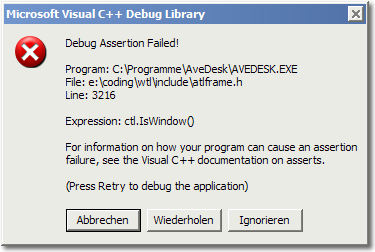
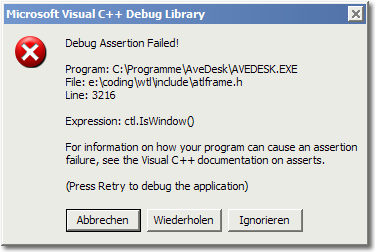
:confused: what's wrong with my avedesk? whenever avedesk startup, it just shows me this error message. need help
Be sure to put the 2.0 files in a 1.3 folder.
I tried to put them into 1.3 folder. Yet the problem still happen. 
cool ! new avedesk!
i tried it and after clicking on the config it crashes. i put it in a 1.3 install.
any idea whats wrong?
the message i get is the following:
Enjoying the beta build. I like the advanged shell Icon support. Before the icons would look like crap, but now they are nice and clear.
I have one bug, well its not a bug it just confuses the hell out of me. When using the Widget dock and you are on the last page, you click right and the icons all go right kind of like its rewinding a tape. There is nothing wrong with this, but it just confuses the hell out of me. :confused:
You might have already put this on a list to do, or you might not but It would be great for an exclude list for the Dock, or in the properties you can select what desklets to put in it, because I would probably never drag out shortcuts, I use Notes, RSS, and FTP when I need it.
Great work friend!
Came up with this error message and not really sure what it means. Still it's a very nice Beta, very stable for me.

Thanks.
Resolution:
The beta is not yet translated at all.
Rename the folder under Avedesk where your translations are located (even if you are using english)
and it will go away.
hth,
herd
ah cool, thanks herdy
Resolution:The beta is not yet translated at all.
Rename the folder under Avedesk where your translations are located (even if you are using english)
and it will go away.
hth,
herd
Will that work for my window message too?
hey i am running vista Rc1 x86, avedesk runs fine, although i have few concerns:
- sometimes the icon disapears in the taskbar.
- sysstat widget crashes when u try to load them..
- How do you install a avescripter widget? like i copied them over to the directory, but i guess i have to install the xml file right? but how do u do that in vista?
- in showcase widgets have a black background shadows when u move them around and the closing animation flickers....
- is there a way to have 2 showcases?
love the app btw..
To install Avescripter, you need to install the avescripter. (The beta version is the most compatible one). You can get it at www.avedesk.org.
Once avescripter is installed you will then see the desklets appear in the control panel.
the avescrippter is installed, i see one of the widget that comes with it sdk help or something, and it runs fine, but when i copy more into the directory, they dont apear for some reason
i downloaded all the files, put them into a new folder and then ran avedesk
i was greeted by a 5 second freeze and then an error reporting dialogue (i know its beta). Was i supposed to do anything other then download it?
Um, so yeah . . . AveDesk 2.0 is sweet. Huge thanks once again to all involved.
I backed up my AveDesk v1.3 folders (almost forgetting the App Data folder),
uncompressed v2.0 and overwrote my v1.3 folder with the new. All my settings
and themes are in working order, no probs at all. Simple, appreciate that.
up n runnin, n runnin smooth,
no problems except sublabel thing,
hey ave, i know this aint the feature req thread, but
since im makin a post,
id like to see a rotate indicator with alt key(somethin like close icon with ctrl, cuz ppl really like rotating desklets and alt dragging to rotate them would be awesome man.
anyway,ave scripter stuff runs smooth here, so far avent faced problems,
i think the beta is rock solid.