 Aqua-Soft Forums
every now and then when I am listening to iTunes, it will crash out of nowhere with a ntdll.dll error. Anyone else experience this?? It's quite annoying...

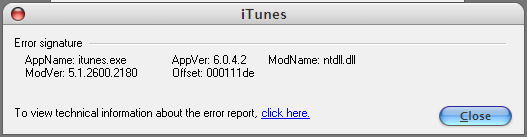
every now and then when I am listening to iTunes, it will crash out of nowhere with a ntdll.dll error. Anyone else experience this?? It's quite annoying...
fixed...delete thread
Uninstalled both iTunes and Quicktime, used the windows installer cleanup to cleanup any uninstallation mess. Then I used windows search to search mycomputer for any file with iTunes and Quicktime and delete them all!! As long as its not a file that I may want to keep such as a icon file or such. This will requiire 2 seperate searches. You just need to search for iTunes or Quicktime, nothing extra.
Once that is done log-off and on, re-download and install the standalone version of Quicktime. (The most up to date one works fine for me and should for you). If you use firefox, you will need to configure it using these steps http://forums.mozillazine.org/viewtopic.php?t=206210
for your quicktime needs!
Re-download iTunes and install it. The installation will be quick because it will notice that Quicktime has already been installed.
Once that's completed, configure your iTunes as you see fit and you should be fully up and running!!!
Now I just gotta redo my playlists....x.x