Aqua-Soft Forums
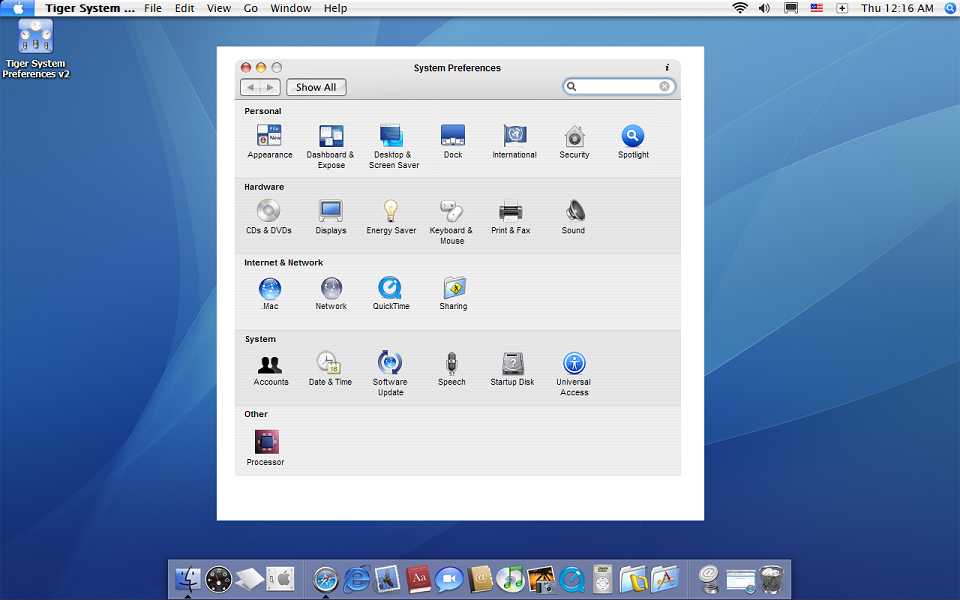
I tried to use TSPv2, but it works weird like my screenshot below.
plz help me out how to fix it.
FYI, I'm using Windows Blind. It seems not to be related to this problem,though.
I tried to use TSPv2, but it works weird like my screenshot below.
plz help me out how to fix it.
FYI, I'm using Windows Blind. It seems not to be related to this problem,though.
i havent had this problem but its got to do with
[Tiger System Preferences Folder]shadow.shadow
and
[Tiger System Preferences Folder]bshadow.shadow
if these dont exist or arent named that, TSP doesnt show shadows.. yours seems to be replaced by a white box... when you rename these to watever.jpg, they simply show shadow images to display around the border of the image.
so.. if you dont have these, reinstall and it should be fixed.
hope this solves it!
[Tiger System Preferences Folder]shadow.shadowand
[Tiger System Preferences Folder]bshadow.shadow
I have both files and I didn't rename them. Also, I reinstalled the application several times to fix it, but it hasn't worked so far.
hmm..try renaming them to shadow.shadow.jpg and bshadow.shadow.jpg, open them, and see if theres a shadow image there. if theres just a white space, then thats what TSP is trying to show as the "shadow".
These files in my TSP folder are just white squares with shadow. I don't know how they are supposed to be.
The weired thing is that although I have tried to reinstall the application several times, the interface of the application is always same as the screenshot I uploaded before.
same problem here ... did you find any solution?
The issue is almost always a problem with one of the Expose' clones - I think it might be TOPDESK. Disable that and see if that makes a difference..
yeap that`s it ... but is there a way make topdesk to ignore system pregerences?
is there a wat to make them bouth work?
yeap that`s it ... but is there a way make topdesk to ignore system pregerences?is there a wat to make them bouth work?
I don't believe there IS a way to resolve this problem with TopDesk. Its really a display card / TopDesk issue. The best thing to do is to replace TopDesk with something like WinExpose'
BTW its not ALWAYS a problem with TopDesk - I have run it successfully on numerous systems. I simply found it easier to use WinExpose' if TigerPrefs kicked up the problem.
Topdesk caused several problems for me when I ran it, but WinExpose and Switcher are both much better in my opinion...
i`m useing winxp so i tryed winexpose but it works so slow ...
i don`t get what option to give up to speed it up
{{EDIT}}
works fine with latest version of topdesk
thanks all
tsk, I(aka Dremation, DJ_Williams) wrote that application for gman.(german)
Are you using XP? I'm using an alphablended window for the drop shadow thats only supported on XP and up.
Also, are running this out of a zip? If so, extract it. Did you delete any files?
It is cause by some other program u are using. When I used to have TopDesk install the same thing used to happen.