 Aqua-Soft Forums
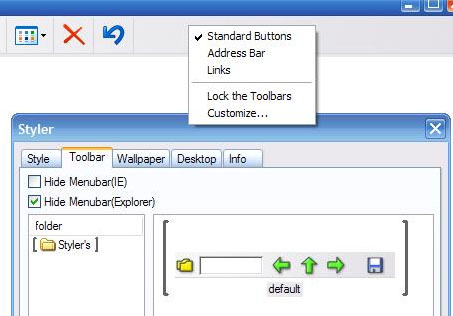
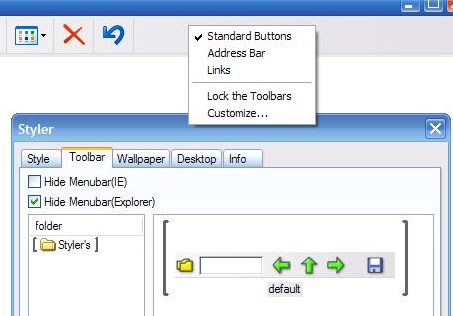
When I right click on my existing windows toolbar to try to change to a styler toolbar, the Styler option does not show on the menu. The toolbar option does not work when i click on it in the Styler window either. The option on the right click menu just one day disappeared. I have tried every version of styler with no improvment. PLEASE HELP!
Styler Toolbars Not Working
are you using a cracked version of styler?
This has been known to happen to such versions, if you are i'd suggest buying the great software since its only a few bucks
if you have purchased a license for it I would contact the developer
if you are i'd suggest buying the great software since its only a few bucks
Actually it's free now 
I have tried the free version too...PLEASE HELP
Hey guys it happened to me the same .Is there a registry line or something that i can add in order styler toolbar to saw up or get in the view > toolbars in order to check it ?
Someone Help
When I right click on my existing windows toolbar to try to change to a styler toolbar, the Styler option does not show on the menu. The toolbar option does not work when i click on it in the Styler window either. The option on the right click menu just one day disappeared. I have tried every version of styler with no improvment. PLEASE HELP!
Usually there is a little "option" button in the shape of a gear... try using that.
There is no styler toolbar so there is no option button .
Styler toolbar is not in the options to select it .
Anybody , any tip ?
Try rebooting.
I did but nothing . I installed it and uninstalled it so many times that i lost counting .
I even installed 1.38 version but nothing .
same here...help!
Mathu2 i found solution to this problem in my pc .
Are you unchecked in the Control Panel - Internet Properties - Advanced
the option "Show Go button in Address bar" ?
If so the only thing that worked in my case was to format and reinstall windows and by no means uncheck the above mentioned option .