
Objectbar Partially Stealing Menus

I have Objectbar v1.65, free version.

I have OB_mod installed

I have the general settings set to "Hide menu of applications when replacable menu is present" (including IE and explorer)

When using explorer, most menus work fine, except "File --> New"

Please check the attachment for a screenshot. I cannot explain it any better.

Thank you in advance for any help...
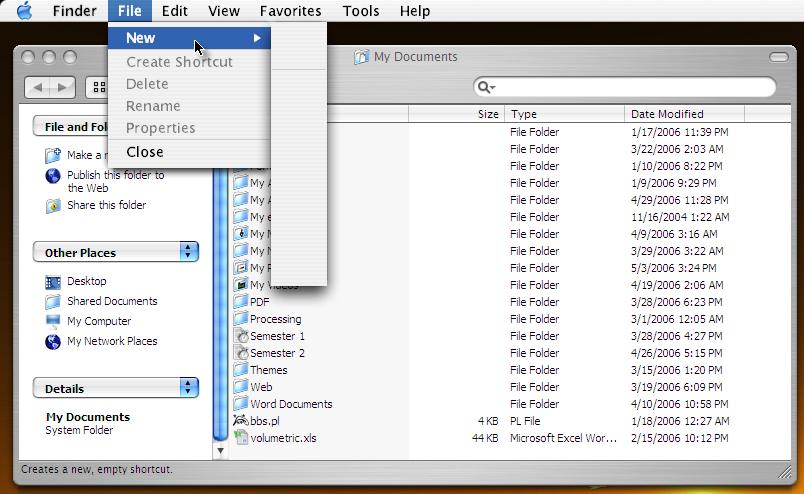
post-42746-1146844107_thumb.jpg

OB error.JPG
OB error.JPG

#386064

Looks like the same bug that causes all the OB menus to look that that in PS CS2.

Speaking of which, anyone know how to fix that?

It might help this guy too.

My File menu's not even coming up the same in Explorer, under File I get Favorites shortcuts. Hmm.

#386208

Still need help... ^_^"

#388627

You contacted Stardock support, right?

-NC

#388748

Well, I don't know if they would be receptive to the fact that I installed OB_Mod (developed here at the forums). But I will contact them anyway... In the meantime if anyone has ANY contribution please by all means post away! Thank you all ^^

#388807

Okay, Stardock cannot find any solution for me except to install their BETA release of ObjectBar (1.99, I think). Anyway I am having trouble installing it and am still asking for their help, but if anyone can help me with the current release of ObjectBar (which I am using now) then by all means any constructive input would be greatly appreciated ^_^ !

#391680

Hey, the bug applies even without OB mod, so you can safely say that to Stardock.

#391733

UPDATE: after almost two weeks of correspondence, the technical support has finally been able to reproduce the problem I am having on their own computers. In fact, because of our correspondence, the ObjectBar development team is getting a special notification. I do not know the impact of these events, but hopefully it will mean that the issue will be resolved in the next release or pre-release of ObjectBar.

If anyone else has been able to reproduce the problem, and has any ideas, all of us here would be greatful.

Cheers.

#396409