 Aqua-Soft Forums
Hey, i was wondering if anyone knew how to get rid of the borders pictured below.
i tried fixing it, but it didnt work. Please help!
[ATTACH]7547[/ATTACH]

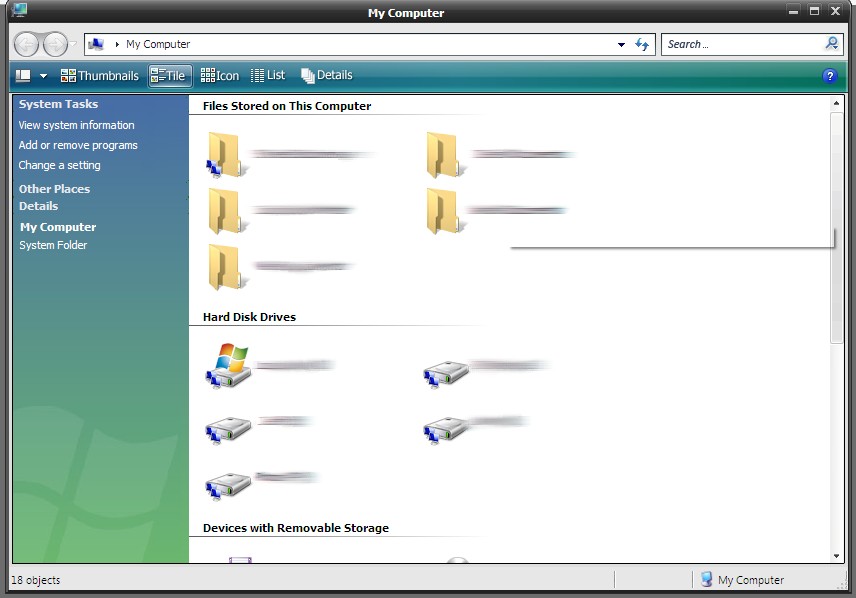
Hey, i was wondering if anyone knew how to get rid of the borders pictured below.
i tried fixing it, but it didnt work. Please help!
[ATTACH]7547[/ATTACH]
borders? picture? I think you forgot to attach something
i uploaded the screenshot. I need to know how to lose the grey borders next to the task pane, and under the styler toolbar
still no picture =P
Er.. Neither can I. Either I'm dying of old age (which is not probable), or it just isn't showing up.
I dont see a pic either  and I for one can't be dying or old age.. considering that I was born just yesterday
NC... you're kidding us, isn't it ? i can't see any picture as well.
ok, i uploaded the screenshot again. I need to know how to lose the grey borders next to the task pane, and under the styler toolbar. maybe this time everyone can see the thumbnailed attatchment
Well, it may be a little late .
try checking the preferences of your shadow program.
see ya .
Viva Mexico !!!
Rofl, I still don't see it