Aqua-Soft Forums
Awesome! Thanks for sharing!
Shinobi (Dark & White) GUI

Very nice port Duyvan  You do such great work my friend!
my taskbar looks weird, how come? It looks like it comes up double
- Try unlock and relock your taskbar.
or
- Unload windowblinds, reload it again.
Thanks everyone for your sweet comments
duyvan82, absolutely amazing port pal I prefer the white shinobi, it looks awesome.
Dude, this appearantly doesn't work with topdesk...any help?
ugh, what is topdesk by the way?
I've never heard of it :confused: and this thing is supposed to work with windowblinds
Topdesk for Windows is pretty much the same as Exposé for Mac OSX.
Topdesk: http://www.otakusoftware.com/topdesk/
Exposé: http://www.apple.com/macosx/features/expose/
The problem is best described by this screenshot:
http://img96.imageshack.us/img96/358/taskbar1ib.jpg

The taskbar ends and then kind of begins again.
Well, actually my prob is that when I go into "expose" mode it shows the windows, but it doesn't show the top of the window...which is weird 'cause it also doesn't display the styler toolbar as well...???
Maybe your theme is just cursed or something...lol
J/k
@Rufus_86: I have not tested the theme with topdesk so i can't tell you why it does that.
@Dust: Do you get that problem all the time or just when using topdesk? Try unlock and relock the taskbar, that should fix it, if it's due to Topdesk, well i've just said to Rufus86.
what wallpaper is that duyvan?
Its the NOD wallpaper. http://www.rimshotdesign.com/goodies.php
I appreciate the info and link mate. Thank you.
Hoi,
first this is a awesome theme. i love it.
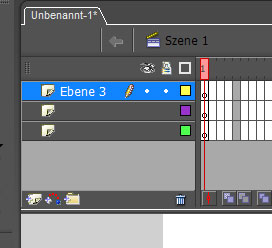
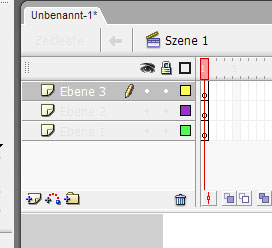
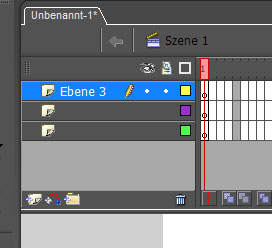
But i have a problem in Adobe Flash.
In the TimeLine i cant see the text of the inactive layers (see screenshot).
Can me someone please give any tip to chance this.
Thanx FF