 Aqua-Soft Forums
Hi, I'm currently in the process if osx-ifying my desktop and I can't find a the documents, images, music, and videos folder icons anywhere. They look like the ones in the sidebar in the attached picture.
Thanks in advance.
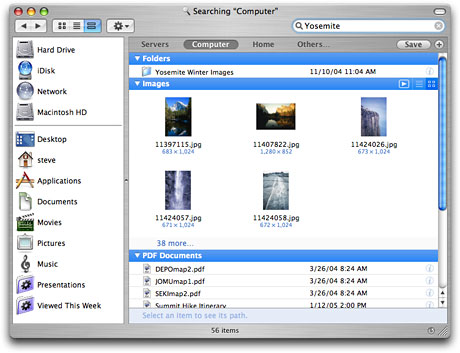
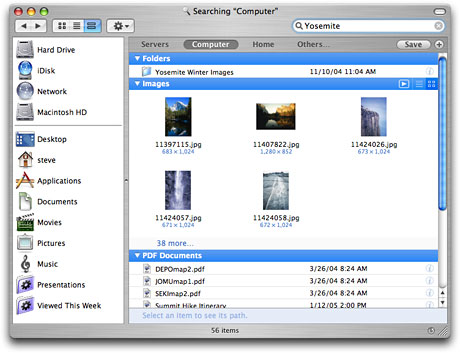
Hi, I'm currently in the process if osx-ifying my desktop and I can't find a the documents, images, music, and videos folder icons anywhere. They look like the ones in the sidebar in the attached picture.
Thanks in advance.
wrong forum and uhm.. use Flyakite
Not really, because I'm using Avedesk for this. What would the right forum be?
Also, no, because all I want to do right now is put osx-style icons on my desktop.
Thanks. Sorry about the wrong forum, but I honestly can't be bothered to hunt through all 800 of them to find the right one. 
Topic moved.
Thanks. Sorry about the wrong forum, but I honestly can't be bothered to hunt through all 800 of them to find the right one.
Well you should be. If you keep posting topics in wrong forums you will be suspended. This place is organized for a reason.
Whatever, I'll be more careful next time. Thanks for your help, Blaze and Austen. And if I may make a suggestion, more than half the posts in the thread are reprimanding me for putting this in the wrong forum. I got it the first time, guys - would it kill you to be a bit more friendly?
You think I could get the images one a bit larger? Please?
actually those images that i posted are the exact size, try Aqua Neu it has bigger sizes for almost the exact icons
Actually, that's my fault for providing a bad example. I meant the icons for the folders in OSX... so they're like those, only bigger, and on a folder.
WHat do you mean post a screenshot up, cause I'm lost :confused:
Here's the documents one... only instead of the 2 pages on the folder it's the picture frame.


use photoshop, open both images in one document, and play with the perspective of the picture frame on the Folder until its just right
Thanks a lot, dude. 
Oh! so that's you wanted, glad NC could help you out
http://www.osx-e.com/downloads/icons/tiger_pngs.html
http://www.osx-e.com/downloads/icons/1000_pngs.html
The second one has the icons in a Documents subfolder.
-NC


