Aqua-Soft Forums
Yesterday after I uninstalled Flyingakite v3.5 and rebooted I had several problems with the Windows interface and the functioning.
1. ALL THE SHORTCUT ICONS ON THE DESKTOP AND STARTMENU FAIL:
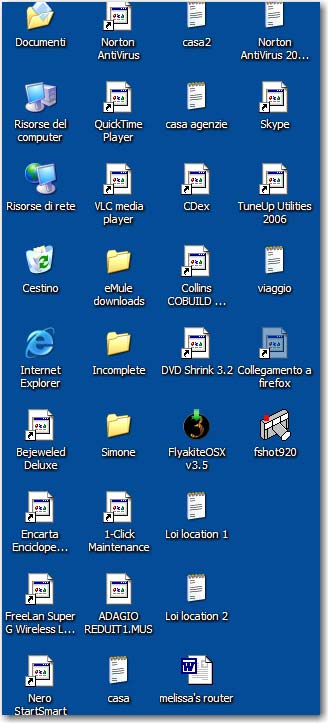
a. Their shortcut icons do not have their original picture as before. Currently it's a default icon picture that is used for programs that are not identifiable (the white page looking icon).
b. When I double-click to activate (open) the program, that the short-cut icon associates with, the shortcut icon does not respond and fades into the background (appears dark). It does not open the program.
Again this occurs on all the shortcuts in the desktop and the start menu.
2. I CAN'T ACCESS THE PROGRAMS FROM THE SHORTCUTS:
I have to go directly to the original source (exe file) to activate the program. None of my shortcuts work.
3. I CAN'T ACCESS MY CONTROL PANEL
I can't get to the control panel through the start menu. It does not respond.
4. MY GOOGLE TASKBAR IN IE NO LONGER WORKS.
I am not able to search any words within the google bar. The program does not function.
5. ERROR WITH THE SHORTCUT IMAGE
a, When I go to properties for the shortcut and look at the current image, it shows the original image of the shortcut (the one before the Flyingakite program was installed) however, it does not recognize this image as it stands on the desktop/startmenu. As if it's not able to link the original icon with the shortcut.
b. When I try to add a new shortcut, it does not show the proper icon. Again, it shows a default white page icon,
6. OPERATION
a. When I installed the program I did select the option create a Restore point.
b. I had unistalled the program as recommended method going through the process given by the program. Then the problems occurred. I went through the forums and searched a method to solve the problems, and they suggested to reinstall the Flyingakite program and uninstall again. I had done that but it did not work.
7. MAIN MY QUESTION:
How do I correct these shortcut issues including the icon association to the original, and be able to have the shortcuts work again in both the desktop and start menu.
As it stand I can't assess programs unless I go directly to their exe files in the original folders. No shortcuts work (old or new) and none of my start menu works when I try to access files that way either.
Thank you for your assistance.
Melissa