 Aqua-Soft Forums
How to move an iamge to be on top of the other in Dreamweaver.
Overlaying images on webpages (with Dreamweaver)
Dreamweaver is hard to use, but to do this i think you need to use the code part!
I have tried to do it befor but it just sticks in the same place…
Ihmm well i need this for my class. here is thml code for reference.
<!DOCTYPE html PUBLIC "-//W3C//DTD XHTML 1.0 Transitional//EN" "http://www.w3.org/TR/xhtml1/DTD/xhtml1-transitional.dtd">

<html xmlns="http://www.w3.org/1999/xhtml">

<head>

<meta http-equiv="Content-Type" content="text/html; charset=iso-8859-1" />

<title>Whimit Home page</title>

<script type="text/JavaScript">

<!--


function MM_preloadImages() { //v3.0

  var d=document; if(d.images){ if(!d.MM_p) d.MM_p=new Array();

	var i,j=d.MM_p.length,a=MM_preloadImages.arguments; for(i=0; i<a.length; i++)

	if (a[i].indexOf("#")!=0){ d.MM_p[j]=new Image; d.MM_p[j++].src=a[i];}}

}

//-->

</script>

</head>


<body onload="MM_preloadImages('rollover-stable-stage-of-no.gif')">

<p><a href="#" target="_blank" onmouseover="MM_swapImage('Image10','','rollover-stable-stage-of-no.gif',1)" onmouseout="MM_swapImgRestore()"><img src="../../unavailable.html" width="129" height="150" border="0" /><img src="../../unavailable.html" width="422" height="68" align="texttop" /><img src="../../unavailable.html" name="Image10" width="68" height="82" border="0" align="baseline" id="Image10" /><img src="../../unavailable.html" align="left" /><img src="../../unavailable.html" /><img src="../../unavailable.html" width="72" height="82" /><img src="../../unavailable.html" /><img src="../../unavailable.html" width="90" height="82" /><img src="../../unavailable.html" /><img src="../../unavailable.html" width="58" height="81" />

</body>


</html>
also tell me how to do a gallery in dreamweaver. please
You can use Photoshop (Fireworks, anything), to place one image on top of the other and create a merged one.
You can use one as background and place the other one as a normal picture.
You can place each one in a layer and then control which is on top of the other.
There's a lot you can do, depending on what exactly you need to do.
Good luck!
well that does not help me. Look over the code. Maybe that will help u to get a idea of what the problem is. this is due monday.
While I prefer doing things in code, here's a Macromedia tutorial on how to use Dreamweavers layers:
http://www.macromedia.com/support/dreamwea...y/using_layers/
Check out the chapter on changing the layer stacking order.
Good luck.
Jeez, don't expect the community to do your homework for you.
however I do not know how to get the homework down without knowing how to use the program? if U do not wana help me , then do not saying nothing.
I be fine if u can give me code. just tell me how to place a pictures on top of another one. The images are sliced.
however I do not know how to get the homework down without knowing how to use the program? if U do not wana help me , then do not saying nothing.I be fine if u can give me code. just tel me how to place a pictures on top of another one.
Let's go through this phrase by phrase, shall we?
however I do not know how to get the homework down without knowing how to use the program?
Google for web design tutorials.
if U do not wana help me , then do not saying nothing.
If you want help, maybe the demanding route isn't the best way to ask.
=muscie]I be fine if u can give me code.just tel me how to place a pictures on top of another one.
How about, "Can you please tell me how to place one picture on top of another? I would very much appreciate it!" Such a manner of asking would endear you to many more people...
<table style="background-image: url('PATHTOBACKGROUNDIMAGE.jpg');">
<img src="../../unavailable.html" />
</table>
That's probably the easiest and least adept way of doing it.
-NC
that code did not seem to work. I want it like this
The attached file is the way it is now on dreamweaver. it is not suppose to be like that. I am using http://www.whimit.com as a reference. please help me out I need the navagation to be on the bottom of the rectanglar image.
picture in top
picture in the bottom
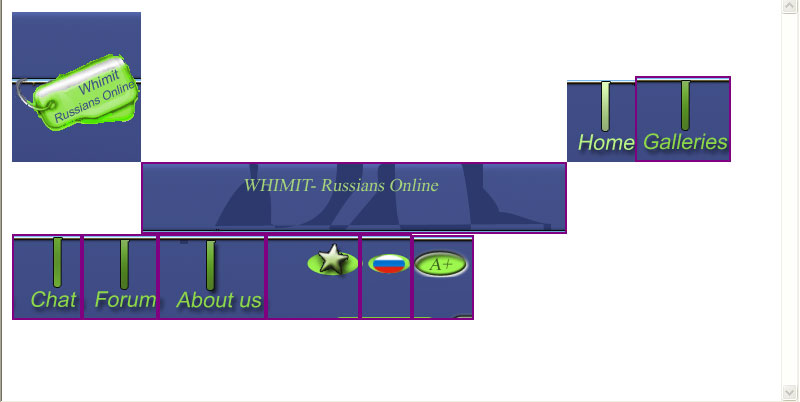

i dont know much about DW but i would guess making div layers would be going in the right direction
well i did it with a table.
oh you meant side by side not like half overlapped!
yes that is what i mean oh when i do it with a table there is a space between picutres and the border is set to 0.
Align the image in the left cell to the right, and the image in the right cell to the left. Then they should be as close together as possible.
"td align="right"" and similar should work.
-NC
or you could cut it through Fireworks and use it as a whole.
or, instead of tables, wich are horribly wrong, you could use a div.