
Linux and Icons

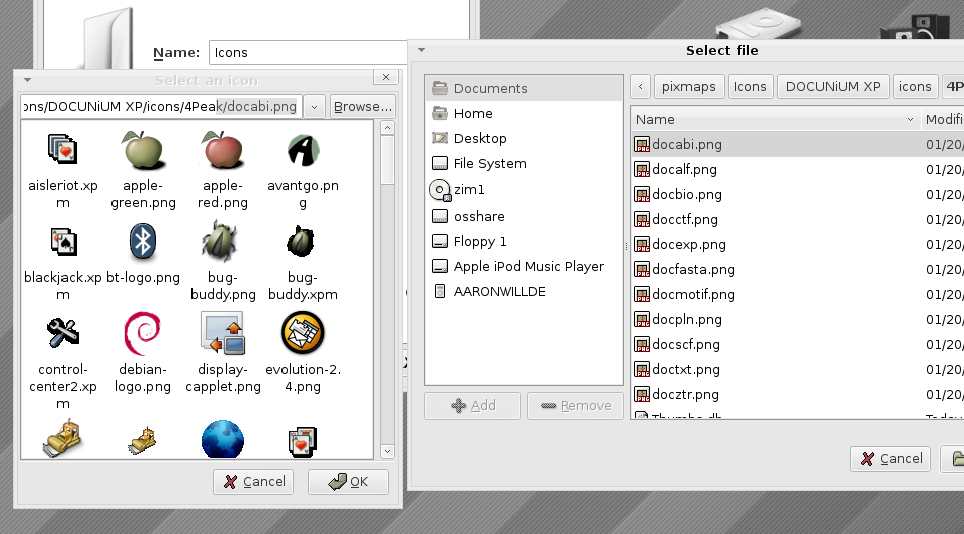
Just wondering, where do you guys install your icons? The process to choose a new one is really annoying for me. I have to navigate to the folder, choose an icon (and due to linuxs browsing system i cant see what it is) then delete the icon file name and press enter so the whole folder is loaded for me to select one. hope that makes sense. do you guys have a different method?
post-37331-1144217929_thumb.jpg

Screenshot.jpg
Screenshot.jpg

#376189

yeah.. don't use linux.. no go ahead but I never liked the browsing system in linux..

#376222

all around linux is 1000x better to mod than windows and looks alot better when you do.

#376229

I have to agree with stinkey diver, I used to mod the crap out of Slackware and Ubuntu in summer,they looked so good... Just put some effort into it and be patient, you'll get excellent results :)

#376260

I think I understood a little about what you are saying but you lost me in the last part. Anyways, think about doing this:

Open your file browser (Nautilus?) and switch to thumbnail/icon view. That way you see exactly what each icon looks like. Keep it open, and instead of clicking the "Browse" button and manually selecting the icon, just copy and paste the file path from Nautilus into the textbox beside the the "Browse" button. That way you directly paste the directory and file name intead of just browsing to the directory each time.

#376303

I think Customizing Linux icons is easier then Windows. You just need to know drag&drop ;)

If you want to Install a new Icon theme (you can download many of them from www.gnome-look.org ) they are mostly in tar.gz format. Just drag&drop them to your theme manager.

if you want to set an Icon for a Folder then goto that Folder's Property. You'll see an Image of the Current Icon. Now Drag your Icon from Nautilas and Drop it Over that Image. Icon will be set(You can use JPG image as Icon too)

Now if you want to change the Icon for a Launcher in Panel there is a little problem. You NEED to have the icon file in /usr/share/pixmaps/ folder. so you can put your custom icon there.

normally Icon themes are saved in ~/.icons [Only Available for current user] or /usr/share/icons[available for all users]

all programs icons are saved in /usr/share/pixmap/

Hope this helps

Enjoy :)

#376334

Thanks. Just one more thing, is there a way to change a icon for file types so all .avi files etc have the same icon? In windows its a piece of cake, but i only know how to change one icon at a time in linux.

#376393