
Filetype icon problem...

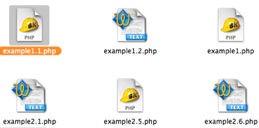
I testdrive skEdit. Its good editor and i plan to buy it but... Until its happen i use TextWrangler for editing .php etc file. And i set TextWrangler as default editor for that type of file. They opens within TW. Good. But file icons are strange. I unpack a newly downloaded folder full of .php file and some of them have TW icon but others - skEdit... If I Option+I on file with skEdit icon and delete that icon - I get a normal TW text file icon. But why its initially was skEdit? I never set skEdit as default editor (maybe its make it itself... not sure). Here a ss of that folder i told you...

How can I "clear cache" or something to make my .php file have the same icon?

BTW

I reset TW as default editor.... No luck.
post-3404-1143023713_thumb.jpg

Picture 1.jpg
Picture 1.jpg

#371902

This was just something I found off Google that might help you:Tiger Cache Cleaner

Yeah thanks Tiger Uncle!!

#372160

aquaman99, he's asking a question about the Macintosh ;).

-NC

#372161

If you opened that file with skedit, the file type icon will change.

If you want to change the file type icon all together you have to show package contents of the app and replace it or do it thru candybar.

#372229

I didn't open files on screenshot with skEdit. It newly unpacked archive d/loaded from internet.

But as you can see - some have TextWrangler while other - skEdit icons...

And i don't want to change skEdit icons toTextWrangler icons inside skEdit package ;)

So...Maybe I have to use sort of "system maintance" utility to clear icon or other cache? Or i have to delete skEdit (which is really bad idea...)?

#372297