Changing Start Menu and Explorer

Please could someone help with

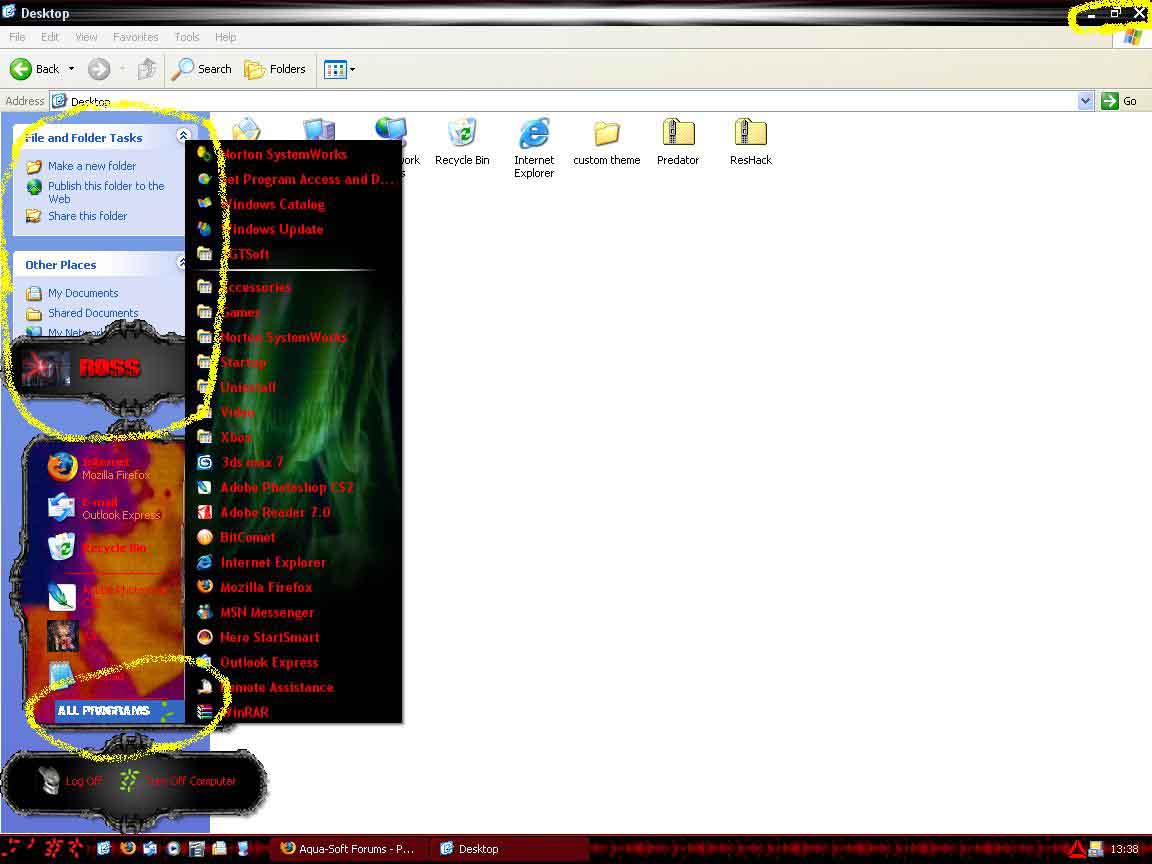
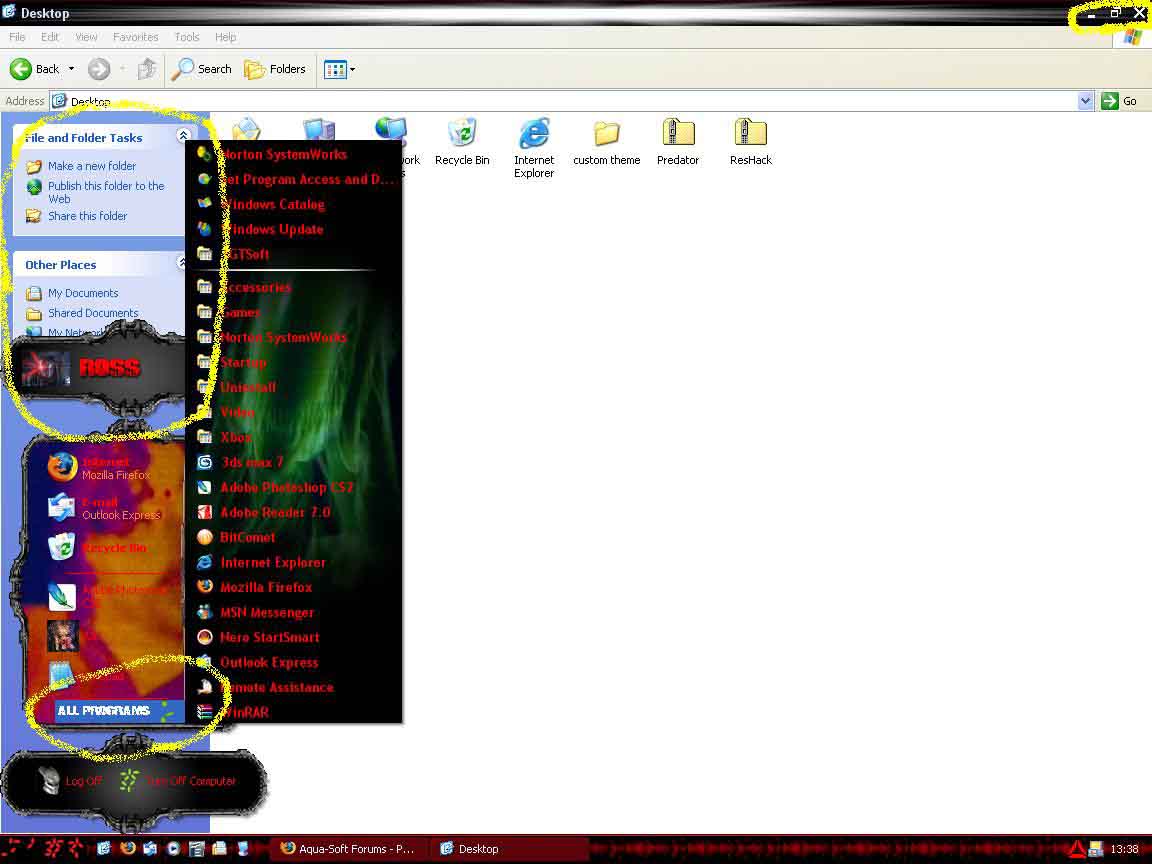
1: Changing start menu highlight colour; Already tried in stylebuiler and in ResHacker (Think that I edited the right thing in ResHacker, I changed the RGB values in the msstyles file of my theme in TextFileNormalBlue_ini1033 by saving it as a hex dump, editing the values with note pad and then putting them back in (Might have put it in uncorrectly but I think I did it right). As for stylebuiler, it did nothing.

2: Changing the image file in the explorer window (both the main part and the common tasks background if possible). I also tried this with stylebuiler but it again did nothing.

3: The close, minimize and restore buttons; there are 5 different image files and whenever I find the one that is being applied and I change it then it switched to one of the other images.

Any help would be great as I am starting to get really annoyed with this

Thanks

Hears what I talking about:

By the way, this is a predator theme i'm making, comment would be nice
post-44136-1142343893_thumb.jpg

Predator.JPG
Predator.JPG

#369224

2. these images are located in shellstyle.dll (/Resources/Themes/Skin Name/shell/NormalColor/shellstyle.dll) you can edit that with reshacker after you finish your skin

3. that's because the luna theme uses the same image file for the maximize,help,minimize and restore buttons. You must specify a different file for each of these buttons in stylebuilder. The other images associated with each button are glyphs

#369227

2: Thanks, but I couldn't find any bitmaps for the background so can I only set the RGB colour as I was really wanting to set a picture in the background and after I edit it do I just replace the shellstyle.dll in the zipped file stylebuiler made when I want to distribute it?

3: What do you mean by a glyph? I'm not sure what it means but those are the ones I am trying to edit.

Thanks again

post-44136-1142358134.jpg

Preview.jpg
Preview.jpg

#369287

that has to be the ugliest theme for windows eva

#369400

Thanks for that. By the way, for future reference, I'm looking more for constructive criticism i.e. hint, tips or ideas. Anyway, this is more an aquired taste for predator fans

#369548

yeah, i recognize the symbols from predator... like it! ;-))

#369589

Thanks

See Austin, not the ugliest

Please, anyone know how to change the start menu highlight colour, PLEASE

#369964

Thanks

See Austin, not the ugliest

Please, anyone know how to change the start menu highlight colour, PLEASE

Glad that you handled my comment rather well :P. You sure you looked in Stylebuilder hard enough? :), I don't want to give you a hard time anymore so ill tell you: The value is located in Values>> General >>Sysmetrics>>"Highlight".

#370138

mntnbkr1065, was there any particular reason for that comment? Were you insulting Austin123? If so, that's flaming. And if you were talking to LostRoss, that's flamebait...either way, you're on shaky ground. Consider this a warning ;).

//Posts Removed

-NC

#370154

I don't want to give you a hard time anymore so ill tell you: The value is located in Values>> General >>Sysmetrics>>"Highlight".

Alreaddy tried that, did nothing

#370219