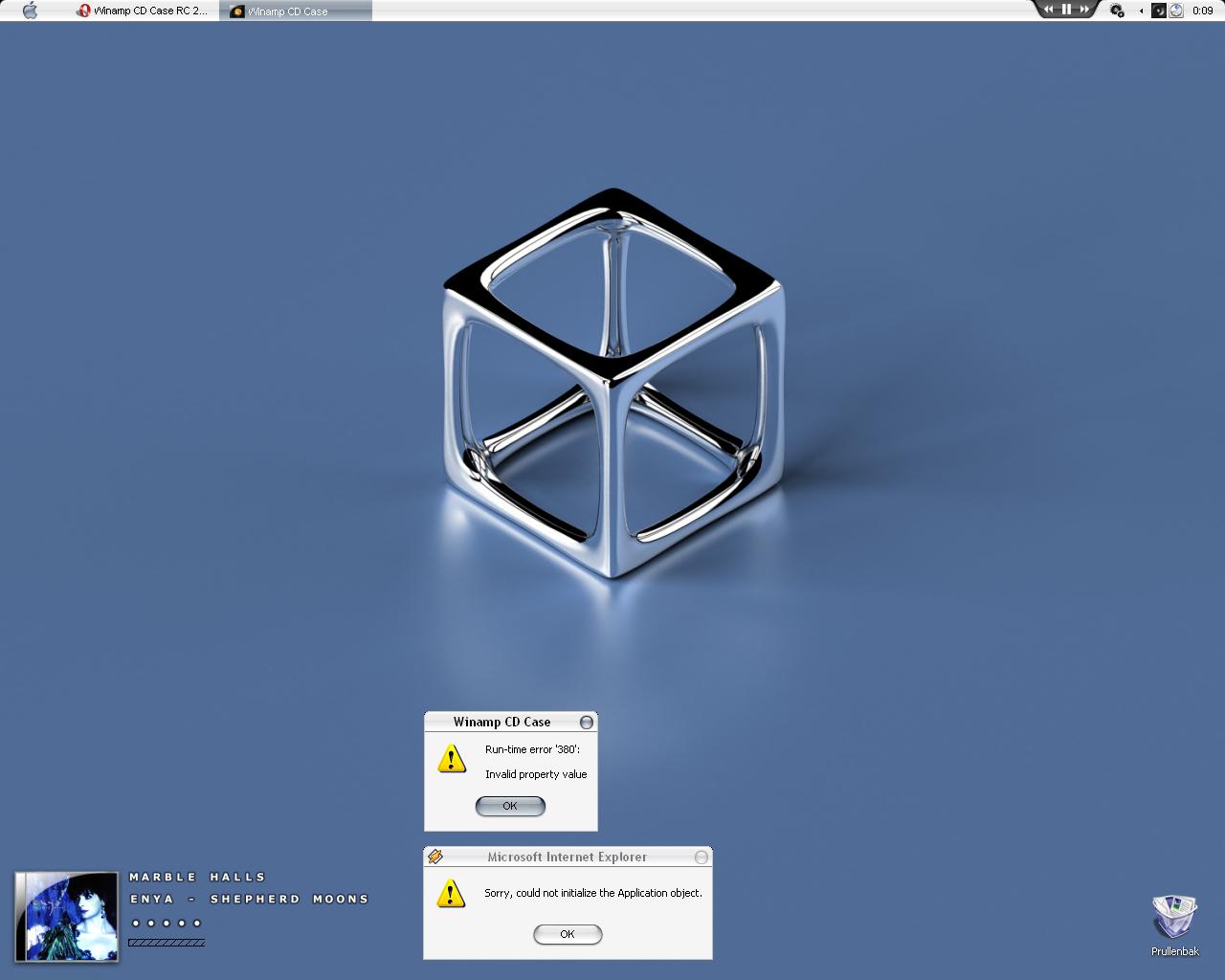
Winamp CD Case RC 2

Winamp CD Case RC 2 was released today (10 Mar 2006)!

You can read about RC2 release at FileForum.

To test the last forum build (not officially released) install RC2 first.

By the way, if you enjoy this WCC version please leave your rate/feedback at FileForum. Thanks!

Download (full version): http://fileforum.betanews.com/detail/Winam...se/1109367710/1

NOTE: Your old skin setting will be overwritten! Backup them it you need!

Forum Builds (get the last working build not officially released yet)

Last updates:

+ New notifier that will accept any font, color, outline, size and some styles (normal, bold and italic)

+ New progress bar style

+ Current Progress bar styles: Borderless, Filling, Modern, Slider, Solid and Transparent

+ (18 Mar) New Fancy rating feature (see screenshot)

+ (19 Mar) Codes adjustments due new features

+ (25 Mar) Most of WCC was rewritten (see Readme.txt inside the zip for details)

+ (27 Mar) Bugs fixed

+ (29 Mar) Improved web radio support and bugs fixed

+ (30 Mar) pad rating, improved time feature and bugs fixes

+ (31 Mar) local db rating back

+ (31 Mar) bugs fixed (build 492 will probably be the future RC3)

Download last build (*): [ATTACH]7375[/ATTACH]

*see Readme.txt inside the zip for installation instructions!

Screenshot (from current build - # 492):

wccrc2b366.jpg

wccrc2a.jpg

wccrc2.jpg

Have fun! :D

#367667

Thanks, great work!

Looks awesome too!

wcc5uf.png

Case mod by me.

(Reflection by Avedesk incase anyone is confused :P)

#367688

YEY FOR RC2! Gotta love it!

Good work man. :D

/.teh

#367697

Top Marks, works a treat.

I've just started using the count down feature, is there anyway the "minus" can be removed?

Apart from that no problems, good build.

Thanks

#367714

yeah...

really like it...

but i am still wondering... why did you remove the notifier background that was in beta 10?

also why did you remove the ability to select any font, and change it to pngs, rather than scripting outlines etc.?

this is not criticism, i was just wondering...

keep up the good work...

cheerio

#367807

Can not get this working. I get the sys-tray icon and thats all. No case anywhere on the desktop. I think it might be on but I have four monitors and they are not all set side-by-side so .... I think it's showing on the default monitor but its below the actual viewing area of the screen. When I right-click on the sys-tray icon and click minimize I can see it flash for a minute on the bottom left corner of the default monitor but I'll never be able to see it I think.

Any help of fixing this or should I go back to beta10? Thanks. :)

Maybe you could add "X" and "Y" settings to the options menu.

#367871

4 monitors? C'mon... :)

WCC is set (since beta 3 or 4) to first start in the middle of the screen when no registry key, regarding its position, is found.

You can try set a value "200" for top and left.

Close WCC, open your Registry editor and go to the following key:

HKEY_CURRENT_USERSoftwareWinamp CD CaseOptions

For the "Left" value set: 200

For the "Top" value set: 200

Start WCC again. Let me know if everything went or not fine.

I'm not sure Beta 10 could solve this issue. It's the same procedure. But who knows what Windows can do? ;)

#367881

That did it. :) For whatever reason the "Left" value was almost 38500 and the "Top" value was almost 400000. But yeah, I have it now, thank you. :)

#367992

How can i use it with Foobar :D

#368041

smoovie

With that values WCC was out of your room! :)

I'm glad to know it's working now! Thanks for your feedback!

Nxqd3051990

You have to use Winamp API Emulator plugin for Foobar2000 version 0.8x (*):

http://www.r1ch.net/stuff/foobar/

(*) as far as I know the plugin was not updated to the new foobar version.

#368107

Hi Carlospr,

When I change from playing a folder on my computer to a bookmark of internet radio I get a double error. See image.

Greetings

post-41395-1142118911_thumb.jpg

Error.JPG
Error.JPG

#368184

Borix,

The second error looks like a Winamp error (see the title bar icon).

Please, send me the internet radio link so I can make a test here.

Email me if you want: support@closetosoftware.com

#368237

Nxqd3051990

You have to use Winamp API Emulator plugin for Foobar2000 version 0.8x (*):

http://www.r1ch.net/stuff/foobar/

(*) as far as I know the plugin was not updated to the new foobar version.

Great thanks for your help ^^

#368266

1dk2noa.jpg

I always get that :(

#368277

It seems that you delete the "Case" subfolder in "Skins" folder. Or you're trying to run WCC from another folder...

Uninstall WCC. Install it again.

If you're using foobar don't move "CD Case.exe" from its folder.

Start foobar then start WCC.

I didn't test the RC2 with foobar, but I wll asp.

#368294

WCC RC2 Build 13 (12 Mar 2006)

- Improved Fade In/Out effect (*)

(*) Uses less CPU (up to 10x less depending the CPU speed) and is a little bit smoother (make sure to check "Options>General>Fade cover")

Note: the new fade in/out was NOT enough tested yet; you may find some bugs...

Download: http://www.closetosoftware.com/temp/wccrc2b13.zip

Have fun! :)

#368357

WCC RC2 Build 74 (16 Mar 2006)

Introduction:

This build completely changes (again) the notifier text.

Thanks to KSoft (the author of RunMe) I could figure how to properly draw the text out.

So the text does NOT depends on png font anymore.

Attention

This is a really working in progress build.

So backup your current "CD Case.exe" before use this.

There are lots of thing for me to do: add more options like text color, update the "Notifier Lines" interface etc.

Important usage notes:

As you'll see "Notifier Lines" (in Skin Manager) has only "Line 1" enabled.

However, the "%newline%" flag is back at least for now.

The screenshot uses the following text format: %artist%%newline%%track%. %title%

This will help you to set your custom "Line 1".

About "Line 2":

"Line 2" will probably be added back. Two reasons:

1) you can make two custom lines, with two different size, font, color...

2) CPU usage: when time is set WCC has to redraw "Line 1" evey second. If a line has all information then the CPU work will be harder.

Screenshot

wccrc2.jpg

Download

http://www.closetosoftware.com/temp/wccrc2b74.zip

Have fun! :)

#370139

...not sure what the deal is, but that last release (2b74) crashed when the cover fades in with a run time error (380), 'invalid property value'

[edit]After talking with Carlos, I learned this error was caused by having notifier font values set to zero (0), he says this will be corrected[/edit]

RC2 is great though, having more control over the searching is awesome, excellent work.

#370157

As always, great update!

One very minor point, though.

It'd look a bit neater (IMHO) if the rating appears as e.g. ****~ instead of as ~****.

I read from left to right even though the text is right aligned.

#370173

I have a little suggestion as well. When listening to cast stations no image shows in the case. Maybe you could make a folder in the WCC main folder for a default image. And when playing the stations maybe have it read the meta data (I think thats it) for what station is playing and the song thats playing like in the main winamp window.

#370174

LeifL

There are lot of thing to do. The rating will be one of the feature that could change since the new text works differently.

smoovie

A default png for cast station is possible right now.

Read meta data is not discarded but it'll take time... I can't promise you anything.

#370177

WCC RC2 Build 81 (17 Mar 2006)

- Set font

- Set font style (normal, bold, italic)

- Set font color

- Set outline font color

Download: http://www.closetosoftware.com/temp/wccrc2b81.zip

Have fun! :D

#370178

^^ that is a welcome addition. :D

#370182

@Carlospr, i love you :P keep it up please

edit: can by any chance the progress bar can be changed in position ( padding from the track info text ) ? I have the text down the center of the cover ( to the right ).. thus the progress bar go far away lol ;/

#370205

lenix,

Post a screenshot. It's porbably a wrong setting.

But try this ("Skin Manager>Text position"):

Main: Left

Pad left: -240

Pad top: 260

#370288