[help] Windows Explorer searches folders on double-click

I am having a lot of trouble with windows explorer. When I double click a folder, a new search window opens. The only way I can open folders is by right clicking and clicking on open. For some reason, search is now the first thing, in bold that is on the right click menu, this may be the reason that makes the new search window pop up.

Does anyone know how to remedy this?

It may be something to do with Flyakite OSX v.3, which I put on my computer for a while, then took off. I have tried uninstalling and reinstalling this, but it hasn't helped.

#353189

Start Menu-->Run-->type in "control folders" without the quotes-->Filetypes tab-->"(NONE) Folder" Advanced-->make sure open (instead of search) is set to default.

And use tags next time please, according to the specifications of the Tagging Guidelines. :)

-NC

#353210

Sorry about the tag.

Thanks for the solution you already said - it doesn't take me hours to get to folders now.

But, in the file folder, under file types in the "control folders" window, there is no Open option. I created one and set windows explorer as the application, and now it opens a new explorer window when I double click, despite the option not being set to that. Do you know how to solve that?

#353460

Not sure if you already solved this, but my windows explorer opened a new window for every folder I double-clicked a while back. This solved the problem (from a post on the freedomlist.com forum):

(1) In "Control Panel > Folder Options", click on the "File Types" tab, locate the "File Folder" registered file type, and delete the "open" command you created which opens "C:windowsexplorer.exe".

(2) The only option in this dialog should be "find", unless third-party programs (like virus scanners) added more options.

Make sure that none of these options are set as "default". You will know which command is set as default because the letters will be bold.

(3) When you are finished, go back to the registered file types and locate the "Folder" option. There should be 2 options under it called "open" and "explore". Again, third-party software may have added more options.

Make sure that none of these options are set as "default". *** very important***

_____

#353503

Nope, neither of those work.

Thanks for trying, but I may just have to make do with opening new windows. Windows explorer is ridiculously difficult to change options for.

#353524

Did you check the forum I posted? Also, you could default to "explore" under folder options until you solve the problem. I did that for a while. ;)

Not to undermine your ability or intelligence, but are you sure nothing is bold under both the "file folder" and "folder" selections in file types? You can also check the registry, like someone suggested in the other forum. :confused:

#353527

This may be too simple but in any folder click tools>folder options. See if there is anything in there that would help you.

#353589

I had this exact same problem for a while but it only happened when I opened drives- not folders. For the life of me I was just totally unable to get it functioning back as normal.

It eventually went away when I reinstalled windows :P

Possibly you need to use a certain parameter when selecting explorer.exe to open files, I think /n will always open a new windows.. so maybe there is another option to open with existing window.

#353608

No, it still opens a new window. The problem is that in the folder types, advanced list, there was no open, and so i made my own, by choosing explorer.exe from the WINDOWS folder. And this means that it will always open a new one. I don't really know how to change that. Is there a way of making it open in the same instance as you are using?

#354279

"Go to

HKEY_CLASSES_ROOT Directory shell

DEFAULT should say "NONE" or "EXPLORER" (if not MAKE DEFAULT = ""

THEN

GOTO

HKEY_CLASSES_ROOT Drive shell

and set DEFAULT to "NONE" "

source: Link

sorry, that is all i know. Or do a google search.

#354283

No, it still opens a new window. The problem is that in the folder types, advanced list, there was no open, and so i made my own, by choosing explorer.exe from the WINDOWS folder. And this means that it will always open a new one. I don't really know how to change that. Is there a way of making it open in the same instance as you are using?

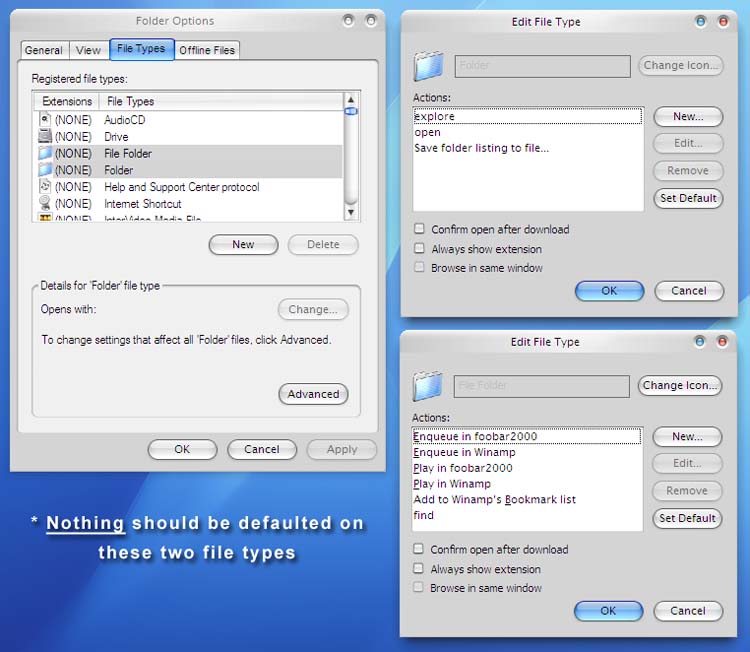
Open should not be used. I have no idea why it's even there and it's what confused me for a long time. See the attached pic on what your fie folder and folder file types should look like (file folder might have a lot of extra things put there by programs, not necessarily what I have). Important thing is that NOTHING should be defaulted. ;)

post-2177-1138473376_thumb.jpg

Untitled-2.jpg
Untitled-2.jpg

#354322

Important thing is that NOTHING should be defaulted. ;)

Nothing is defaulted!

And yet it still opens in a new window!

#354331

Well, then you got me. I can't wait to see the solution (if one exists). Good luck. :)

#354334

I'm actually thinking of just reinstalling Windows. That should solve it, and speed up my computer which has become very slow recently.

I solved it! The HKEY_CLASSES_ROOT Directory shell and HKEY_CLASSES_ROOT Drive shell must both be set to explorer, not to nothing.

Although I still think it would be a good idea to reinstall windows. What is the best way to do this?

#354620

How odd. Good to hear you got this solved. :)

#354678