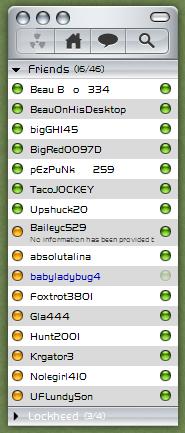
[Release] Inspirat Pro for Miranda IM

Inspirat Pro for Miranda IM

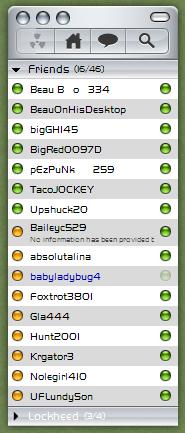
ippreview9xs.png

Credits

Inspirat Pro Skin - ModellisTa, http://inspirat-pro.deviantart.com/

AdiumX skin - philou, http://www.aqua-soft.org/board/member.php?u=38130

Somatic Emoticons - Bad Seed, http://badseedc.deviantart.com/

iChat Chat Log Skin* - ZTL, http://powerproductions.deviantart.com/

Help - ppoppe, http://www.aqua-soft.org/board/member.php?u=25782

Inspiration - StefanKa, http://stefanka.deviantart.com/

*I include a modified version of ZTL's iChat Chat Log Skin for Miranda IM with a bit more quality images used.

[Download]

#352963

Sorry russian here : Скин жжет, но для помоему аква кнопки наверху не в тему.

#352965

Great work man. Lovin' it! :)

#352973

Niiiiiiiiiiiiice work! Looks great!

#352976

Nice .........WB theme???

#352981

Verrrryyy goood man !!!!! Great job ;)

#352993

Very Nice indeed, love it :D

#353005

Awesome, thanks but I still need the iTunes skin y'know :D LOL

#353039

would also look great w/ ruler graphite... im new to miranda... mind telling which plugins are needed and a quick tutorial?!

#353082

I have just one question... that Boo avatar. Where would I get it, or avatars in a similar style?

Edit: well, I guess a second question as well... any chance of a Mac-styled message window, with the OS X orbs instead of the Vista buttons?

#353093

Willy, I'll probably will be allowed to release once Stefan releases it in his Aqua SE GUIkit :).

hr8trtim, for instructions see the ReadMe file included ;).

Desides, unfortunately, I don't remember abnything about Boo avatar. I'm not quite sure I understand what you're sayung about Mac OSX orbs... Any screenies of the buttons you're talking about?

#353220

Desides, unfortunately, I don't remember abnything about Boo avatar. I'm not quite sure I understand what you're sayung about Mac OSX orbs... Any screenies of the buttons you're talking about?

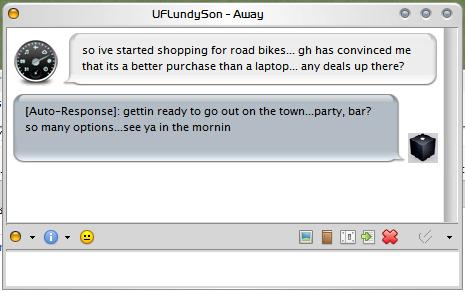
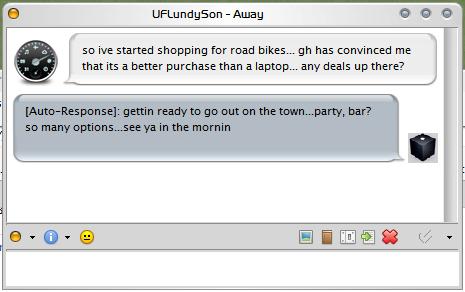
I'm referring to the close/minimize/maximize orbs ala those that appear on the contact list. Just replace the Vista-styled buttons with the orbs, and move them to the left, and it'd fit right in with the Stefanka's Aqua kit, not to mention Tiger graphite themes or any number of combinations.

This skin really makes me want to switch from Trillian Pro to Miranda, though the plugin-based nature of Miranda is pretty intimidating...

#353252

be intimidated... i can't get that crap to work to save my life

#353267

Desides, there's no way to do that becouse the chat window's caption which contains "Vista"-styled buttons is a part of a Windows theme. If you use for example Tiger Graphite VS of WB you'll get what you want. That's becouse the close/maximize/minimize buttons in this themes are 1:1 to the contact list orbs. Simple.

#353282

Ahhhh. Well, now I feel kind of stupid for asking...

Now, I wonder how to get Miranda set up...

#353285

Note to all: this guide will work http://www.aqua-soft.org/board/showthread....t=miranda+guide

Thanks for the props, modellis

#353286

ppoppe, your guide was very useful once I've switched to Modern Contact List Layered :). I've linked it in the ReadMe file in case someone will experience any difficulties installing skins. Thak you!

#353288

Excellent skin. This was worth switching for.

One last question, however: despite setting logging options for timestamp displays and showing events in the window (such as disconnects/reconnects), they aren't showing up. Anyone have a clue as to what setting I goofed?

#353341

have two problems... please help

I would like to remove the green dots on the RIGHT of contacts name and also fix the hide/show button... thanks

post-26518-1138323326_thumb.jpg

problem.JPG
problem.JPG

#353856

have two problems... please help

I would like to remove the green dots on the RIGHT of contacts name and also fix the hide/show button... thanks

For the second problem solution is to open file Inspirat Pro.msf with Notepad, find

;Show Online and Offline Users

$BTNonlinenorm=sGlyph,Image,btnonoff.png,StretchBoth,0,0,0,0,100

$BTNonlinehov=sGlyph,Image,btnonoff.png,StretchBoth,0,0,0,0,100

$BTNonlineDn=sGlyph,Image,btnonoff.png,StretchBoth,0,0,0,0,100

and change it to:

;Show Online and Offline Users

$BTNonlinenorm=sGlyph,Image,btnonoff.png,StretchBoth,0,0,0,0,255

$BTNonlinehov=sGlyph,Image,btnonoff.png,StretchBoth,0,0,0,0,255

$BTNonlineDn=sGlyph,Image,btnonoff.png,StretchBoth,0,0,0,0,255

Or you may just re-download the file at deviantART in 15 minutes.

As it goes to the first problem you've faced - try searching something about showing status icons in contact list at Miranda IM Options. I'll post the solution later if I'll find it.

#354008

hey thanks for the fix.... i actually found the solution last night... those are protocol buttons located in the contact list setup, called extra icons... simply uncheck protocol...

im at work so cant list the exact location... but yea, thanks again

edit: found a new problem... again please be gentle as im completely new to miranda and ieview...

why do some icons (all pngs) not show transparency correctly. This box came w/ your skin...

post-26518-1138376289_thumb.jpg

problem.JPG
problem.JPG

#354009

edit: found a new problem... again please be gentle as im completely new to miranda and ieview...

why do some icons (all pngs) not show transparency correctly. This box came w/ your skin...

That's becouse of the transparency of the window (PNG handling plugin issue). The only known solution is to disable transparency of the chat window.

#354831

I've finally got this Miranda thing mostly figured out, and I'm in love with the work you've done. Just one final question: is there a way to show timestamps in the message window? I've checked the relevant options under IEView -> Message Log, but can't find anything to control timestamp appearance in the actual live message window.

#355153

i had the same question... only thing i could find was to enable time stamp in status bar of ieview... that way i knew when the last message was sent...

#355178

I love this skin, but I have an issue as you can seewith the attached image.

It seems that the contact list is a few pixels larger on the right than the header. Where do I fix this? I know how to do it in clist nicer but not here

It is more pronounced on my screen than in the ss

Thanks!

ss030920061148060zv.th.png

#367205