 Aqua-Soft Forums
needs a shellstyle but its still pretty good
Mac OSX 10.4 Tiger on Intel
needs a shhe shellstyle but its still pretty good
In the screenshot you can see what the shellstyle will look like - it will be in the final version
screenshot: http://www.cbs-it.co.za/tiger.jpg

With the ShellStyle, will we be able to change the title-bar font? It just resets every time I try to change it :-.
Well , its fine .
the only thing for me is the color when the mouse is over. i suggest a Aqua blue.
anyway . keep going , your doing nice.
Viva Mexico Cabrones !!!!!
Any chance for Windows Bilnd? It's gonna be great!!!
Any chance for Windows Bilnd? It's gonna be great!!!
Yes... he's already said that he's going to make a WB5 version. Read the threads before posting.
Play nicely now - hehe.
I wish someone can help me with a good tutorial on how to make the shadows using SkinStudio.
what separates this theme from say kol's?
I think that the theme is beautiful. But, the taskbar is too big and you can see around the apple logo the square (of the botton) and it should not be seen.
Other than that very good job and I will use it whem it's done
its okay, but it looks less like tiger, then say kol's.
what separates this theme from say kol's?
- Download both and check the differences - then u will know
But, the taskbar is too big and you can see around the apple logo the square (of the botton) and it should not be seen
- screenshot please, ill will look into it
but it looks less like tiger, then say kol's.
- cool, then maybe you will be usings Kols version. :-)
the rest enjoy
Thanks guys for ALL the feedback - really appreciate it - will be working on the theme again on the weekend - may a final release Sunday - we will see how it goes.
Hi there and thank you for your wonderful job!
I attached a picture of those squares under the apple logo


And one more thing. Look please at the picture (it's Russian language) There's only a half of TurnOff button. Is there anything I could do to coorect it?
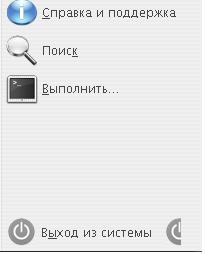

To 184200
The Squares : (Try this)
- This happens to some themes when the language bar is in the taskbar -
- Also make sure your taskbar is locked -
- I will try to take the "square" out fron the start buttons even if people have the language bar there.
Turn Off Button:
- You must have Lucida Grande font installed -
- If you do have the font installed, then maybe that word is so long that its pushing the Turn Off button to the right.
- In the english version its fine.
Lemme know if you fixed it on your own.
Thanks again
Shardie
@ 184200: This is a problem with many themes. You can "fix" that by removing the LogOff Buttom from startmenu:
1. Start Regedit [Click on "run" and then type "regedit" (withouht " "]
2. Go to HKEY_CURRENT_USERSOFTWAREMicrosoftWindowsCurrentVersionPoliciesExplorer
3. Create a new DWORD with the name "StartMenuLogoff" [again without " "]
4. Give it the value 1 and restart your PC
This will help you unless the bug is fixed. It's a problem with different languages because "Log Off" is much shorter than the russion version. In german, it is "Abmelden" wich is also longer.
EDIT: shardie786, can you please mail me the two wallpapers called "Tiger X" and "piercolor" [biggest solution, please], 'cause I don't have these two. This would be really nice!
@ 184200
Ive just fixed the start button now for you. Dont have to do any registry editing..... gimme a short while to post the update..... will be today (depending on which part of the world you live - hehe).
I just have to do a few things first.'
Sweeet
BTW: thanks DZGH_Operator for that info
----------
All Mac OS X Wallpapers here:
http://www.wuzzie.needlemen.com/macosxwallpaperpack/
THEME UPDATED - CHECK FIRST POST
//Posts Merged. Edit your original post instead of double posting, please. Great theme! Thanks.  -NC
-NC
Thanx Shardie!
You're fast enough, no more gray squares.
@ DZGH_Operator
Danke schon for your advise but I prefer to use tweak progs like XPTtweaker - more safe I think
Anyway thanQ
great... thx
Thanks Shardie!!! This is what i was searching:o !!! Thanks again;)
Soo... is nobody else having trouble changing the titlebar font but me?
hi..
i wanna make a request..can u make the separator in windows/internet explorer invisible in ur theme? i like to use separator to make the button gap not too close.


WOW this skin is looking better and better...
Beta2 is almost perfect, only fonts are too big for me
When will the final version be released? I'm really exciting of how the final result will look like.
@ 6205: Yeah, I also think that the fonts are too big
The theme is still in the works. It was tentatively scheduled for Sunday, but obviously hasn't shown up yet...
The fonts are fine. It's about time we had a Tiger theme with decent-size fonts. You can always just reconfigure them to be smaller if you hate larger fonts that badly.