
[help] transfer songs from ipod to computer?

well, my friend had to reformat his computer, and he lost his songs... he was wondering how he could transfer his songs from his ipod mini back to his computer.

any way to maybe have explorer show all the song files on his ipod? is it possible to transfer his songs back?
#348615

on a pc, winamp can transfer songs back to the computer with the ipod plugin. just install winamp and this plugin, http://winamp.com/plugins/details.php?id=138888

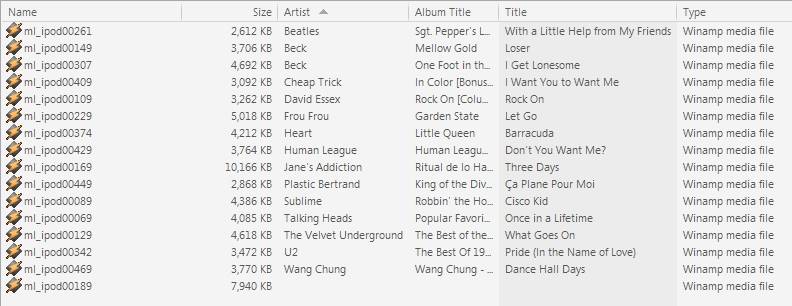
if you open up the ipod in explorer, the filenames themselves won't mean anything, but if you have the columns showing of 'artist', 'album title', 'title' etc. , your friend will know what song it is. only thing is, that if you copy them from explorer, they will retain the insignificant file name. if you copy them using winamp, the filename will become the title of the song (or whatever format you decide to have winamp copy it back using)

post-3080-1137118188_thumb.jpg

Clipboard01.jpg
Clipboard01.jpg

#348619

ah, thats pretty cool. i'l relay this info back to him. thanks wookie

#348624

Well, on my computer at least, if you right click on the drive and click "Open as portable media device" a songs column will come up. It organizies them odd, but it may work.

#348633

In Windows-

as long as you have enabled disk use (in itunes) and then in explorer enabled "show hidden files" in Tools=>folder options=>View=>Advanced options. You can then drag and drop all the files from X:iPod_ControlMusic (where X is the diver letter of your ipod) into itunes. itunes will then rename all the files using the IDv3 tags and move them back to your music folder (if you have enabled "keep itunes library organised").

Sorry I don't know about in OSX.

#348635

Do what aleph said, but instead do this:

Copy the entire Music folder onto some other place. Don't worry, it wont' be permanent. Might be a lot to transfer...

Open up this new folder (that has all the music), and search for .mp3 files inside it. Copy these files into yet another folder--this one, unlike the previous, shouldn't have any directory structure. Just tons of .mp3 files!

Then follow the technique aleph advised--dragging the songs into iTunes. Now you can do it all at once, though.

Hope this helps ;).

-NC

#348645

NC has a good idea but I found a better one- In itunes use the "Add Folder to Library" option selecting the music folder.

No need to drag and drop and all files- mp3 or aac will be automatically transfered over.

#348657

sharepod- A small program that you copy onto your ipod, and allows you to copy accross playlists of songs.....not sure how well it works if you music isnt organised in playlists- but it worked great for me!

It meant no annoying sorting, and searching...

ps- google sharepod, you'll find it.

#348707

well, he was able to transfer them back to his computer thanks to you guys =)

#349334

I just had to chime in for the OS X users... Senuti is a beautiful, free application for just this.

That is all :-)

#350774