
how to....???

[ATTACH]6846[/ATTACH]

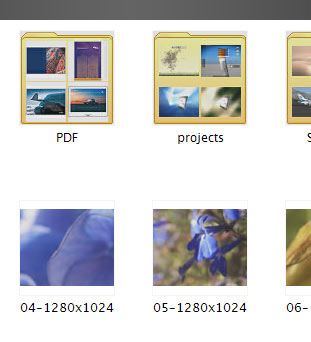
In the picture you see the thumbnail preview of windows. The folders with thubnails of the content are represented with an original XP folder 'icon'. Does somebody know how to change that, or which system file should be modified. Thanx in advance.

Happy New Year to all.

-Mitch
post-4328-1136130492_thumb.jpg

sec.jpg
sec.jpg

#345340

Right click the folder you want, select properties, and go to the customize tab. I believe it's the middle Folder Pictures option.

Hope this helps!

-NC

P.S: That is, if I understand your question correctly...

#345344

You didnt understand the question I think lol.

He means the "yellow folder" benhind the thumbnails...I dunno how to do that, I can not help you!

#345347

He meant how to change the yellow folder on the background of the thumbnail. Right? mnote

#345349

thanx for the great response, my question is answered.

-Mitch

#345375

Can your thread title be any more vague? Next time, please make a better one and use tags when posting.

#345393