[preview] iTunes Keyboard Remote

(please forgive my terrible English, I'm a Japanese....)

Hi,

I'm writing an standalone app for windows to control iTunes with keybaord shortcuts,

and i thought of asking here for opinions .....

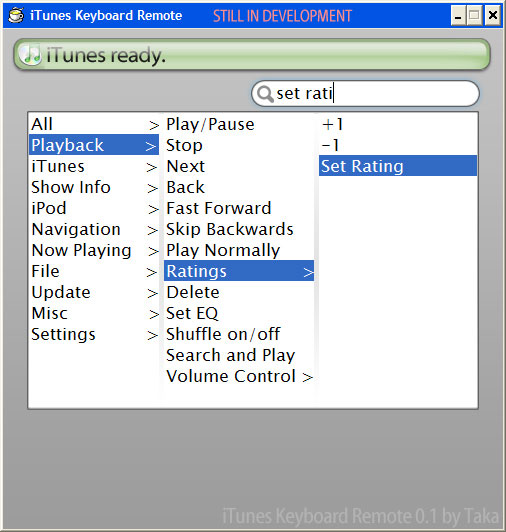
I've attached what i've made so far, and I'll post latest ones if I've made big improvements.
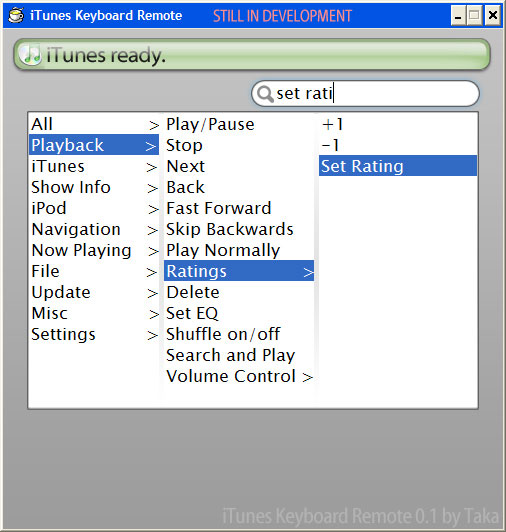
post-34709-1135766769_thumb.jpg

iTKR.jpg
iTKR.jpg

#344124

I've attached the list of functions i thought of..

List.gif

(i tried writing them here, but I realized that I had to put indents tags for each... so i'm putting them here as a image.

edit:added descriptions for oridinal functions...

Playback>Play Normally

-this will disable fast forward and skip backwards

Playback>Ratings

-this will show a little window for you to rate the song

Playback>Search and Play

-this will first ask you to input search string. it MAY have a search-as-you-type interface. The enter key will close it and play the result as a playlist.

Show Info>Lyrics>Lyrics Card

-this will show a window to show lyrics, imagine a Dashboard wiget to display lyrics

Show Info>Lyrics>Lyrics Subtitles

-this will show a band of window at the bottom of the screen, and displays lyrics there.

-the problem is....when to move on to the next line!

iPod>Eject iPod>From Windows + iTunes

-this will tell iTunes to "eject ipod", and them tell Windows to be ready for plugoff.

Current Song>Add Artwork from Screen

-this first captures the entire desktop, then show it in a fullscreen window (as a image). the user will draw a half-transparent box on it, then the iTKR will use the image within the box as a artwork.

Lyrics>Find Lyrics Online

as you read, this will go looking for lyrics on the web.

this will first support Japanese + English lyrics search, and others if you can tell me where to look for.....

File>Configure this Song

show you a list of settings to this file, might be merged to "File>Set"

#344127

wow, looks like that will be very comprehensive. right now, i use ituneskeys, which works real well. you might wanna have a look. good luck!

#344185

the option of search and play is nice

#344198

wow, looks like that will be very comprehensive. right now, i use ituneskeys, which works real well. you might wanna have a look. good luck!

thanks very much for telling me,shmengie !

i'll make sure iTKR will be better than this :)

the option of search and play is nice

thanks, proenca!

thus function'll bring up a small window for you to input search string. enter key to play the top match.(might be search-as-you-type like iTunes, but i'll see how fast it can be....)

....i hope you've imagined same thing as me, sorry i didn't describe them...

----------------------------------------------------

i'll be away until morning of Jan third (in Japanese time) , which is ...6 days from now

#344218

ok, good luck with this project :)

#344324

Hello.

I'm now working on "Search-as-you-type" function

#346152

thanks i am definalty looking for something like this that is better than ituneskeys

Just please please please allow yours to include the binding of alt+arrow key and the pausebreak button PLEASE I WILL LOVE U FOREVER

thanks :P

#348837

thanks i am definalty looking for something like this that is better than ituneskeys

Just please please please allow yours to include the binding of alt+arrow key and the pausebreak button PLEASE I WILL LOVE U FOREVER

thanks :P

hello,

>>alt+arrow to pausebreak

certainly, i will make iTKS to support ctrl / shift / ctrl / capslock / esc / space / page up , down/ end / home ..or mostly all keys you see on your keyboard. (not fn keyboards on laptops though) by option. to all functions.

and, after releasing my first version, I'm thinking of adding "Control Bar" that would scrool in to the screen (like Linux "task bar") to let you control itunes.... any opinions?

BTW, i'm working to improve GUI

------------------------

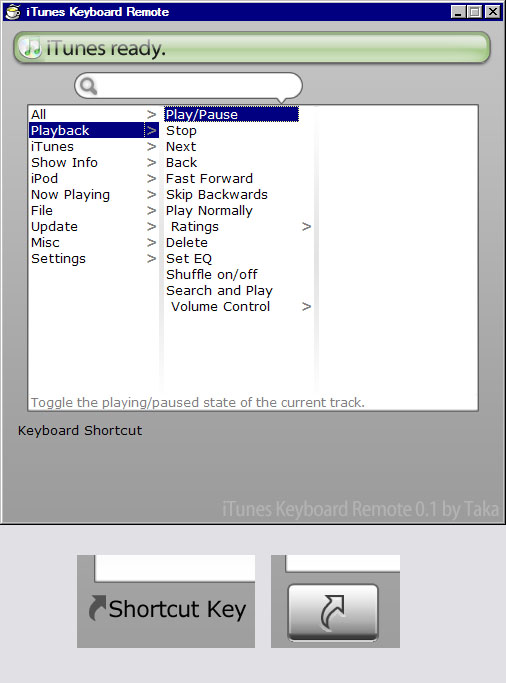
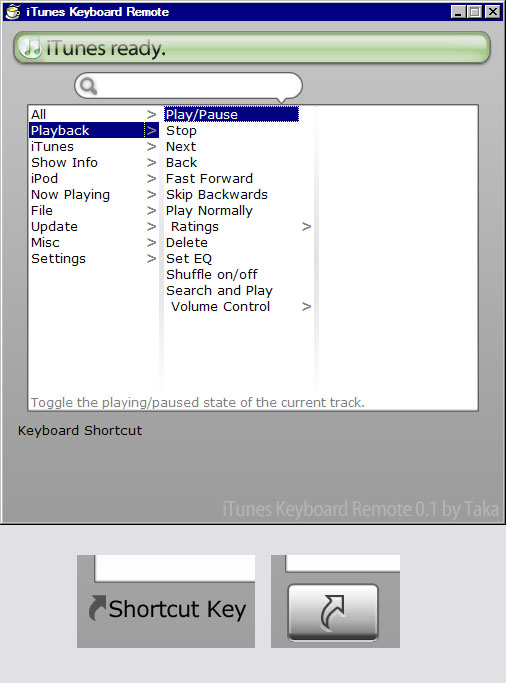
here's newest screen of iTKR.

and i'm actually stuck with GUI on the space at the bottom. (where "Keyboard Shortcut" is in the picture attached)

i was trying to put

Shortcut Key:Ctrl + P [Change]

kind of thing there, but it dosen't look nice. I tried text-type and button-type, but none of them seems to fit.

could anyone give me some ideas ...?

post-34709-1137224210_thumb.jpg

Screenshot.JPG
Screenshot.JPG

#348972

What about the third column? At least for things that don't have an extendible arrow...

And why does it not look nice? I can't imagine how it would look that bad.

-NC

P.S: When there's not too much time separating consecutive posts, please edit the original post instead of adding new ones. I've just merged what you already had...thanks ;).

#349233

i say lets beta test :P

#349330

What about the third column? At least for things that don't have an extendible arrow...

And why does it not look nice? I can't imagine how it would look that bad.

-NC

P.S: When there's not too much time separating consecutive posts, please edit the original post instead of adding new ones. I've just merged what you already had...thanks ;).

>3rd colum

i think this explains your question :)

3rdcolum.jpg

>not looking nice

the button and the "shortcut icon" didn't seem to match, as the oridinal buttons had less "round curves" than the shortcut icon....but i think i'll adopt it for now.

any ideas for this is welcome!

>editing original than adding new post

thanks, I'll do it from now on...

i say lets beta test :P

they still don't have any functions, and all they does is react to your selections. would that be fine..?

i thought i'll give out my first beta after making basic functions, or at least "Playback" functions...

#349354

hmm, just post a beta when u got the functions working cuz then u can actually test it.

also will these be global hotkeys that are activated when itunes is open or only when itunes window is visible? (global preferred)

#349437

hmm, just post a beta when u got the functions working cuz then u can actually test it.

also will these be global hotkeys that are activated when itunes is open or only when itunes window is visible? (global preferred)

>hotkeys

they'll be "global hotkeys".

as long as iTKR can recognize iTunes(Title and class name is "iTunes") ,

they could be stored in the system tray, or in task bar, or anywhere.

but i will provide options for this if you wish. :)

=================

edit

i am working on "Set Keyboard Shortcut to this function" window, and i'm halway done.

iTKR will support following keys:

●mouse right,left,middle, x1 ,x2 (probably the functional key)

●Windows key,Backspace,tab,clear,enter,shift,ctrl,alt,pause,capslock,esc,SPACE,page up,pade down, end,home,select,print,execute,printscreen, insert,delete,help

●arrow keys

●number keys above alphabet keys

●A~Z, comma,period,backslash

●F1~F24 (i have no idea where F13~F24 is .... the command i use to check for key input said so.)

●numlock, and number keys , / , * , - , +

●9 OEM keys ( probably Fn keys or something, but this didn't work on mine...)

●media keys(browser back,next,reload,stop,search,favourite, mute,louder,softer,next track, previous track, playpause,mail, mediaseleft, app1, app2

===================

another edit

At least for things that don't have an extendible arrow...

i realized that i missed it at my previous post.

i'm sorry, nightcrawler1089.....could you explain that to me? my english skill isn't good enough to read your message...

another another edit

here's the window image for "Set keyboard shortcut for this function" screen.

the user will first see the screen on the top.

and if the user wants to use "Ctrl + P" for the functoin, the user can click on ctrl and P keys, or push ctrl and p keys (one push will toggle on/off). the key pushed will turn blue as shown.

the image at the bottom is the image for mouse. and i will need to add pictures for RIGHT/LEFT + MIDDLE..

i could use transparency, and i know i will , but this was easier for me now.

this program will be seperated, as this is quite complicated and requires a good deal of resource.

and i will certainly provide option not to use this method. the user can use classic method (activate a input box, and push whatever keys they want. the name of keys pushed will be shown ) instead.

#349862

thats nice. i hope this will b released soon :P

#351407

here's the window image for "Set keyboard shortcut for this function" screen

GET THE **** OUTTA HERE!!! THAT LOOKS INSANELY AMAZING!!!! (yes, i meant to shout).

#351411

I've made a new homepage for iTKR, and i'd be posting up-to-date infos there.

As I need to be away from my home every schoolweek ( Mon-Sat Afternoon),they'll be updated on weekends.

http://www3.to/itkr

still a lot more to do :)

#354574

I'll be checking pretty constantly. Can't wait for the release! ;)

-NC

#354619

looks good, please dont give it up, im anxious for release :D

#356010

looks good, please dont give it up, im anxious for release :D

i swear won't:), as one of my reasons to develop iTKR is to see if it's kind of a test for my future. i'm 16 yrs old high school fresman in Japan, and i'm wondering what I want to be.

and this ends in success,i thought this'd help me apply university.

therefore i WILL release iTKR and further versions.

====================================================================

edit

I've made some progress, and the screenshots are available at my new website:

http://www3.to/itkr

now with Japanese/English pages:)

#356048

I hope everything is going well

#359514

>>CrisCr0ss

everything's going ok, and I'm almost done with "configure keyboads" screen.

unfortunatelly i have a big exam comming up, so i'd have to pause for two weeks or so ;( ,

but in return there'll be holidays ....

and i've also decided to release components (to interact wih iTunes) as they're done...

so if you use dock, or a launcher, and would like to contol iTunes from your app, you won't need to wait until the beginning of March ....

(but i will relase those components and some extras as a set)

#359732

i think this would magnifecently as a plugin for mplugin with itunes, similar to the global hotkeys plugin of winamp

#360127

ok we havnt had an update in a while im hoping u didnt stop deving this !!

:edit: after visitng the site it seems this program has truly shifted away from what i thought it would be, Its no executables rather than keybinds to allow me to function like the Global Hotkeys of Winamp.

#382513