
Popup menus in RK Launcher

Apologies for slightly off-topic post and for creating a new thread, but I think you may like this.

There is a great little app called MenuApp (currently 1.04), available free at http://www.desktopapps.co.uk/menuApp.html

As the name implies, it produces menus when you run it. Drag a shortcut to the dock, set the arguments (-F for favorites, etc) or provide a working directory and when you click the icon, a menu pops up for that directory, submenus and all.

For best results, turn off the Server and Autostart options in the MenuApp ini file, and disable RK Launcher's animation for opening applications (otherwise the icon will bounce a few times before the menu pops up).

The menus can be anything from a tasklist, the contents of your start menu, a drive etc. You can add as many different menu icons as you like to the dock, but don't check 'Same Instance' for any of them.

Hope this helps.

#342045

This is fantastic, thank you so much. I scoured a whole mess of sites looking for something like this. Now if I can just get something to replicate the system tray in the dock, I can be completely taskbar-less. :)

#342093

this is just insane, this should be integrated into rk launcher!

#342103

Thanks for sharing this. It's nice, but not as customizable as KKMenu. I'll still use it, though.

#342112

ok, the merge feature has me really interested, thanks for the link

#342136

jeeeej. Fried Eggs, you are awesome, I just wanted to post here the idea of using the MenuApp, but U were first. Thnx for this

=o)

ssuuddoo

Slovakia

Dell Inspiron 5150, 3.06/512/512/64/40

#343798

I love your name, Fried Eggs! makes me wanna grab a couple o' those in the fridge and FRY ME SOME! :)

#343801

Great app. I've been looking for something like this for RK Launcher for a while. Objectdock has this builtin and is a nice feature I miss from it. I have menuApp working in RK, but all the icons have the running indicator on them, because menuapp.exe is running. Is there a way to get rid of the running indicator in RK for the menuApp icons? Will running it in server mode help?

Also, ideally I like to set it up like it was in Objectdock, which is left click opens the folder normally and right click opens the menu. Is this possible to set up with menuApp?

#348322

Freaking brilliant. Loving it and will be using it until the end of time (or as close to it as martianally possible ;)). Now to figure out what sort of icon to use...
#350359

about the menuapp right-click feature - you better ask the creators of menuapp =)

#350442

Great app. I've been looking for something like this for RK Launcher for a while. Objectdock has this builtin and is a nice feature I miss from it. I have menuApp working in RK, but all the icons have the running indicator on them, because menuapp.exe is running. Is there a way to get rid of the running indicator in RK for the menuApp icons? Will running it in server mode help?

Also, ideally I like to set it up like it was in Objectdock, which is left click opens the folder normally and right click opens the menu. Is this possible to set up with menuApp?

Yes. As I said in my first post:

For best results, turn off the Server and Autostart options in the MenuApp ini file, and disable RK Launcher's animation for opening applications (otherwise the icon will bounce a few times before the menu pops up).

As for left and right clicks - no, because RK Launcher will capture the right click and show its pop-up menu. It will only run the app on left-click. You would need some sort of docklet to get the ObjectDock effect (or a new version of RK Launcher). Don't know if there is one, though.

Don't care either.;)

FE

#357658

ok i dont understand how to make menuApp work with RKLauncher.. i mean.. i have the folder i want to have the menu on my dock.. but i dont know what to do next

1.where do i put the .exe file?

2. do i have to put an argumant.. and where?

3. and how am i supposed to turn off Server and AUtostart if there is only one file and nothing installs.!?

thanks a lot in advance.. can someone help me out with this?

#402565

Would you guys explain this feature in more detail ?

possibly with screenshots ?

I can add this but I don't quite understand it :(

#402849

This is fantastic, thanks for the headsup!

@daevild:

  1. Put it anywhere in your harddrive
  2. Make a shortcut of MenuApp.exe and (if you're using RKLauncher) drag it to your RKLauncher, change the "Work Folder" to the folder containing a shortcuts to your frequently used programs. Basically the "Work Folder"'s content will appear whenever you click MenuApp at this moment, be it shortcuts, or file documents. For available arguments, visit here and check out the Special Folder secition.
  3. Edit the .ini file residing inside your Local_App folder (on WinXP "C:Documents and SettingsusernameLocal SettingsApplication DataMenuApp"), change the lines below:
    [Server]
    EnableServer=No
    AutoStart=No


    And press Ctrl + Alt + Z to recycle the .ini

@raduking:

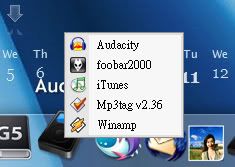
Basically it adds a sub-folder feature to a dock icon (or probably something else), so you can have extended menus within an icon. For example I used 1 icon to represent my Audio programs, so I still have some spaces left for my other icons.. (Think KKMenu?)

Sorry for my bad explanation...

See screenshot:

MenuApp01.jpg

From their website:

  1. menuApp takes folders and turns them into menus
    • For example, you can point menuApp at your documents folder and it will draw a menu with all your documents on it.
    • Or you can point it to a folder full of mp3s and the mp3s will appear on the menu.
    • Click on any item on the menu and it will be launched as if you clicked on it in Explorer.
    • If there are sub-folders they will appear as sub-menus.

[*]menuApp understands special Windows folders

So you can tell menuApp to draw a menu containing the items from your QuickLaunch bar or from your Desktop.

[*]menuApp knows about tasks

Which means that menuApp can display a menu containing a list of the programs currently running on your computer. Select one and you switch to it.

[*]menuApp has some other smart features

For instance hotkey support, a background server to minimize menu load times and intelligent keyboard access.

#402912

With RK Launcher's "click-hold" menu feature, can't you do the same thing without the need for this app? Just create a folder with shortcuts to your apps in it, then put the folder on RK Launcher - change the icon of it to whatever you want. Am I missing something?

#403131

so you want this items on simple click ?

cause actuall what hallf said is right....

#403166

@hallf & raduking: Hehe sorry, I haven't used the latest build so I'm not aware of this feature. Just downloaded the latest build (Beat 04.1 Build 258) and played around with it :D

Oh btw, can we change the hold delay? :cool:?

#403175

i have tried click-hold. it does work.super!, and i hope i can change the font and the size of pop-up. and it will be great if i can choose only left-click instead of click-hold.

#403626

With RK Launcher's "click-hold" menu feature, can't you do the same thing without the need for this app? Just create a folder with shortcuts to your apps in it, then put the folder on RK Launcher - change the icon of it to whatever you want. Am I missing something?

How can I access the click-hold menu feature? I can't see it on the settings page.

#404658

just click on a folder and hold the left mouse button clicked until a popup menu appears

#404683

This is great, I haven't noticed this feature.

Could you add a config parameter to set how long you will have to wait until the popup comes up?

It would be a lot easier to use than KKMENU.

#414440

This is great, I haven't noticed this feature.

Could you add a config parameter to set how long you will have to wait until the popup comes up?

It would be a lot easier to use than KKMENU.

Totally second this. Didn't know it was there but if we could set it up how quickly we want it to work that would be fantastic.

#414450