 Aqua-Soft Forums
Alguien sabe como cambiar el default background cuando abres Photoshop?
Se que se puede costumizar to what ever Imagen tu quieras.. pero no se como...
Alguien sabe como cambiar el default background cuando abres Photoshop?
Se que se puede costumizar to what ever Imagen tu quieras.. pero no se como...
Translate please. The best I could come up with (Google could come up with) is: Somebody knows like changing default background when you open Photoshop? That to can be costumizar what to ever Image your you want. but not like...
i think speaking different language here is prohibited.
Wow! Nice job NC! Now, I need to find out what you said :-).
what he is saying is-
Anybody know how to change the default background on photoshop?
im aware that this mod can be done but i have no idea on how to accomplish it.
Oh, thanks.
OMG!...Facist had a go a while back and said it was a no no...unbe strikes...soon I reckon.
Nah, I think Gyurza is asking something slightly different--he wants to know if you can change the background color from the default gray. Facist was trying to make it disappear.
Ah well, whatever  .
.
-NC
P.S:
@Fnj560--whoops, I probably should have translated that for others. Thanks  .
.
@Jjcd7--Look Ma, no translator! I basically told him that if he could, he should speak English...and then in the postscript, I told him that I didn't know the answer to his problem.
OK NC...yeah...either/or would be nice...
@NC: didn't know you were bilingual... good job on the translation!
@NC: didn't know you were bilingual... good job on the translation!
You'll find, GillBates, that there are a lot of things you don't know about me.
But yeah, I know a few words .
-NC
P.S: Where's that darn stripper emoticon?!
Whoo.... avedesk's translater sure comes handy.. 
Yeah, removing it completly - failed I have, but to just change the default color of it, just open display properties, go to appearence, advanced, application background, and you can chose any color you want there. Hope that helps
Alguien sabe como cambiar el default background cuando abres Photoshop?Se que se puede costumizar to what ever Imagen tu quieras.. pero no se como...
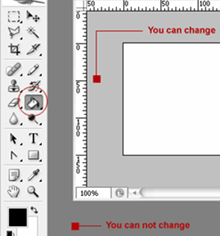
You can change only document grey workspace, you can not change photoshop workspace background. If you must change document grey workspace, maximize the document window, choose the forground color after press the SHIFT button and select the "Paint Bucket Tool" then click the grey workspace.

sorry to bump this but if you don't want the background at all, just size the window so the toolbars ar visible but roll up the background completely, and yeh! no background (well almost):

nice idea, works great
dont forget, the top bar w/ the tool options, can also be dragged out of the main window, and the main window w/ the menus can be scaled down so only the menus show
just my cent
 .
.