
[release] iTunes systray icon

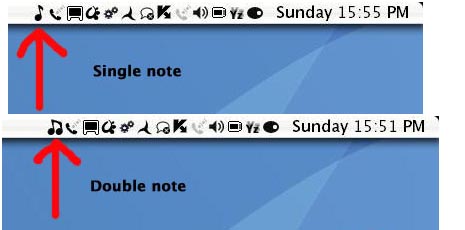
Hey just thought i would share these would the Aqua community. I kinda made them for personal use cos i couldnt find any decent ones for iTunes on the forum, since then ive developed abit of a fetish for making all my systray icons nice and Black to match my tiger theme. Anyway there are two icons a single note one and a double note one included see picture. Enjoy.
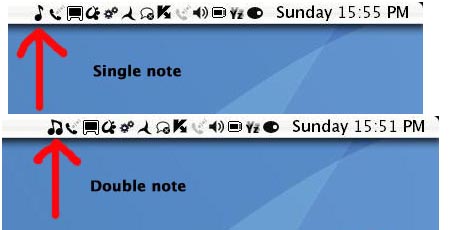
Download here

post-32867-1132503699_thumb.jpg

screenshot.jpg
screenshot.jpg

#332873

I like its sort of cartoonish style, thanks! :)

#332878

can someone please post a .exe for itunes 6 that has it's systray icon modded....i got a program that does it but it was only a trial and since then the itunes version has changed

#332895

how do we install this? Do you have a readme file that explains how to change the taskbar icons? Also, is this for objectbar or for the windows taskbar? Thanks.

#332966

awesome icon, I especially like the mask you used so there is alot of right-clicking space!!! Also would you consider a Styler, Bearshare and Emule icon?, thanks again.

how do we install this? Do you have a readme file that explains how to change the taskbar icons? Also, is this for objectbar or for the windows taskbar? Thanks.

It works on object bar and windows taskbar

#332979

Replacing the itunes systray icon:

1. Download and extract the note icon from the link above.

2. Search for a program called eXeScope on the web and download it(its used to exract and add resources to files). by the way Res Hack does not work with iTunes.

3.Make sure iTunes aint running and open the iTunes program folder containing the iTunes.exe and rename the iTunes.exe to anything else i.e test.exe

4.Open test.exe(formaly iTunes.exe with exescope which you should have downloaded and installed.

5.Navagate to Resource -> Icon -> 128

6. Replace the 32x32 icon as that is the one that is used in the systray(odd i know, usally its a 16x16 icon)if you want you can replace both 16x16 and 32x32 with the same icon if you choose.Replace by clicking import in the file, after which it will replace it with a icon of ur choice and ask if u want save the update, click ok or yes. If it doesnt prompt you then navigate to edit menu and select save update.

7. Now that u have saved the update icon, quit the exescope program and rename the test.exe back to iTunes.exe, run it and enjoy.

As regards to Austin123 request for emule, styler and bearshare icons, well..

the emule icon has allready been done by someone else on this forum along with a whole load of systray icons released as pack(s) download these pack and see if they contain any usefull icons

http://peaudepailles.neuf.fr/partage/icone...ons%20pack1.rar

http://peaudepailles.neuf.fr/Partage/icone...diconspack2.rar

As regards to bearshare and styler, i dont have these programs installed Yet. i would need to install them and see the orginal systray icons, ill work on that ;) , ive just released a full skype set and Quicktime systray icon aswell check them out on My Devaintart

#333003

whoever has made the itunes exe mods already can you please post your .exe files for the latest version of itunes please?

#333115

The iTunes.exe file is 4.45mb as a rar file, i have modded mines with double note, you find a place where i can upload to and where you can download the file from,

If you do, then also state if you are happy with a double note icon or prefer a single note icon?, find the space and i will upload.

#333182

Hey just thought i would share these would the Aqua community. I kinda made them for personal use cos i couldnt find any decent ones for iTunes on the forum, since then ive developed abit of a fetish for making all my systray icons nice and Black to match my tiger theme. Anyway there are two icons a single note one and a double note one included see picture. Enjoy.

Download here

Could you share that avedesk icon as well?

#333353

i'll host it on my site but send it to me first.... at jag_g@hotmail.com

#333405

Rite i will send the iTunes.exe modified with double note systray icon

#333407

Thanks! I had been looking for an icon like that for some time.

#333422