[Release] miniMIZE 1.0.34

I have the pleasure of announcing that the second public beta (build 1.0.34) of miniMIZE has just been released. The new features include:

Exclusion list

Ability to hide taskbar buttons

Single click restore of thumbnails

Hide notification icon

Custom drawn shadows

Default thumbnail window levels

Hotkeys

Help files

For more information on miniMIZE go to the project page and you can download it from the miniMIZE download section.

Please post all comments and bug reports. Thanks.

Enjoy.

#329662

This program makes me wish my desktop was more tidy :P

Gonna check this out right now.

Thanks for all the great work :)

#329671

This programs is awesome , I have been using it since day one, and the upgrade has everything i wished it had.

So great work and thanks. :D

#329673

Great I was wondering if this will clash with RKLaunchers minimize to dock feature?

#329683

Thanks for the compliments guys. :)

Ghostwalker, I have tested it and everything seems to work fine with RKLauncher.

#329687

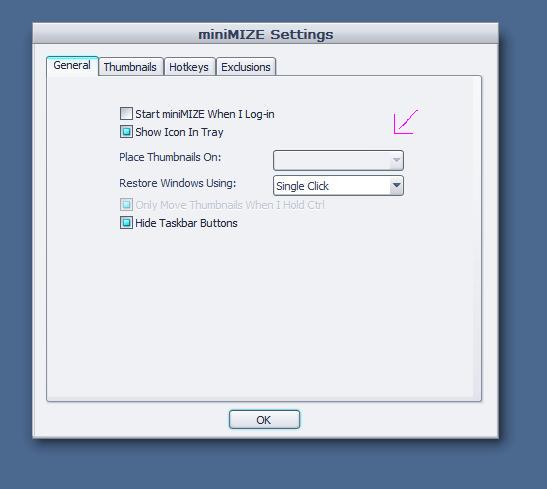
Doesn't work for me! Is it me or my widescreen monitor? (1680x1050) Have tried the first release on a 4:3 and it works fine.

post-10542-1131457061_thumb.jpg

1.JPG
1.JPG

#329691

ToNer, does it not work at all, or just not the setting that you are showing in the screenshot. Thing is that that setting is for systems with multiple monitors.

Is the notification icon blue or grey?

#329694

ToNer, does it not work at all, or just not the setting that you are showing in the screenshot. Thing is that that setting is for systems with multiple monitors.

Is the notification icon blue or grey?

Hehe, ok... but as i can see it doesn't work at all. It minimize to the taskbar. I've installed it again after closing RK but still same problem. And of course i've activate it! :P

#329702

Hmm, that is really weird. Can you check one thing for me.

Close miniMIZE. Then in the Registry if you go to HKEY_CURRENT_USERSoftwareminiMIZESettings create a DWORD in that key called Debug, and set its value to 1.

Then start miniMIZE, when you do, a debug window will open and display some debug information. You should get at least:

miniMIZE Debug Console

Installing miniMIZE Hook

miniMIZE installed sucessfully

#329705

It's exactly like that

miniMIZE Debug Console

Installing miniMIZE Hook

miniMIZE installed sucessfully

Splash Timer

Shutting Down

Andit works. I can create thumps!

But when i close MiniMIZE, delete the DWORD and restart MiniMIZE it does not work again! :confused:

EDIT// Have tried the whole thing once again and now it doesn't show thumbs any more while using the debug- thing. I d o n o t u n d e r s t a n d t h a t !

#329706

Yeah, that really is weird. One thing you can try is: when miniMIZE isn't working exit miniMIZE. Restore all your windows (so like click on all the buttons on the taskbar once). Then start miniMIZE again and see if that works.

#329725

Nope, did not work! But do not care about me. I've tested the old version and like how it works. Perhaps i figure out what the problem is and can give the new one a try.

Thanks for your work & help,

//Cheers, Toner

#329738

This is really nice, just one problem encountered so far... for the most part, it works well with TopDesk http://www.otakusoftware.com/topdesk.. (i have the minimized windows still show in the task bar so that the expose clone can expose those windows that are ss'd by miniMIZE.) However, I have discovered that somewhere in the mix, the thumbnails of the windows get 'stuck' on the desktop/disassociated with it's corresponding window. Closing the window does not get rid of the thumbnail and after the window closes, the thumbnail becomes orphaned. Closing out of miniMIZE does get rid of the remaining thumbnails that were left tho...

Could you please check into this? I'm glad to see further development in this program. Very promising I must say!

#329747

firecracker6, hmm, that's an odd one too because I can't seem to reproduce this. Which version of TopDesk are you using? (I am assuming that the expose clone you spoke of is TopDesk) Also, which application do you start first? Is it maybe occuring after you do something in one or the other application?

#329758

it's the most recent version of TopDesk... v.1.3.7 i also use Strokit (Mouse gestures) to activate minimize all/expose all etc.

I will try to reproduce the results and post, thanks for looking into it :)

EDIT: Odd, I have been using the application combination since and the issue has yet to surface again. It really does work like a charm! (Crosses fingers for drag'n drop support) I was wondering if the application was meant to remember application/file minimized locations after a restart of miniMIZE? I like how it does while miniMIZE is running, but it seems to reset the organization from upper left to right after restarting the program.

#329768

Very nice update ;).

The only thing I ask is that you successfully detect when Firefox is being minimized using the Winkey + D shortcut, and either hide it completely, or get it to look like other thumbnails. I'm fairly sure the bug is reproducible--do you want a screenshot?

-NC

P.S: Not that the code is similar or anything, but a similar problem occurs with Mozilla products and RK Launcher when minimized with Winkey + m.

#329888

With the taskbar on top, it seems that on my home machine the thumbnails arrangethemselves with their tops clipped by the overlappinng taskbar. Let me know if you need a screenshot. Should be easily reproducible..

EDIT: I figured it out, the thumbnails remain stuck on the desktop when/after you change something in the settings and continue use...

Also, currently when changing thumbnail size, the spacing between does not scale accordingly, so the thumbnails begin to overlap. Could a temporary function to set margins be feasible, until a more graceful way is considered?

#329926

Hey Illumination good update!

I wanted to know if there existed (as I can't remember) in the previous version that if you right click a thumbnail you could get the "Minimise, Restore, Maximise, Close" menu like you do when you right click an open window on the taskbar?

Only reason I ask is because if you check Hide Taskbar Buttons then you can't close a thumbnailed window by right clicking and pressing close.

Thanks!

#330126

Whoa this is a great app.. just one complaint.

Is there any way to make the minimized windows appear by default on the bottom right instead of the upper left? I have the same problem as firecracker6

#330149

firecracker6, thanks for that info, that should help me track things down, so I'll start looking into that.

As for changing where the thumbnails start, that will be out in the next release.

farhan, yes, right clicking a thumbnail does bring up the Window menu, the problem is that for some reason if you bring it up once for a particular thumbnail and then exit miniMIZE, the menu for that application will not appear again until you restart the particular application. I have done extensive testing on that and unfortunately there isn't anything I can do about it. Effectively, if you are using window menus, you need to restart any application who's menu you have used if you restart miniMIZE.

#330181

nightcrawler1089, unfortunately I'm still looking into how to deal with that. Unfortunately Windows isn't consistent with its messages when you use the Win+M or Win+D hotkeys. In an attempt to work around that, I have added the "miniMIZE All" hotkey into miniMIZE that effective acts like Win+M while correctly miniMIZEing all windows.

#330182

really great app

for one thing it seem doesn't compatible with styler, when I use styler toob bar ,it shows in the mini thumb a black bar where the styer bar is .

#330193

great this kick ass when used in association with litestep

#330299