Please be nice and come to my rescue...

Hello Board Members,

I hope you guys are as nice as the folks I've found over at TabletPCBuzz.com. I am the owner of a new startup whose product line depends somewhat on the PC Tablet. So, while I wasn't computer savvy at all three months ago, I have sense learned a lot, but have miles and miles left to go. So allow this disclosure to preface my ignorance...

Good News:

I purchased a PC Tablet (Fujitsu T4010) for one of my employees who is a MAC LOVER! To appease him, and to make the transition from Mac to PC a little smoother I luckily stumbled onto the Flyafox OS X skin. I've downloaded and it's up and running and looks great.

Bad News:

1)I can't get the rollover icons changes to stay. For example, I want to replace the IE icon with Mozilla's at the bottom. I have swapped the E out for the Firefox icon but when I restart the computer, everything goes back to default. Obviously iTunes doesn't apply, but when I do away with the icon, it too returns after a restart. Please help.

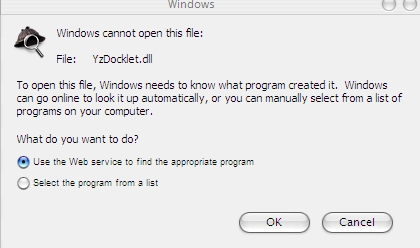
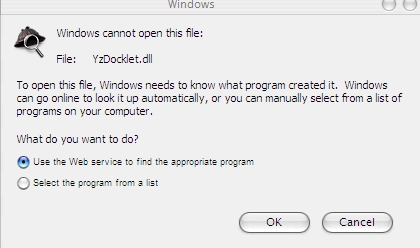
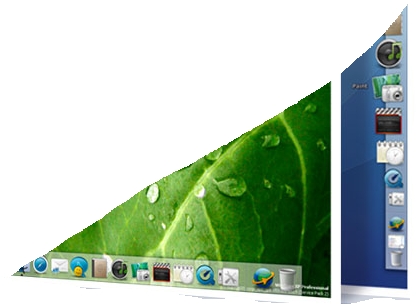
2)I love the look of the RKlauncher with the dew drenched leaf and most importantly the icons on the righ-hand side (employee is left handed). However, I've downloaded and checked the box in the Flyakite settings, restarted computer, and still nothing??? I downloaded the 4.0 beta but can't get it to launch or run. Windows keeps asking me for the program that created it in order to open it. Pleaaase help.

Please take it easy with the high-tech talk. Baby steps, baby steps...

I am truly a beginner when comes to the understanding of software apps and crossing Mac with Windows is even more confusing.

BTW, I am running Windows XP PC Tablet Edition 2005. Members at PCTABLETBUZZ were successful with their installs so I know it works. Just need some guidance. Thank you in advance for extending a hand in kind.

post-37651-1130984463_thumb.jpg

RKLauncher.jpg
RKLauncher.jpg

#328304

1)For best results, I recommend changing the settings (the .conf file). If you can spot the location (it's fairly easy to understand), you should be able to do it without trouble.

2)Hmm, don't use the Flyakite settings box. Windows should be able to extract RK Launcher from inside the .zip file it's in; that error makes no sense. Can you provide a screenshot?

ACTUALLY, on second thought, I'm not sure RK Launcher would work on a Tablet Edition PC, as I have no experience with them. Is there a way to get Winzip on a TabletPC? That might explain why you can't extract from within Windows.

Thanks!

-NC

P.S: If this doesn't make sense, ask me and I'll try to make it even clearer.

#328312

1) get teh pngs/icos files and put them in the rklauncher directory and assign your programs those images instead.. should fix any problems with images not staying

2) get the latest version from radukings website, unpack the files with winzip or winrar or whatever you use into a folder and then run the .exe file

Everything should be right as rain

#328313

Can I work for you too? :)

#328315

OMG, you folks are just as nice and responsive as the folks at the Buzz! Please accept my gratitude. Now let me disect your responses...

Nappystudios (love the moniker) - Can you break #1 down in lamen terms for me? Where do I find the png/licos files? Do I drag and drop them to the RKLauncher directory? How do I assign?

Nighcrawler - Thanks for extending your hand. I have Winzip that came preinstalled on my Motion Computing Tablet PC, but the Fujitsu doesn't have it. This may be the problem. Where do I go to get it?

Smoovie - How well versed are you with the TPC? ;)

$tock

#328317

I stand corrected Nightcrawler - I have WinPlash for aiding in BIOS updates, not WinZip. I have also located the website for WinZip. So next step will be to download that program. (sorry for the misspelling of your moniker above)

#328320

Isn't a tablet PC a laptop with a stylus?

#328326

Welcome to Aqua-Soft, $tock!

#328337

Isn't a tablet PC a laptop with a stylus?
In it's simplest sense, yes. It also generally has a detachable keyboard, and a GFX card that supports portrait-mode resolutions.

#328338

Indeed Kenta, it offers a third input device - the stylus. Fujitsu, Toshiba, Compaq, Acer, HP, IBM all make them and it's most likely you've seen one before but didn't know what you were looking at. They are terrible at advertising. Once MS Vista OS comes out in 2006, you will see a lot more of them.

I was asked for a screenshot of my problems earlier...

Please see below.

post-37651-1130998849_thumb.jpg

Windows Problem.jpg
Windows Problem.jpg

#328353

Kaloyster - I thank you kindly. Much respect with the avitar you've got going on...

#328355

$tock, in the screen shot you have posted you are trying to open a .dll file. Windows itself can't open these files for editing, however there is software avalible on the net that will do it for you.

If you are trying to open RK Launcher, just click on the "rocket" style icon. :)

click5qy.gif

#328393

Melta207, I have clicked it several times, but nothing happens. I'm guessing everything needs to be redownloaded.

I did a system restore and now I'm just a littttle shakey because several of the Windows' icons did not restore. For example, the Desktop icons are still all OS X. All folders are blue as well. I went into Control Panel, Display, Desktop Customize Desktop, Restore Default. Still the OS X icons appear.

1)How do I completely remove all reminance and start fresh. If I can't get the program to work properly at all I WILL DEFINITELY need to restore the computer to its original Windows XP settings. Any advise? I saw when downloading that the program established a restore point. Thus, I went into my system restore and it appears on the list of things I did yesterday. I chose a time before and restored. However...

#328427

Yeah redownload the program, should work.

About flyakite, it came with a uninstaller. go, start -> All Programs -> FlyakiteOSX -> Uninstall

#328479

My aunt has one.

It was pretty cool.

I've always wanted that, or a Wacom monitor, but both are out of my price range.

:(

#328485

Ah thank you for that Melta207. I went straight to Add/Remove programs instead of using the unistall. That's what messed things up. Everything is back to normal now.

May I ask, has anyone had any problems with replacing the rollover icons with icons that are pertinant to your PC, such as swapping E/Explorer for Firfox logo, itunes w/ Windows Media Player, etc? As stated in my original post, I tried, but the skins go back to default after a restart.

#328491

May I ask, has anyone had any problems with replacing the rollover icons with icons that are pertinant to your PC, such as swapping E/Explorer for Firfox logo, itunes w/ Windows Media Player, etc? As stated in my original post, I tried, but the skins go back to default after a restart.

Here's a tip on using RKlauncher: imagine you want a certain program in your dock that is not available (such as microsoft word or excel): find the shortcut in your start menu, and drag and drop it to RKlauncher (be sure that the items are not locked, by rightclicking a separator in RKlauncher and making sure that the "locked" option is unchecked). Voila, you have made a shortcut in RKlauncher. The standard icon is probably pretty ugly, so you'll want to change it to something more mac-ish, right? No problem, just rightclick the shortcut in RKlauncher, and select "dock item properties". Here you'll see such properties as "name" "link", etc. What you want to do is change the icon, so select "change icon", and you'll see a list of icons to choose from.

It's quite possible that you cant find the icon you're looking for, which means you'll have to download icons from another source. Icons come in two formats: an .ico format and a .png format. .png formats are of higher quality, and tend to display things such as transparancy better. You can find icons pack at www.osx-e.com (http://www.osx-e.com/downloads/icons/panther_icons.html is a good example). Because these packs contain a lot of files, they are compressed. This means you'll need a program to decompress them, such as winzip, winrar or winace (I like winrar, but to each his own). Once you've downloaded the compressed file and have installed the decompressing program, you'll simply be able to open the compressed file and drag and drop the whole set of icons to a desired place (such as my pictures, or a new folder that you have made).

Now you can change the icons in RKlauncher by browsing to these custom icons. If you do not want to use custom icons, but want to use the generic icons, you can simply uncheck the "custom icon" button in the properties tag of each icon in RKlauncher.

If you have issues saving these settings, you could actually get down and dirty with the configuration file that saves information about the icons: Quit RKlauncher, locate your RKlauncher directory, find the itemlist.conf file, open it with notepad (let me know if I skipped too many steps here), and DELETE the line that states "icon=..." for the shortcut that needs to have its generic icon. Now save the file, open RKlauncher again, and the shortcut should have a generic icon!

Hope that helps you out!

#328934

Phat Lizard I really appreciate your response. Just getting back in town so I apologize for the delay in gratitude. This was a great help!

#331360

Phat Lizard I really appreciate your response. Just getting back in town so I apologize for the delay in gratitude. This was a great help!

Feel free to ask all your questions, we're here to help (well, I like to think so anyway)

#331941