Aqua-Soft Forums
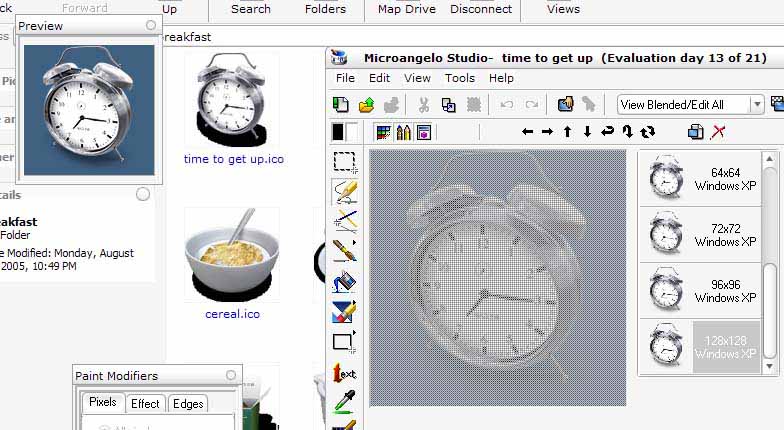
Can some one tell me why some icons have this weird shadow on them and dont display correctly? And how to fix it?

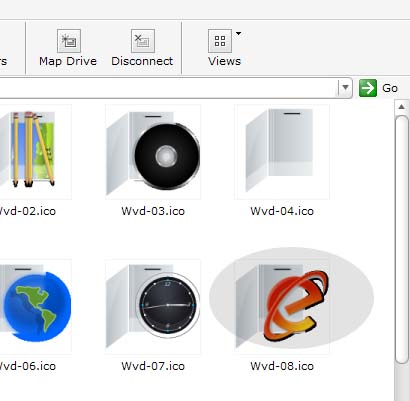
Can some one tell me why some icons have this weird shadow on them and dont display correctly? And how to fix it?
o,o they don't have alpha channel...
No it's not.Im pretty sure its not the icon...
It shows up funny because you are looking at them in thumbnail view.
In this view, Windows extracts the icon data and tries to display the image.
In icons/details/tiles views everythung should look fine.
They better fix than in vista, or im switching to unix.
Maybe you could just set your icons to display larger and use icon view.
Thumbnail view is far from perfect anyway (trade-off between speed and cache file).
They better fix than in vista, or im switching to unix.
I'm sure Bill Gates is shaking in his pants right now. 
You can always switch to the "pretty" Unix : Mac OS X 
Alpha channel is missing, what OS do you use? Any pre XP systems aren't going to have one. Same as any pre OSX systems.
You can see it the screenshot that it's an XP system.Alpha channel is missing, what OS do you use? Any pre XP systems aren't going to have one. Same as any pre OSX systems.
As I've stated above, icon alpha is not displayed properly in thumbnail view.
Yes - even in XP.