
[help] Avedesk 1.3 Problem

Well...i'm all excited to check out the wonderful new animations of 1.3, but there's a slight problem.

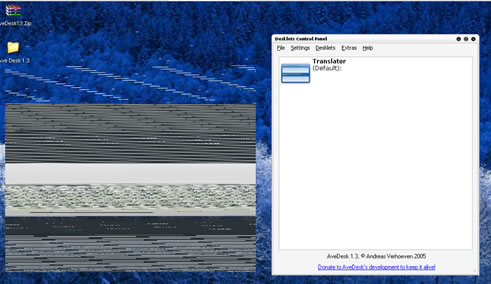
When flipping a widget, the area surrounding it goes to crap...see the attatched file for a pic of it.

I installed the teaser for 1.3 a little while back, and that worked fine...so I have no idea what I'm doing wrong.

I would appreciate any help the community could give me. Thank you.
post-29329-1130346149_thumb.jpg

ave1.jpg
ave1.jpg

#326145

Version 1.3 of AveDesk is sux, and i stil use 1.2

#326155

I installed the teaser for 1.3 a little while back, and that worked fine...so I have no idea what I'm doing wrong.

I would appreciate any help the community could give me. Thank you.

You had the teaser running without problem?! Can you try to re-use the teaser's EXE and see it the problem still exists.

The flipping-related code didn't actually change for 2 months now.

#326159

Version 1.3 of AveDesk is sux, and i stil use 1.2

I agree with this. AveDesk 1.3 sucks, flips, fades and do many, many things. Amazing app. ^_^

Sorry for the OT: About the problem. Maybe that have something to do with your videocard, or direct X version. You should put that on Bug Thread, with all the requested information. That should help Ave to sort your problem.

#326160

its a videocard problem....try getting a better one...

#326181

its a videocard problem....try getting a better one...

I didn't know you coded AveDesk? :slant:

#326192

well...it sufffices to say that I won't be getting a new video card anytime soon -- since I'm on a laptop. I have an ATI Radeon 7500c, and I have had problems with it before. Like it not working with Half Life 2 even though it met the minimum requirements (worst 50 bucks I ever spent).

But that still doesn't explain why I'm having problems now and not before. I recently reformate a couple weeks ago, so I'll go and make sure all my drivers are updates as well. If that doesn't help, I'll move onto the bug topic and fill in all my information and see if I can get help there. Thanks.

#326218

i can't get any of the new animations even up like i don't see the close button on the widgets or desklets as well as the flip animations i fully exceed the requirements :|

#326221

you have to press Ctrl to get the close button.

#326222

ahhh how about the flip affects?

#326223

I have tested avedesk on on a window 2000 box ,with a 64 meg video card and 128 megs of ram

the card was a geforce card it worked fine ,i have also tested it on a radeon and a xp machine.

1 gig of ram and it was fantastic.

Try this reinstall your video card drivers and directx9, are you having problems with full screen 3d games as well?

And make sure you logged in as an administrator when you do it.

What kind of video card do you have?

Have you got your display set to use 32 bit color depth?

If it was working with the preview release it seems like you drivers on your card have become corrupted.

I hope this helps.

#326237

Have you got your display set to use 32 bit color depth?

Very important one! 32bits color depth is a must for AveDesk

#326238

ahhh how about the flip affects?

oh Jebus...

Did you even read the intro desklet?

Flip button is activated by pressing the "flip" image (usualy a circular arrow). It is desklet dependant. Some have it, some don't.

To get the close button to show, click on a desklet and press Ctrl.

#326241

ay corrumba thx guys yeah i'm an idiot :D

#326249