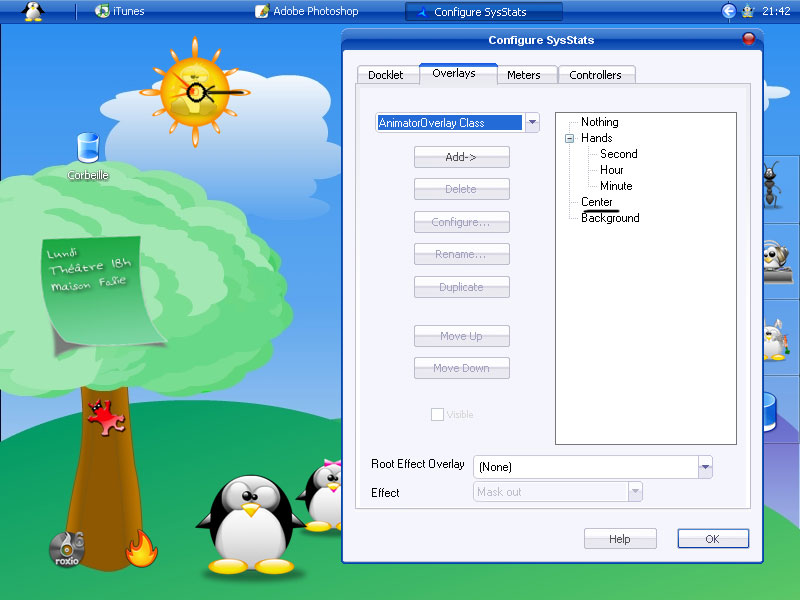
help help for clok

sorry for my english i'm frenchy

I made a clock for my personal desk and i modified .ini based on GANT and Longhorn Clock but it doesn't work and I don't understand why

can you help me please?

this is link for my buro

http://img292.imageshack.us/img292/2485/pb...eavedesk4ap.jpg

Choco_Tux_Clock.zip

Attachment: Choco_Tux_Clock.zip

#322206

When you say it doesn't work, what do you mean? Does it not display the right time? Do the hands not move? Details will help a lot...so does tagging your thread properly. It should be something like "[help] sysstats clock" or something (without the quotes, of course)

#322207

Sorry that was my first post and i make an effort to be clear in my explanation be "indulgent"

I succeed in working my clock , i desinstall avedesk and reinstall and it work today (before it not display the right time and hands don't move too)

I changed .ini based on Longhorn Clock but I don't know how place my center round above my hands

i suppose i add a level (if i understand avedesk each image has its own level and if i add an image i must have to change count of general level no?)

How to place my center?

#322402

sorry this is my final clock

Choco Tux Clock.zip

Attachment: Choco Tux Clock.zip

#322403

i believe that to put the center round above the hands, it needs to be higher up in the list of items. so, you add the round, then use the 'move up' button to get it where you want.

#322419

but i changed my ini manually how i had the round manually?

this is the higher images

[overlay-1-0]

Alpha=255

AnimationMeterIndex=-1

CenterX=64

CenterY=64

EffectOverlayEffect=0

EffectOverlayPath-Count=0

HAlign=0

HScale=1

HueShift=0

ImageHeight=128

ImageWidth=128

MeterIndex=-1

Mode=0

Name=Second

Path=imagesChoco Tuxseconds.png

Rotation=162

Saturation=1

selector=

Type=ImageOverlay Class

VAlign=0

Visible=1

VScale=1

X=22

Y=22

must i changed [overlay-1-0]?What number must I note?

#322651

right-click on your config and select 'configure'. go to the 'overlays' tab. highlight the center round and click 'move up'.

#322655

hello but my center ISN'T written in my .ini what i want to do is to add a line for my center

unfortunatly i suppose i must have change this number [overlay-1-0] no?

Or this Overlays-Count=3?

#322662

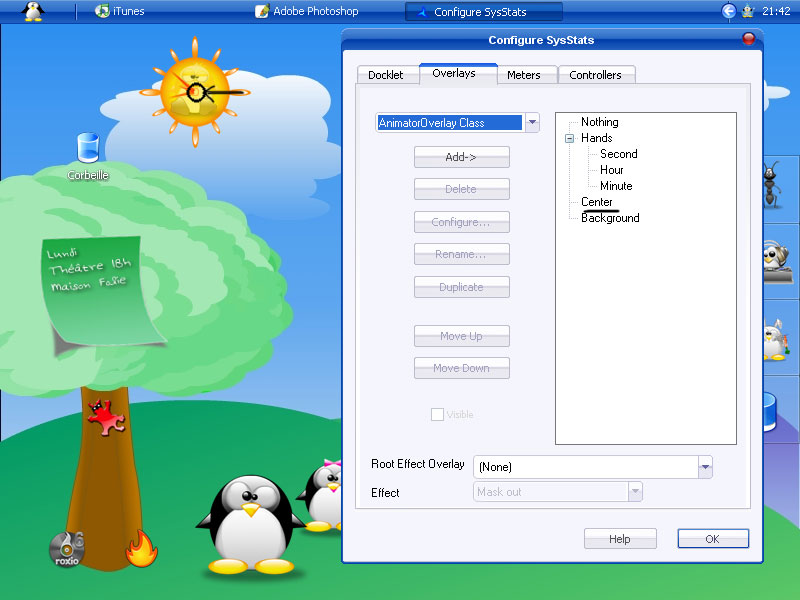
okay. i think it would be easier to add it via the config tool. from the overlays tab, select imageoverlayclass form the drop-down and click add. you can then rename the object, point to the path, move up or down, etc. this will automatically update your ini file.

#322665

ok thank for your "conseils" i'm going to do this and read notes i found in french which are very very very limited

i hope french community will bring up later ;)

bye

#322668

When you rightclick on the docklet and choose 'configure' you can select the 'overlays' page. Here you have a list on the right side of overlays which are the items or layers that are to be displayed by the docklet. These can be text, bitmaps, meter overlays etc.

The overlay order in the stack is important! The one at the very bottom is displayed first (and therefore at the rearmost layer of the docklet) typically used for a background bitmap. Similarly the one at the top of the list is displayed last and is therefore the top layer.

I hope this helps.

#322772

Hi Kamiwaz, i'm not the best person to speak config.. But, je parle francais hehe, donc je peux p-e juste te dire ou conseiller d'utiliser ou étudier certaines horloges existantes avec configs, pour Avedesk il y en a plein, et en plus juste pour un horloge je te dirais, vas te chercher Rainmeter, il est si simple et ne prend pas de place.. Tu as déjà ton skin de fait à ce que je vois..alors le reste sera pas trop dure... P-e et c'est bien préfères tu travailler plus et réussir avec Ave et je comprend, alors n'écoute pas trop ce conseil.. sinon ya Rainy's comme je dis, ou bien même Konfabulator.. Juste pour te dire qu'ici ya d'autres francophones ;) So bye and goodluck, you have a very nice desktop man too.. I love Tux :)

Sorry other for my little message or explanation in french for our new mate Kamiwaz

#322806

merci @ceroy cça fait chaud au coeur de voir kon est pas tout seul car parler en anglais quand on en a pas fait depuis des lustres c pas facile

merci pour les conseils mais quand j'ai une idée en tête je l'ai pas au dérrière

le buro est pas encore fini ya du boulot et je prépare un desk complet sur le thème de la famille Tux en version campagnard (g des racines "térriennes") ce sera amusant (sont jamais rigolo les buro c con nan?)

a bientôt

sorry for the english readers it's just thanks and coucou for frenship friends

bye

#322918

Communityship is always been a common language here. No need to apologize.

bienvenue:Mirror

#322980

hello

i tested advices from sh mengie and it work but it's not finish

if i move up my center above hands they don't move more because of the overlay order in the stack, which speak cthoffm in this post above, cant' be moved and my hands are just under

so i don't know how place my center above hands

:(

post-34263-1129542468_thumb.jpg

pb_center_choco_tux_clock.jpg

#323395

Ah, OK yes this might cause a problem. It's because there is a VBS (script) file that does the job of moving the hands and which is referring to the hands overlays according to their 'position' in the 'stack'.

Since they are no longer in the original position, the script will be moving the wrong overlay. If you look carefully you might see one of the other bitmaps rotating!

The only solution is to edit the script to correctly refer to the overlays that correspond to the hands.

The script file's usual location is dockletssysstatsscripts. In the configuration dialog it should be under the meters tab with a class of 'ScriptMeterClass'. Getting the properties of this meter will identify the script filename.

#323689

Hi Kamiwaz - I had a look at your clock and updated it.

It now works on my system and I hope with your system too. I hope it agrees with your original design idea!

Choco Tux Clock-Updated.zip

Attachment: Choco Tux Clock-Updated.zip

#323698

hi cthoffm

it's GREAT :))

It 's working

but the last problem it's not the true time

AAAARRRGGG

don't understand?

Do you have modify vbs.script to go to disappear the overlay "nothing"?

#323763

For the benefit of others who might like to use your clock. Here's a summary of my email reply to you...

The incorrect displayed time was due to the hour and minute hand PNG filenames being reversed (OOOps! ;-))) and possibly my timezone setting not matching.

To remove an overlay, all you do is select it in the config dialog and click the 'delete' button.

#323956

I saw last night I must have changed GMT Time in the meter tab

but there is 1 hour decal (i choose bruxelles) and i not connect on Internet

there is very very strange phenomen in my computer :confused:

#324050

:cool:

yeah yeah

very good thanks to cthoffm who help me to finalize config of my personal clock

it's especially for Tux lovers who likes funny desk and original clock

have fun with this (be indulgent because it's my first "création")

tchao

my next desklet for tux theme is a hd docklet with wild duck

Choco Tux Clock.zip

Attachment: Choco Tux Clock.zip

#324084