 Aqua-Soft Forums
Hey, I was wondering if anyone knows of a way to tweak the display properties window. I want to change that fugly crt looking image to something prettier, like a picture of the monitor I have. this is what i'm talking about...

Any ideas? Thanks.
Hey, I was wondering if anyone knows of a way to tweak the display properties window. I want to change that fugly crt looking image to something prettier, like a picture of the monitor I have. this is what i'm talking about...
Any ideas? Thanks.
I think if you edit run.dll or something in reshack it will have the image.
WINDOWSSystem32themeui.dll
Bitmap 126
Note: This image is a PAIN to modify correctly. XP uses a certain area of the image to draw the preview for screen savers and wallpaper. What I recommend, is using your imaging program and setting the default XP bitmap on the lower layer. Then work on an image on top of that, setting the opacity lower so you can see through. Basically, the screen area of the default image and the new image have to line up exactly to work properly.
Here's the image I used in FlyakiteOSX v2.0 as an example. I created it from a media image from Apple's site of the cinema display. Then chopped it and resized it so that the borders went around the necessary screen size. Good luck 
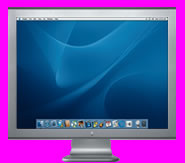
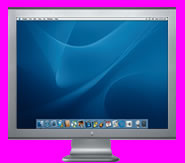
Hmm.. That seems to work, but then how do I get it to work? Heh. I did all of that, and it sorta just overwrites mine with the original.. At least I think taht's waht it's doing. Do i need to do it in safe mode? or restart right after? What do i do next?
Thanks for all the help so far
install the FlyakiteOSX2.0
use replacer to replace the file
nice tweak.. but I don't use this CP to change wallpaper, I simply right click on an image and set as a background.
I'm a new guy here,so I don't know your name.In my mind, you are an expert!I am using your Flyakite right now, and Thank you sincerely!
(I'm afraid I cannot support you by sending you the USD. 'cause I'm a Chinese, and you may not know the currency. 1:8.11 Oh,My God! )
WINDOWSSystem32themeui.dllBitmap 126
Note: This image is a PAIN to modify correctly. XP uses a certain area of the image to draw the preview for screen savers and wallpaper. What I recommend, is using your imaging program and setting the default XP bitmap on the lower layer. Then work on an image on top of that, setting the opacity lower so you can see through. Basically, the screen area of the default image and the new image have to line up exactly to work properly.
Here's the image I used in FlyakiteOSX v2.0 as an example. I created it from a media image from Apple's site of the cinema display. Then chopped it and resized it so that the borders went around the necessary screen size. Good luck
I replaced the image in the themeui.dll with this on:

Then I replaced the themeui.dll with replacer. After having done this, I wasn't able to run display properties anymore until i replaced it again with the original file.
What's my mistake?
*push*
noone knows the answer?
Could please someone test the image with his themeui.dll? I'd appreciate it.
/EDIT:
somehow it finally worked with the same image... I don't know why but I don't care... the main think is it works