 Aqua-Soft Forums
Hi y'all! Couldn't find any good category for this. This is the most relevant one for my question.
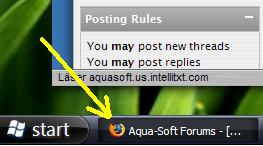
However, I was wondering if I could change the firefox icon in the taskbar (see attach.), e.g. to a safari .
Thanks

Hi y'all! Couldn't find any good category for this. This is the most relevant one for my question.
However, I was wondering if I could change the firefox icon in the taskbar (see attach.), e.g. to a safari .
Thanks
I think you have to open it is Reshack. Then change it with whatever image you want.
Hey thanks, very useful app.
There's another way to do this;
1. Go to the folder you installed Firefox in (e.g. C:Program FilesMozilla Firefox) and then go to the subfolder chrome.
2. While in chrome folder, create a new subfolder called ''icons'', then go to that folder and create yet another subfolder called ''default''. The full path to this folder could be C:Program FilesMozilla Firefoxchromeiconsdefault.
3. Choose the icon you want to use and place it in the ''default'' folder and rename the icon to ''main-window', e.g. main-window.ico on Windows and main-window.xpm on Linux.
In addition to the main window, you can also change the icon on the Bookmark Manager and JavaScript Console. The icon names are ''bookmark-window''.[ext] and ''jsconsoleWindow''.[ext], respectively.
After this is done, restart Firefox and you should be able to see your chosen icon in the title of the browser windows.
