
Sysstats introduction

Hi guys...i dwl´ed Sysstat and want to use it in avedesk...i use avedesk 1.2 and sysstat 2.57....

i extract the sysstatfolder to docklets and the sysstat dll to the folder where the avedesk.exe is...

so when i add the desklet sysstat ..i dont know how to configre that!

i want to show cpu usage ram usage and internetspeed....what must i do to show me that?

i have only the no overlay icon and nothing happend...pls help me...i read the forum threads but no one can help me...

thx a lot
#309085

ummm.....which desklet did you add? You need to download one of the meter packs (available on dockex.com or here on the forums), and then you can go to the AveDesk control panel and add the individual desklet you want to use.

And somehow, I find it hard to believe that you really read all the forum threads, 'cause these sorts of questions have been answered before. A lot.

#309099

ah meters pack...intresting...

I READ ALL!11SHIFTONE!11 ^^....u see ..i have a lot of time^^...a LOT..thx dude ..

u say i can dwl it on this side ? can u give me a link i dont found them

#309112

Don't even try to tell me you read them all, that's garbage. I just entered in "sysstats meter pack" in the search box, and found multiple threads that have all the answers you could want.

#309115

yes my fault ...i found the meter packet...BUT

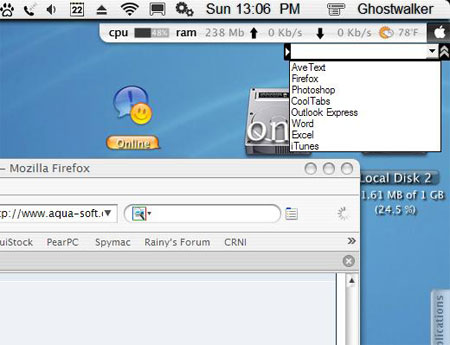
now i have another problem...first. i want to see my cpu usage, ram usage, internet traffic...so like on this picture i upload...in the right corner u can see a taskbar which is a sysstat image...i have this imgae but dont know how it works wih sysstat..,

understand ?

post-34553-1124292193_thumb.jpg

launcher.jpg
launcher.jpg

#309119

Right click on the image, and to go to "configure." Then a SysStats config window will pop up, and go to the "meter" tab. From there, you can change the "feed" each meter gets. Ram and cpu are probably already set properly. To set the network ones, just configure that meter to get the kb/s received or sent (i.e. download/upload) from your network adapter.

#309123

hm...i upload the image i mean...i want to see that images instead of the original one...and so it doesent work...with the network...-_- i select network in and then network recieved...but its shows -O and O

InfoLineTiger.zip

Attachment: InfoLineTiger.zip

#309127

configure->network interface->bytes received (or sent). And on the right hand side, you have to pick the network adapter you want to use.

#309130

okeh i do it. thx a lot for your endurance...

but how can i use the images ? u see it? i upload it...

#309133

whattya mean, how can you use the image? The image you uploaded is simply the background image for that desklet, and SysStats displays the text readings from the different meters overtop of it. That's all it does. You can't really stretch or shrink it easily, 'cause the text is all specially spaced to fit in the appropriate places in the image.

#309135

hm...i another forum i ask how its possible that can i get these taskbar like the one i upload ..u know like menumeters for mac.

and i get the answer that is sysstat for avedesk and a guy send this images to me.

and now i want to know how its possible that can i get this one ?

like on the picture...thats all...

#309141

If you're asking where you can get the actual SysStat docklet instead of just having those images, you could always try searching the forums for "InfoLine Tiger." You'd be surprised what you might find.

#309179

Let me just ask you one thing - did you even bother to search?

Cause i tried it and found a bunch of things on this subject :slant:

#309180

^^ That's what I said....

#309182