 Aqua-Soft Forums
Hey guys, I was wondering if it was possible to create some sort of custom konspose background or logo or to remove the logo completely.
thanks again!
Hey guys, I was wondering if it was possible to create some sort of custom konspose background or logo or to remove the logo completely.
thanks again!
I think they haven't implement the ability to change the Konspose background without ResHacking the Konfabulator.exe (if you're using Windows)..
If you're using Mac, try
1. Ctrl-Clicking the Konfabulator app
2. Choose "Show Package Contents"
3. Navigate to Contents/Resources
4. Try editing the "BackgdropGears.png"
Hope this helps 
Thanks men.
nice Jelgadis, nice. And thanks 
Hey guys,
In case anyone wants this, this is Jelgadis's Konfabulator file (without the Konfabulator logo) but this one has a reshacked system tray to have the mac os x konfabulator system tray..
edit: i tried attaching it but it doesnt seem to attach. strange
i wanted to ask if anyone has a prob with objectbar in konsposé... the objectbar remains "uncovered" by konsposé...
Thanx a lot!!!!
Can u pleaz tell me why, when i enter in exposé mod my objectbar is not covered with the konsposé background ?
I need this for konfab 2.1.1, or tell us how could do to not pissed you after each update.
Thanks again.
Doesn't work for me, is there any type of guide on how to res-edit the exe? I would really prefer to use my own background.
Well this thread was started back in 2005. We're up to Yahoo widgets engine 3.1 now. Anyone got any ideas for replacing the background on this one?
Hello,
I succeeded to make this modification on Yahoo! widget engine v3.1.4 (build 104).
And I give you a small tutorial in images (see attach images).
I hope that it will help you.
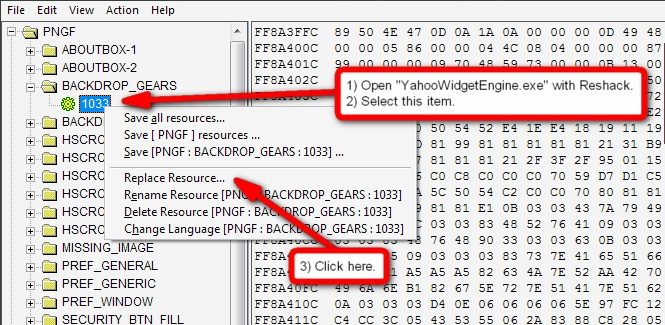
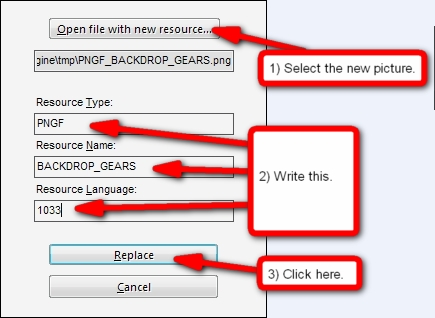
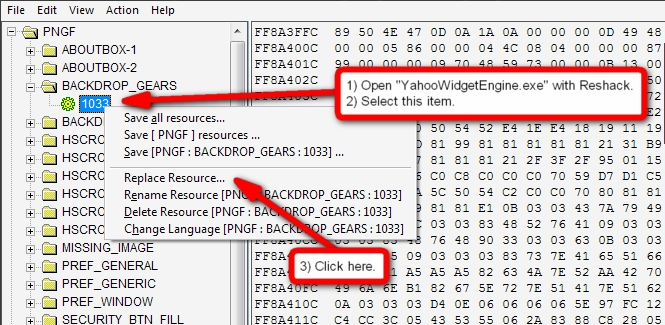
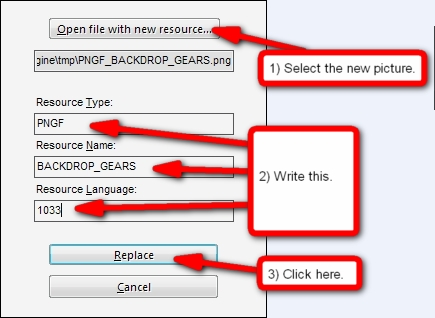
I successfully removed the entire background of the heads up display on version on version 4.01 of yahoo widgets, based on previous suggestions to use Reshacker. I got rid of the gears and purple fade, and not only does it look far better, it loads faster now too.
I couldn't see the tutorial images above, so I'm posting how I did it below for others. Basically just download Reshacker, open the widgets exe file, and delete the entries BACKDROP_GEARS and MISSING_IMAGE. Resave the file and open widgets again. Hope this works for everyone. SPECIFIC instructions here:
A) Download Reshacker from http://www.soft32.com/Download/Free/Resour...0/4-3568-1.html or anywhere convenient for you. ( http://delphi.icm.edu.pl/ftp/tools/ResHack.zip )
 Unzip & Run Reshacker. Use File-->Open to open the Yahoo Widgets EXE file. Mine was here: " C:Program FilesYahoo!WidgetsYahooWidgetEngine.exe "
D) You will see a number of folders. Click the folder titled "PNGF" to open it. Many of the resource images seem to be saved here.
E) *** Click on the folder BACKDROP_GEARS to open it. Click on the subfile 1033. Right click on the same file 1033. From the rightclick menu, choose DELETE RESOURCE.
F) *** Repeat the last step for the folder MISSING_IMAGE.
G) Make sure Yahoo Widgets is not running, then save your changes with FILE-->SAVE. Closer Reshacker, and restart Yahoo widgets. Now, when you open the HUD, there should be no background.
Thanks to all for the helpful posts.
Oh, and as a nice extra touch, I used "AutoHotkey" to setup a hotkey on my middle mouse button. This hotkey references the Widgets HUD hotkey in the Yahoo widget preferences, so it works entirely like the Mac Dashboard now. Groovy.
Most awesome... bump... ever.
Thanks so much for this, and especially for that AHK tip (I've got many buttons )
I want to say thank you too for the guide.
absolute genius! thanks lots