LucidaMac is driving me creazy! and i know i´m not the only one

ok folks, ya, again a font-prob-thread and ya i searched the forum for weeks now and read near by every thread about lucida. i would not ask for help if i would not be really finished with my nerves and tried everything. on my search i found some others this that prob, but no solution.

check my posted pic:

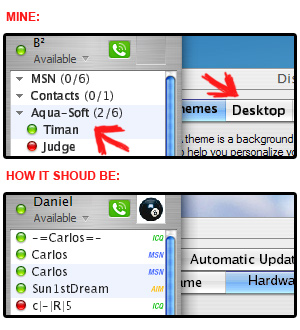
u see trillian 3 pro with dans great skin and a msstyle-theme by three drives. the "how it shound look" one is an original pic posted by the creators dan and three drives, therefore, it must work somehow. well, and u see nime on top. it´s the font-file LucidaMac (LucidaMac Bold) which looks crappy.

facts:

- it can not be the fault of the skins because the creators posted "good looking" previews

- i followed font-install-instuctions, worked even in safemode to install the font, ya, i did what they said and just dropped the inf-file into font-folder

- tried even adobes atm to install the font

- tried soulless lucidamac font

- tried ms cleartype tool

folks, plzz. i´m running out of options and while i´m a skinning-freak like u, u can maybe understand how such a "small" thing can really hadly go on ur nerves.

so, me thinking it can not be the fault of the skins and theme, it can not be the fault of my skills to install this font (hopfully at least), and it can not be the fault of the font-file, because other people seem to get it right with that font included in the skin and theme.

anyone with ideas what i can try, plzzzzzz!!!!!!

edit: mods, sorry, i forgot the tagging

post-167-1121364654_thumb.jpg

Unbenannt-3.jpg
Unbenannt-3.jpg

#300776

try a mac

it's easier

#300791

^^^

try an intel

it´s faster

oh, i forgot, u have to in future

lmfao

#300793

try a mac

it's easier

And that helps him how? Don't post useless junk like this, we're not going to buy a 2000 dollar machine just to get your fonts to look right.

#300795

Lucida Grande is very similar to LucidaMac maybe you could try that ?

#300815

Try playing around with your ClearType settings.

Personally I avoid LucidaMAC because it bugs me too.

#300830

^^^^

trust me, i did. therefor i extra downloaded this ms cleartype tool. that´s not the trick, sadly.

#300833

Try Soulless' Verdana font... Same look, and doesn't give fat pushbuttons.

#300850

And that helps him how? Don't post useless junk like this, we're not going to buy a 2000 dollar machine just to get your fonts to look right.

hell, its the truth

there's no way he can get it to look exactly like on mac

anyway, he could just get a mini for 500 ;)

#300909

anyway, he could just get a mini for 500

Easy to say.... They want $649for the simplest mini configuration here :((

#300924

come on, folks. i will NOT buy a mac, so plz stop that talk.

like i said, i´m not asking for impossible things here, because of the "how it should look" pic. others get it like that, me just wants to know what causes my probs.

#300930

it's just a poor-quality font, like the version of handelgot that's been floating around. good fonts are hard to find and usually cost money.

#300959

well, to make it one more time clear: the "how it shoud look" pic is exactly the same fonts as in "mine" pic.

and btw, i tried it on my vaio either. damn, ALL LOOKS GOOD THERE. i´m completly confused what can be responsible for this prob on my main machine.

#300984

hell, its the truth

there's no way he can get it to look exactly like on mac

anyway, he could just get a mini for 500 ;)

Sorry, but minis are no good. A 500$ Dell is far far faster, and it comes with a screen/keyboard/mouse.

#300985

Go here.

Don't thank me, thank the search.

#301013

know what drives me creazy? peaple whose spealling is incorreact. :P

#301019

^^^

like i said, i searched the forum deeply, found that link either and tried that too.

seems that i´m still not understood 100%, hm.

- the font-files are fine i´m using. reason: other people get a good result with this fonts (even me on another system)

- the skin and theme can not be the fault. reason: same as said earlier

it must be something completly different, well, maybe. i don´t know what. therefore i´m asking u for help here.

edit:

@shmengie: thank u very much for ur help. FO!

#301020

Chill guys.

This should be a "friendly, supportive" forum :P

#301039

How about the resolution, DPI and stuff like that?

That's the only other thing I can think of.

#301960

^^^

res is fine. it´s the default 1600x1200 of my tft, so no resizing is going on here. this all on an ati radeon 8500. even tried different drivers.

what is DPI?

me starting to getting depressed. i don´t see a reason for this font-issue. when i use lucidamac in other apps like ps, illu or even word... the font looks good.

#302096

To get to the DPI goto the thing where you'd normally change your resolution (Right Click @ Desktop > Propteries > Settings) and click the Advanced button.

A new window should pop up. Click the General tab and look at the combo box. The title for the box is DPI Setting. Windows should be set to Normal Size. Normal Size on most systems is 96DPI. From my experience, the DPI setting is just trouble. It works fine on some applications but it screws up on tons of 3rd party applications.

#302140

^^^

well, right, 96dpi is normal. played around a little bit with that. still: no luck.

but thanks for this idea. others are welcome.

#303111

It looks to me like it's reading the bold version oer the normal one (I wouldn't know why, I do graphics not programming). Have tried it with only LucidaMAC (not LucidaMAC Bold) in the fonts folder?

It's definately something in the system, personally, I'd try forcing it to use Lucida Grande instead, but that takes a whole lot of effort.

#303158

well, tried that now either. it´s LucidaMac for sure, not LucidaMacBold. beacause of some reason LucidaMac is displayed more bold than it should be, and this without being set to be bold.

still :(

damn riddles

#303182

You will probably have your best results with an LCD monitor. IN the event you have a CRT, I have my settings as follows:

ClearType Tuner set to 1.4 via the Advanced Tab.

Lucida Grande fonts. Everything looks great to me (1152x864, dual-monitor on a 9600XT).

#303620