Safarifox theme SaFire

I installed this theme on Firefox 1.0.6 yesterday. Have some probs though.

1. The blue RSS button doesn''t show in the address bar but on the status bar. How can i fix this?

2. I don't like the icon when a pop-up is blocked. Like the one from Hills' theme better. How can i change this?

3. The searchbar. I think this is quite an error, because it shows the Google logo and not the magnifier like it did (by default) in Hills' theme. For a Safari clone i kinda expected this to be by default in SaFire. How do i change it? (like this)

4. The close-tab button on the tab bar. It's not vertical aligned and it is on the far right. Wanna have it aligned and a bit more to the left, just like in the screenshot from Hills's theme

I'm just getting into the whole tweaking thing so excuse all my questions, but this is a great place for info and help.

Btw, that Firefox page when a new tab opens, is quite a nasty trick. Found the solution, but stuff like this shouldn't be in by default. In fact it shouldn't be in at all imho.

#310714

(1) if you read the comment at deviantart, you'd have to make an extension like fusion to put it up there. The screenshot is decieving, hehe.

(2) you could edit the userchrome.css if you know what your doing, but if not, just delete the image in tabextenstions.jar

(3) http://www.aqua-soft.org/board/showthread.php?t=10356 try the attachment in this...

I'm kinda not sure what you meant about the last one...maybe post a screenshot to clarify? :)

#310781

You people have got it all wrong. RSS symbol WILL show in the address bar if you use the latest DEER PARK nightly (not Firefox), found here. It works fine, except Fusion messes it up.

#310877

It should work with a Deerpark release. found here.

Might be more stable then the nightlys.

#310924

really? didn't know that...

*Edit:

I really can't get it to work in Deer Park Alpha 2. I installed the fusion extension for Deer Park but still the RSS blue button in at the bottom...do i have do do anything else?

note: i was kinda satisfied with firefox but i had to uninstall it to get deer park...now i gotta go through the whole "Safaring" process again.

#310946

@vkeios and all:

to see the RSS icon in the URL bar you have to use a Deer Park build newer than 12th of august. The Deer Park Alpha 2 release version is too old for this.

I propose to use the latest 1.8 branch which should be quite stable.

@j2227 and all:

It is not true you have to uninstall Firefox to run Deer Park!

You just can't start them at the same time, unless you set the environmental variable MOZ_NO_REMOTE to 1.

You could do this with a batch file:

Create a new textfile in your Deer Park folder.

Insert in this textfile:

SET MOZ_NO_REMOTE=1

start firefox.exe -p

rename this textfile to batchstart.bat for example.

Double click on that batch file and the Deer Park profile manager appears. This is important, as you couldn't use the same profile as with 1.0! So you have to create a new profile for Deer Park.

@phuture:

about the searchplugin: just read the comments at deviantART ;) :

BazonBloch"]it's up to you to replace the icon: Just go to your serchplugins folder in the Firefox Program Folder (in newer Deer Park builds also in the profile folder) and replace the image of the searchplugin by the one you like (png and gif AFAIK)

and à propos comments on DeviantART:

the problem of tha.wizza was also solved there, see here

It seemed, that tha.wizza removed some firefox files as browser.jar or so for other Safarifox Themes like Safari -fx. SaFire seems to be made to run with original Firefox files, not replaced ones...

Maybe it's also a good idea, to disable TBE for this theme if you use it, it messes the tab close buttons up a bit....

have fun!

Moe Zilla

#311118

(1) if you read the comment at deviantart, you'd have to make an extension like fusion to put it up there. The screenshot is decieving, hehe.

(2) you could edit the userchrome.css if you know what your doing, but if not, just delete the image in tabextenstions.jar

(3) http://www.aqua-soft.org/board/showthread.php?t=10356 try the attachment in this...

I'm kinda not sure what you meant about the last one...maybe post a screenshot to clarify? :)

1. i must have overlooked then. the screenshot IS deceiving hehe. Not a big deal, would have been nice to have the button in the address bar, but it sits well on the statusbar too

2. not sure what to do. guess i'll look for the image, replace it and see if it works.

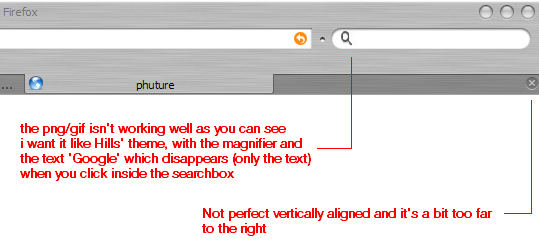
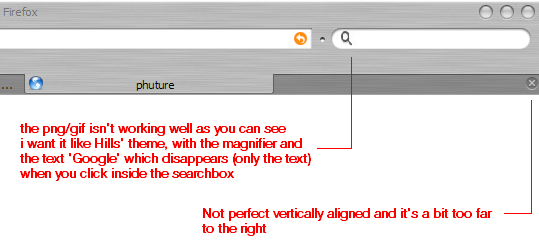
3. thanks, i've read it, but a png is not what i need. check the attched screenshot. it isn't working well and besides, in Hills' theme it had the magnifier with a small arrow (dropdown menu) and the text Google which disappeared when you click inside the searchbox.

I'll try that guy that posted on deviantart, recommend by Moe Zilla, thanks!

In his screenshot he had it working i think (hope its not a full png hehe)

4. check ss, see the close button. dont want close button on each tab 'cause every time i wanna switch to another tab i accidentally hit the close button. anyway, this is not a big deal, but for a clean look i'd like to fix it

post-30103-1125004387_thumb.png

safire.PNG
safire.PNG

#311200

Umm **** here how do i import the items like

@import url("chrome://global/skin/subskin/rounded.css");

im lost sorry for the troubles

#311207

1. i must have overlooked then. the screenshot IS deceiving hehe. Not a big deal, would have been nice to have the button in the address bar, but it sits well on the statusbar too

3. thanks, i've read it, but a png is not what i need. check the attched screenshot. it isn't working well and besides, in Hills' theme it had the magnifier with a small arrow (dropdown menu) and the text Google which disappeared when you click inside the searchbox.

I'll try that guy that posted on deviantart, recommend by Moe Zilla, thanks!

In his screenshot he had it working i think (hope its not a full png hehe)

1. works without an extension, check Moe Zilla's post for a newer nightly.

3. Edit the image, yours is probably not 16x16px for it has too much space on one side.

Or go inside the safire theme, there's a good png to use in there.

#311222

@vkeios and all:

to see the RSS icon in the URL bar you have to use a Deer Park build newer than 12th of august. The Deer Park Alpha 2 release version is too old for this.

I propose to use the latest 1.8 branch which should be quite stable.

Moe Zilla, you hit it right on the dot: rss button shows in the address bar! cool! i figured out how to replace the google image, just give me a few minutes to verify.

#311232

Umm **** here how do i import the items like

@import url("chrome://global/skin/subskin/rounded.css");

im lost sorry for the troubles

Get the chrome edit extension. Makes it really easy to add lines to the file and edit others as well. Just read the instructions in the editor. :)

http://cdn.mozdev.org/chromedit/

#311240

4. check ss, see the close button. dont want close button on each tab 'cause every time i wanna switch to another tab i accidentally hit the close button. anyway, this is not a big deal, but for a clean look i'd like to fix it

Try the Tab Mix extension. One of the best I've tried to fully configure tabs (get rid of close buttons, etc.)

http://www.extensionsmirror.nl/index.php?showtopic=2291

#311241

Hi Im retarded how do i install this

#311243

Hi Im retarded how do i install this

Download the jar file to your desktop, open tools>themes and drag the jar onto the new open window. It should install, then double-click the new theme entry and restart firefox to use it. ;)

#311248

Hi Im retarded how do i install this

or install deerpark...the link is above by Moe Zilla...get the one for you os and stuff...

install the theme by bazon (if i spelled that right) it the first post in this thread...

and that's about it. all the rest is at deviantart if you wanna do extra stuff...

Get the chrome edit extension. Makes it really easy to add lines to the file and edit others as well. Just read the instructions in the editor. :)

http://cdn.mozdev.org/chromedit/

That doesn't work for deerpark. what does?

#311250

Check here:

http://www.projects1.com/firefox/exthacks/...extensions.html

Thanks, I was just looking for that to reply. :P

#311260

hey all, i made some changes to the search bar so now it looks like it did in Safari fx. Unzip..then backup/replace the old files in the safire theme directory with the new ones(c:Program FilesDocuments and Settingsyour nameMozillaFirefoxProfilesxxxxxxxx.defaultextensions{a98e826c....}chromesafire0_

32.jarbrowser)

oh can't forget...move to the main folder [c:Program FilesMozilla Firefox (or Deer Park)] or delete the google, yahoo, and anyother pictures in the c:Program FilesMozilla Firefox (or Deer Park)searchplugins folder... :P

#311264

Get the chrome edit extension. Makes it really easy to add lines to the file and edit others as well. Just read the instructions in the editor. :)

http://cdn.mozdev.org/chromedit/

thx i got it but i still dont understand how to add the lines :(

#311445

hey all, i made some changes to the search bar so now it looks like it did in Safari fx. Unzip..then backup/replace the old files in the safire theme directory with the new ones(c:Program FilesDocuments and Settingsyour nameMozillaFirefoxProfilesxxxxxxxx.defaultextensions{a98e826c....}chromesafire0_

32.jarbrowser)

oh can't forget...move to the main folder [c:Program FilesMozilla Firefox (or Deer Park)] or delete the google, yahoo, and anyother pictures in the c:Program FilesMozilla Firefox (or Deer Park)searchplugins folder... :P

THANKS!!! this is what i meant. Nice work

would it be possible to have the text ''Google" showing when the searchbar is 'not in use', like SafariFX?

that when you click inside the bar, the text disappears and (when you didn't type anything) when you click outside the searchbar, the text appears again. That would be the finishing touch hehe

#311452

thx i got it but i still dont understand how to add the lines :(

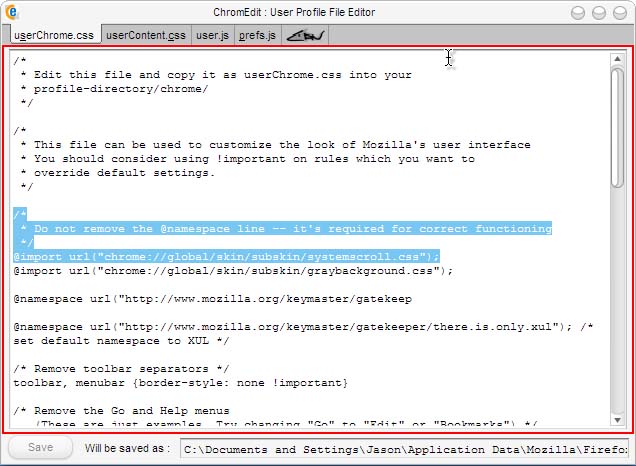
Check out the attachment. I highlighted the important instructions and an example line. Just place any of the lines you want in a list there. Hope this helps.

post-2177-1125092594_thumb.jpg

Untitled-3.jpg
Untitled-3.jpg

#311463

I'm not really sure how to add the "Google" in the searchbar...i did a search in safarifox (safari fx) but i didn't find anything...maybe others have luck.

The only thing that I want working is fusion... i studied for about an hour or so on the fusion.xml in the .jar of the fusion extension, but really didn't understand a lot of it...i mean, i knew some stuff, but everytime i edited it i got the rss button working but the url bar gone or the url button working and the rss stuck next to the fav. icon. i guess i'll wait for someone to mod it or the author to fix it. :(

#311477

http://img211.imageshack.us/my.php?image=untitled4bg.png

above i attached a picture of problems i hope to fix. the main problems are the search bar (dono how to install it), the BOLD on the bookmarks, the "+" button for a new tab.

anyone able to help?

#312822

I hate to jump on the "HELP ME I r Teh stoopid" bandwagon BUT i have this skin modded to the point ALMOST to where i want it.

Can anyone help me with this: problem4ar.png

All i need to do is move it a few pixels up darn it!

Edit - Also could anyone tell us how to put the RSS bar into fusion?

#312843

@reincarnatdballa: for the search icon go here and follow the instructions for Step 4. For me the gif in that post looked wacky so I used a different one (an icon I renamed to google.gif). I haven't tried to get the search bar to say "Google" and have it disappear when clicked on, someone else may know more about that.

@enjoilax: I think I read somewhere that the rss bar in fusion only works with Deer Park? I could be mistaken but I thought I read that in the comments section for this theme on deviantart.

HTH

edit: @enjoilax: look at post #28 in this thread for the info I saw on the RSS button.

#312889