 Aqua-Soft Forums
[rel]RULER 1.0 Firefox skin

Hmm, I must be doing something wrong, but when I'm using the pinstripe theme everything is fine, and when I switch to ruler, this:

You are using Fusion extension, don't you?
Just change the size of the icons, restart and it's done.
I'm having a problem I haven't seen anyone else mention...why don't some of the buttons show up for me? See image to see what I mean.

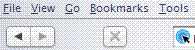
I'm having a problem I haven't seen anyone else mention...why don't some of the buttons show up for me? See image to see what I mean.
Uncheck the "Use Small Icons" box in the customize menu.
Yes the find bar is f***** , I read some time ago the way to fix it here in A-S
this is a way (dunno whether this is the way karma.police meant, at least this works for me):
Add to your user chrome.css:
#find-closebutton {

	-moz-appearance: none;

	list-style-image: url("chrome://global/skin/icons/tabclose-front.png") !important;

	margin-top: -2px !important;

	padding: 0px !important;

	}

#find-closebutton:hover {

	list-style-image: url("chrome://global/skin/icons/tabclose-front-hover.png") !important;

	}

#find-closebutton:active {

	list-style-image: url("chrome://global/skin/icons/tabclose-front-pressed.png") !important;

}


.checkbox-icon {

  list-style-image: none !important;

}
that's all 
Moe Zilla