 Aqua-Soft Forums
Does anyone knows if it is possible to change Windows and Program Files folder name ?? I want to put Windows to System X like in mac and Program Files to Library, what i've done is a shortcut and then i changed the folder and the name. But if anyone could tell me how to do it with ResHacker or something like that ??
[Help] With Folder Names
Dont do it. Honestly, it's not worth the hassle and the endless problems you will face afterwards.
Duckie has done it. Search his forums.
[Edit: I think it recalls hacking your Windows XP CD, and then reformatting. It IS a fair amount of trouble.]
-NC
I have my system like this already. When it came round to having to do a reformat I did it and as has been mentioned you need to set up an attended installation with your Windows XP disc. Afterwards I've had no problems with any programs or anything, and this computer hasn't been formatted for 3 years or so.
It does also require a lot of logging in and logging out and renaming of your registry to get it done if I recall (I think this was so I could change c:documents and settings to c:users). However, if you were to try the whole thing (such as changing c:windows to c:system) without a reformat then I can guarantee that you will run into more problems than you can throw a pyschiatrist at. This is why most people will agree that it is IMPOSSIBLE to rename your windows and program files directories without a clean install (cos if you attempt it, you'll need to do a clean install anyway lol).
The main benefit for me though is that if you use the run dialog or you just manually type folder addresses into the address bar, then it saves a lot of time typing c:users or c:applications than the windows counterparts. Some people think it would cause problems with things such as windows updates etc but as there are conditions where folders do get renamed and/or exist on seperate drives, windows uses system-wide constraints such as %systemdir% instead of c:windows.
The tutorial USED to be on AquaXP's forums long before they were closed so I doubt we'll ever see that again, but have a look for unattended installs of windows (and when you install you can specify foldernames), and you can use a registry editor to change your documents and settings folder.
Here's a quick tutorial that Nobski wrote (and I'm quoting it cos I'm tired and it saves me having to remember the process lol);
1. Log on to the computer as an administrator.2. Create a new folder.
3. Open the current "Documents and Settings" folder.
4. On the Tools menu, click Folder Options, and then click the View tab.
5. Under Advanced settings click Show hidden files and folders, and then click to clear the Hide file extensions for known file types and Hide protected operating system files check boxes.
6. Click OK.
7. Click and drag to copy all the folders to the new folder, except for the currently logged on users folder.
8. In Control Panel, double-click System, and then click the User Profiles tab.
9. Copy the current user's profile to the new folder.
10. Click OK, close Control Panel, and then log off and log on to the computer as an administrator again.
11. In Registry Editor, click Find on the Edit menu.
12. Type documents and settings, and then click Find.
13. Replace the value data or rename the value or registry key to the new path for each and every registry key and value that contains the original path.NOTE: You must complete this change for every instance in the registry or your computer may not start. It is imperative that you update all registry keys and values with the new path.
14. Restart the computer.
15. You can now safely remove the original "Documents and Settings" folder.
In addition, I recommend looking for a new registry editor other than regedit, one that supports "Replace All" otherwise you'll spend ages looking for every instance of c:documents and settings and c:docume~1 (and you MUST search for BOTH otherwise again, you might run into problems because the latter is the old dos style 8char version of the foldername).
I'll perhaps post a full tutorial at some point when I've relaxed from my busy day at work (which I've only just got back from).
Xalcore im not sure if i understood but i don't want to errase the Documents and Settings folder i want to rename the Windows and Program files folder, obviously u can't do it. I was asking if somebody know how to do it...
Nightcrawler u said that duckie do it but i couldn't find any post about that, i already add duckie to the msn but i would appreciate if u have the post were he explains....
Thanks
You can do it, but you'll have to make a specialized Windows XP disc and reformat. Go look up nLite on Google, that program is GREAT for what you want to do.
Xalcore im not sure if i understood but i don't want to errase the Documents and Settings folder i want to rename the Windows and Program files folder, obviously u can't do it. I was asking if somebody know how to do it...Nightcrawler u said that duckie do it but i couldn't find any post about that, i already add duckie to the msn but i would appreciate if u have the post were he explains....
Thanks
As I said, you can rename the Windows and Program Files folders (which I have done on my system - and you'd know if you'd properly read my post) but you need to reformat your computer and do a clean install of Windows XP - it's only possible through the installation options if you make an unattended installation.
In terms of erasing the Documents and Settings folder, that's after you've made all the appropriate registry changes, copied the Documents and Settings folder to the new one, and then delete the old Documents and Settings folder (and then restart). I only gave instructions for that cos it's easily done without having to do a reformat but I was just too knackered to give full instructions for changing the windows and program files folders at the time.
The thread about it with instructions (to my knowledge, as I explained in my last post) was at AquaXP before their forums got closed down. I have a print out somewhere which I'll look for and retype for you soon (been busy I'm afraid, sorry).

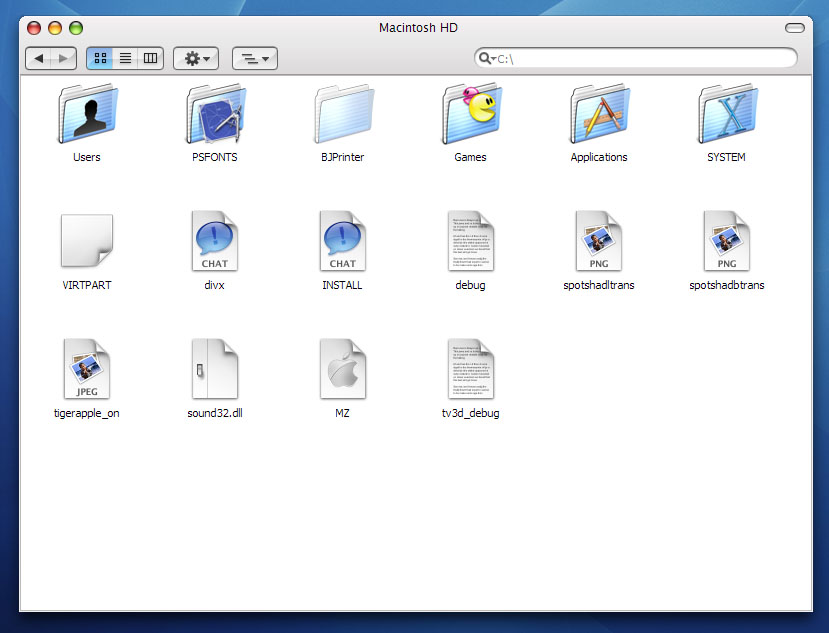
Nlite Works it's perfect i already do it !!! Thank u very much i recommend it u can create a disc with all the updates and service pack and without all programs that u don;t want like windows movie maker.... Try it www.nliteos.com