 Aqua-Soft Forums
[help]Does anybody know what application is this?
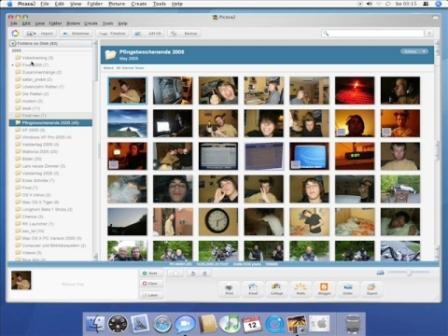

its got picasa2 buttons, layout, menu, scrollbars etc.
+only skinned title/menubar by windowblinds, not a picasa skin.
if you zoom in on the picture you can see the picassa logo top left side but I dont believe there is a mode for the latest version.
how do u know it's windows at all?to me it looks like OSX and iPhoto
I would recommend you opened iPhoto for the first time in your life then :confused: - they are really different man 
That's definately Picasa by Google.
The icons, layout, buttons at the bottom... yeah, I'm definately 100% certain that's Picasa!
Picasa is the closest thing on a PC to iPhoto. You can tell that's a PC because of the File Edit... menu along the top of the picasa window (whereas it would only be on the finderbar if it were iPhoto... plus iPhoto has a brushed feel to the entire application - this only has it on the [skinned] titlebar).
Edit: Sheesh - there was only the original post and two replies when I started writing mine... then suddenly everyone's flooding in. Well - if that's not proof enough that we all say it's Picasa then I don't know what is lol. Good example btw Neal 
I wish there was picasa for OS X  - i'd trash this failure that is iPhoto >_
I wish there was picasa for OS X
That's something I've heard before... what's so horrible about iphoto anyway?
well, its great if you have less than 1000 photos at anything smaller than 2 megapixels. If you are like me, you have ~10000 photos at a resolution ranging from 4mp - 5mp... and then, opening and closing the app is a zen master test. (even when i had ~5000 photos)
well, its great if you have less than 1000 photos at anything smaller than 2 megapixels. If you are like me, you have ~10000 photos at a resolution ranging from 4mp - 5mp... and then, opening and closing the app is a zen master test. (even when i had ~5000 photos)
Didnt Jobs say something about the "incredible speed" of iphoto a keynote or two ago? Is iphoto the only program for macOS that has that kind of functionality?
No, of course it isnt the only program... there is adobe elements i believe its called? iView Media, extensis portfolio, acdsee...
The problem is that the rest are 1. all fugly, 2. not such a speed improvement... iPhoto could be called of incredible speed, relatively, it is... i mean, the way it generates all those thumbnails on the fly is amazing, but then again, Picasa does taht too (better) and it takes way too long to start and quit (picasa doesnt even with my same library, my fiancee uses it).
The other (big) quirk iPhoto has is that it automatically "arranges" your photos, and there is not much you can do about it. The way it does is VERY awkward, and, if you are like me, you like to have your photos on the "Pictures" folder, categorized by ocasion/whatever, and then, when you import them into iPhoto, you will get a duplicate of all your photos, one in your folder and one where iphoto wants to - really annoying.
No, of course it isnt the only program... there is adobe elements i believe its called? iView Media, extensis portfolio, acdsee...The problem is that the rest are 1. all fugly, 2. not such a speed improvement... iPhoto could be called of incredible speed, relatively, it is... i mean, the way it generates all those thumbnails on the fly is amazing, but then again, Picasa does taht too (better) and it takes way too long to start and quit (picasa doesnt even with my same library, my fiancee uses it).
The other (big) quirk iPhoto has is that it automatically "arranges" your photos, and there is not much you can do about it. The way it does is VERY awkward, and, if you are like me, you like to have your photos on the "Pictures" folder, categorized by ocasion/whatever, and then, when you import them into iPhoto, you will get a duplicate of all your photos, one in your folder and one where iphoto wants to - really annoying.
So you're actually admitting that windows does something better?  (well ok, not windows, but something ON windows). Kind of surprises me that iphoto arranges photos in a horrible way: I always loved the way apple kept your files (and programs, and OS) organized the way YOU wanted it. I've had the same issue with iTunes arranging my audio files in a billion different folders, which was the main reason (RAM usage was my second reason) for using foobar instead. Anyhow, this is COMPLETELY off-topic, so I'll just shut it now