New Spotlight clone

The fixed file has been posted, please check the first post to download. Simply overwrite the old exe with the new one and run, it should work now. There was no way in h*ll it would have worked on anyone else's computer before because no matter what, it was using the security code from MY computer!!!

It's always the simple little stuff that gets me

#286005

this one opens the files that you click, but for some reason the windows picture and fax viewer is not playing nice with it. Sometimes I think all microsoft programs are built in with a "Mac" detector that messes things up if you run any cloned programs!!!

#286006

still don't have any dialog box

;'(

#286007

Donniedarko, open you registry (regedit.exe)

Navigate to HKEY_LOCAL_MACHINESoftwareSpotlight

under that group, could you please list all of the attributes that are listed there so I can analyze it

#286009

oki

i'll do it

maybe it's because the first time i've run spolight.exe there was a missing file.

reg8yn.th.jpg

#286015

ok donnie, try to delete the spotlight folder in the registry alltogether and re-run the app

#286016

If I see right, you don't have the key inside your settings...

I also checked it out... but it's there and it also doesn't work.

#286017

as far as getting the security code on systems other than english, I don't think it will make a difference.. but we'll see

Also if this program starts working for anyone, could you post your sucess here so I know I am making some kind of progress, thanks

#286018

nop

always the same result

#286020

you do have the google desktop search installed, correct?

#286021

yes of course

i'm using it for a month now

#286022

Larsen2k4!!!

What language are you running on your system?

#286023

I've tried both versions allready (german, english) ... but no success. But I've noticed something (I don't know if this matters, but I just wanted to say it).

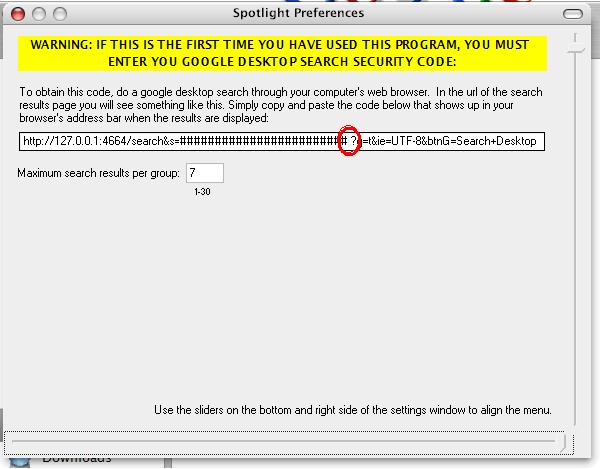
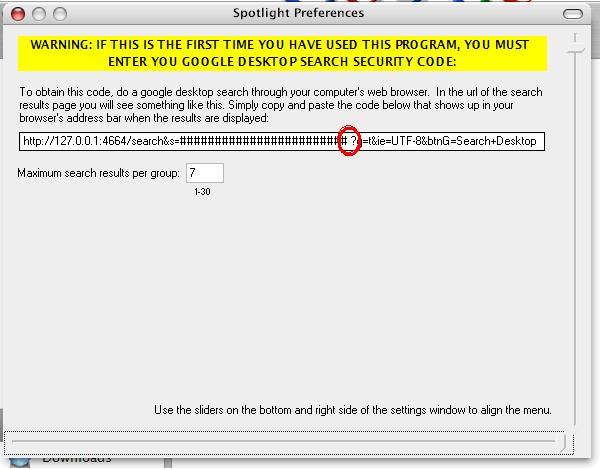
In the settings-windows, there's always a space between the last charakter of the code and the questionmark (see image)... has this something to do with the program?

Greetings

//EDIT:

My system is german like me, Tom ;)

post-19144-1116965859_thumb.jpg

space.JPG
space.JPG

#286024

yeah, that's fine. That's just to kinda show you where the security code is located.

Is there anyone on here that has had a sucess with the program, if so please let me know so I can narrow down these bugs

#286026

btw: why do you ask for my system-language? is the tool depending on it?

#286027

not that I know of, but I just wanted to make sure

#286028

WAIT A MINUTE!!!!

Can anyone tell me the ip address that is listed in the url of the google desktop search results window. I think that's the problem!!!

#286029

http://127.0.0.1:4664

I also have this ip listed as standard.

#286031

yeah, that's what I have, this is killing me because it works perfectly on my computer. And nobody else responded so I have to assume that not even one person has had success with this program.

I initially did have a problem with the google desktop search telling my program that it was an unsupported browser, but it gave me the option to continue anyway. I inserted code to emulate the user clicking "ok, use my browser anyway" but something is still not lining up

#286032

I wish some of the other 5 people that downloaded this would post about theirs, so I had more to work with

#286033

can u post a screenshot

to see :)

#286034

yeah, that's what I have, this is killing me because it works perfectly on my computer. And nobody else responded so I have to assume that not even one person has had success with this program.

I initially did have a problem with the google desktop search telling my program that it was an unsupported browser, but it gave me the option to continue anyway. I inserted code to emulate the user clicking "ok, use my browser anyway" but something is still not lining up

And what would be, if you remove the code for the emulation and let the users click OK ? ... Just for a test..?! ;)

Just an idea :D

#286036

I've had no luck... that said, when i go to preferences, my security ID is always XXXX

it overlaps the end of the text box by one digit, though. Also, I feel uneasy without any "Apply" button or nothing. Why not just keep it simple and use a normal text box with normal apply button?

#286038

it overlaps the end of the text box by one digit, though. Also, I feel uneasy without any "Apply" button or nothing

Real mac-users love that :D

#286040