[Help] High(ish) CPU Usage = Loud Squealling

Hi,

About one or two years ago built a pc for myself, however recently on heavy CPU usage, i get a loud squeal from the PC Tower, on investigation it seems to becoming from around the CPU itself.

An IT Technician i know said its normaly the fans so check them out, which I have. I have also replaced the heatsink i had on the CPU as I wanted lower temperatures. (the squeal was there before i replaced the heatsink).

Hight CPU usage is often caused by just moving the mouse round in circles on in firefox, and not in IE. However resizing causes the squeal as well.

Anyone got any ideas as to what could be causing this?

p.s The heatsink was replaced about a week ago.

Edit:

Scrolling is a good cause of the squeal as well.

#279931

Did you actualy replace the CPU fan?

Most modern motherboards adjust the speed of the CPU fan based on temperature.

If ti squeals at high speed, the bearings may be getting worn out.

#279949

Substute child with computer > http://www.teenswithproblems.com/drugabuse.html

Anyhow thats all scred yp. I dont know whats causing this. CPUs dont make noise, is it your hard drive mabie? Or graphics card fan? Unplug the other case fans. Thoes 3 parts are the only ones that realy make noise in your average PC. You also shoulnt get high CPU usage by moving your mouse around (unless its like a PII)

#279953

@rjohnstone : yes I did replace the CPU fan. Replaced it with a Zalman CNPS7000B-Cu

lostspyder, just give me a moment and i'll find out, btw don't have a graphics card fan.

EDIT:

Right, disconnected the OTES fan, and some otherone that was already on the motherboard. This leaving me with the CPU Fan and the two on the PSU.

However, the noise still continues.

#279955

Your cpu really shouldn't make any sound... There aren't any mechanical parts on a motherboard, with the possible exception of a very small fan to cool it (although most 2-year old motherboards have passive cooling). So it could be your cpufan, but you told us you already replaced that one and had the problem before changing the fan.

I'm guessing these could be the origin of a horrible sound:

- CPUfan (checked it, so that cant be it)

- mobofan

- Casefan (you can simply disconnect those for a short while if you leave your computer open (FOR TESTING ONLY!! - keeping a computer open can be seriously dangerous))

- Your floppy (check by disconnecting it)

- Your CD/DVDrom (same as previous)

- Your harddisk (you could try to boot your computer without harddisk and let it run for a while, see if it makes any noise. Alternatively you could try to use another harddisk (but that means you'll need to install windows/linux/whatever you use on that HD))

- Your power supply (jack someone's powersupply to test it)

- Your processor slowly frying your motherboard (god hope it's not that: just check your mobo/cpu temperature)

Basicly, you need to check which mechanical compartment makes this noise. My guess is either your harddisk (the firefox issue you described can be a damaged region) or a powersupply issue (which is close to the CPU, and has a fan that could make a horrible sound)).

Hope that helped you out a bit....

#279966

Phat-Liz0rd:

-CPU (checked it, so that can't be it)

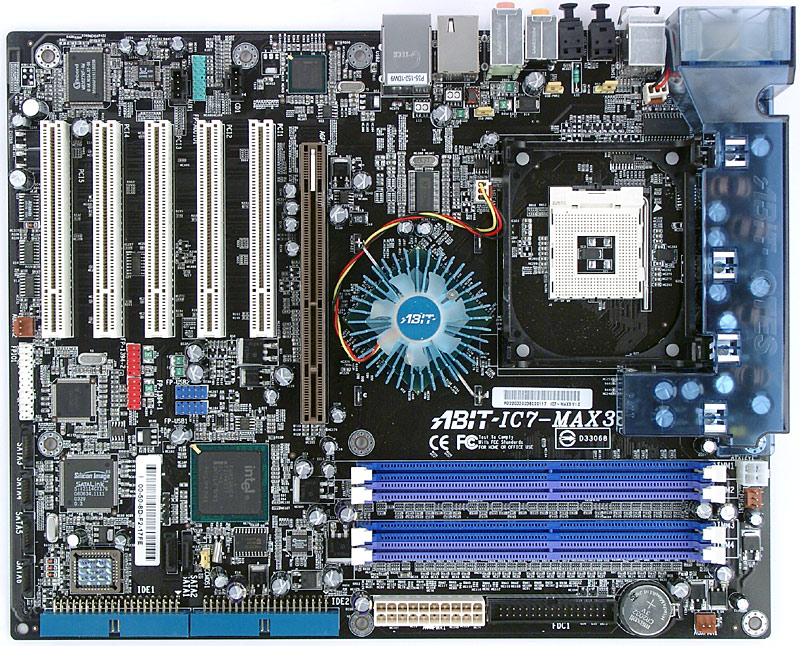
-mobofan (see http://www.ixbt.com/cpu/intel/pentium4-32g...max3-booard.jpg its that green thing smack in the middle, checked that, and the OTES Fan in the top right in that photo)

-Casefan (checked, not it)

-Floppy/CD/DVD all disconnected and not it

- Harddisk, stuck my ear right next to it, and its not coming from that. Although after powering down and touching it, it does get hot!

-PSU, haven't been able to test

-Frying my mobo, I HOPE NOT TOO!!! :S CPU temperature is about 37C on idle, minimum work like firefox etc.

I'm starting to think PSU more, but i'm still not 100% sure its coming from that, I don't want to spend money on something that is just going to leave me in the same position.

Edit:

I can't remember if i mentioned this, i guess i could scroll up ;) but i'll say it anyway;

Resizing of firefox makes a really good squeal!

#279971

Of course it gets hot!

Hmmm~ its the hard disk, happened to me once... check for any bad sectors...

-The CPU, nah uh, not mechanical

But... maybe its the PSU (I don't think about it, unless the wattage changes... then sparks fly, computer explodes, mother wakes up, argh~, cat goes thru the window, monitor explodes, speakers too... and don't forget, keyboard and mouse too!!! OHHH THE DANGERS~ (ehehhee, ok, i'm a bit high on coca.cola))

But... yeah, check for bad sectors dude...

#280014

do you have any pets in your case? just wondering if there's a mouse locked up in there. might be the problem. it should be the power supply or hard drive. if you put your ears very close to the fans and stuff while moving around firefox at the same time you can pinpoint the sound location.

#280112

maybe its the pc speaker? the built in one.. i dunno what im talking abouit LOL

#280113

you mean teh beeps that the motherboard makes? possibly. it's not just the moving parts. that makes noize.

#280154

Does this squealing sound like a mechanical noise? As someone rightly pointed out, it could be the internal speaker letting you know there is some kind of error... Although you're pretty sure it's not a hard disk error, you should check for errors on your drive (just to be sure). If your harddrive comes out clean, I can only think of the PSU as being the cause of the issue (if the sound is mechanical at least). The weird thing is that a powersupply error should simply have your computer freeze (or explode), but not make a loud (squealing) noise...As I said before: replacing the PSU with one you took from another computer should enable you to draw some conclusion regarding this item of hardware.

If the sound ISNT mechanical, you're getting a motherboard error; check your motherboard manual (if you still have it) for the code of the beeping (does it beep once? Twice?...). This should tell you what causes the error. If you dont have a manual: start updating firmware/bios. (and be sure to do it correctly, I would hate the idea of you flashing your bios incorrectly and ending up with a motherboard that doesnt work, and hating me for the rest of your life for giving you the idea of doing something as dangerous :) )

#280165

have you re-seated all the vacuum tubes?

seriously, a high squeal from non-mechanical parts is the sound of heat-stress. probably not the cpu itself but rather a resistor (probably) or capacitor or diode (another likely candidate) on the mobo, something like that. if you've got a fry's or pc club in your area, go pick up a new mobo. if i'm wrong, you can always return it. and if i am wrong, it's the first time! ;)

#280175

Ok, I'm about 100% sure its not the internal PC speaker.

I haven't been able to get my hands on another PSU just yet, i'll see what i can do over the weekend.

Shmengie: What are vaccum tubes?

Also this Abit IC7-Max3 was only put into the system a few months back, I had an MSI board before hand. Its a P4 Northbridge 2.6Ghz btw.

Edit:

The PSU with the MSI board has blown before, in which the computer froze and the PSU was unable to boot the system, power kept droping.

This new (to me) PSU was bought off a friend, who used it in a previous computer he had.

Edit 2:

I have MBM5 running on my computer, and I'm not sure if this is any relavence but the 12V under resizing firefox drops to around 11.86V from 12.04V

#280209

OH NO!!! THE PSU EXPLODED!!

You have any mods installed? like cold.cathode lights... lots of fans... and that kind of thingys?

maybe your PC uses dunno... 500 watts and your PSU is just 400 watts worth...

~~~~~~~~~~~~~~~~~~~~~~

Hmmm~ i still think its the hard disk... check for any bad sectors!

Vaccum tubes... those old thingys that really old.skool radios used...

#280275

I doubt it, I have a barebone with a 150 watt PSU and ive got at least 400 watts of stuff in there

and its not giving me any trouble at all :P

#280283

The only mod, is the PSU which I bought off a friend.

The only things connected are,

OTES Fan ( http://www.ixbt.com/cpu/intel/pentium4-32g...max3-booard.jpg ) (top right)

CPU Fan

The mobo fan, ( http://www.ixbt.com/cpu/intel/pentium4-32g...max3-booard.jpg ) (middle)

Hard Drive

then the standard 4pin and 20pin to the mobo.

#280290

sorry, the vacuum tube part was a joke. the other stuff is real, tho...

#280298

:)

Anyway, i removed the PSU from the computer and powered it up, and i'm pretty sure its not coming from that, this leaving me with only some component on the motherboard. I have a feeling its that component under the fan in the middle of the motherboard, according to the manual this is the "intel 875 memory controler hub". I do have another p4 motherboard lying around so i'll hook the same setup to that, however, to actually run the operating system it would require formatting the hard drive. It is normaly whilst using the operating system does it squeal....*thinks*...unless i download one of those live cd versions of linux.

#280314

I recommend DSL (damn small linux)

#280363

I downloaded DSL, and tried it on my laptop and it worked, however when i tried it on my current PC setup I get the message to press enter to boot, then it checks all the devices, after that it just goes to a black screen.

I'll try and get round to changing the motherboard and then trying.

#280477

you know... at the end... this mystery would be something like

"I know what was it... there was this little piece of paper inside a fan"

or something...

to resolve something, go for the most simple answer...

#280567

sorry, the vacuum tube part was a joke. the other stuff is real, tho...

Actually, there ARE motherboards with vacuum tubes :P Sorry about the PSU thing Zenko: I think switching the mobo could be your best bet right now... Let us know if that solved things for you!

#281033

@zenko : it prolly has the resolution set to somethign above what your monitor is compatible with

at the menu that shows up on boot up (maybe you have to use a hotkey or something) choose the

mode where you get to choose the resolution and refresh rate. Set it to something low like 800x600

to be sure itll work.

#281237

what parts have you tested and ruled out?

sometimes squealing is caused by hot mosfets.

#281380

I recommend you replace your Motherboard ASAP. However, before you do that, check the black tube-like things (capacitors). If they look at all bloated, it's your MB for sure. I just had mine do that but without the squeal. Mine just shut down under heavy CPU usage though...It didn't ever crash during WoW until the very end...maybe even my computer is addicted!!!!!

#282121