Cloning and Video Editing

Hi all,

Im working on an amateur movie, and i’m going to try something new, and was wondering if i could get some help with it.

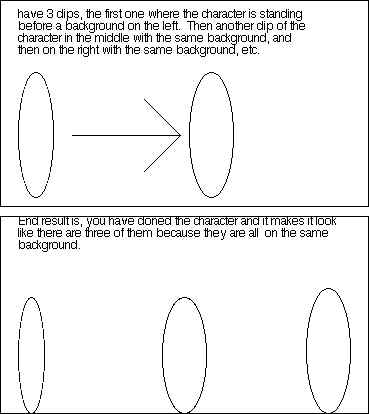
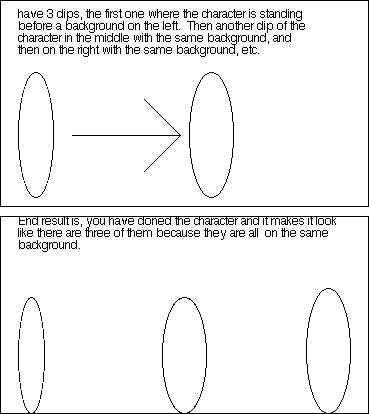
What i need to do is take a character from my movie, and clone him so it appears that there are many of him all doing different things at once. (explained in picture below). I was hoping that by just shooting a background image, lets say a fence, and having one person stand at once spot, then cut, then move him to a different spot within that fence background and film again, then combine the two clips because they have the same background, i could achieve the effect of multiple copies of one person in one scene.

Is this possible?

Pops
post-2281-1115215927_thumb.jpg

untitled2.jpg
untitled2.jpg

#279509

like the matrix 2 and 3 when there's a bunch of Mr. Smith's?

#279540

@ popsandthefamily: I would think so... for ease of what you are trying to accomplish, i would keep the camera positioned steady, as in, the frame of the surrounding scene does not change. Then, without 'cutting' the camera.. continue shooting (as you want to minimize any unnecessary movements or blur effects which would result. You can then reposition your actor to all your desired locations and actions, making the appropriate cuts and overlays in post.

I will leave the editing component to another person. I know i didn't really introduce any new ideas, but i hope this at-least reassures.

#279567

like the matrix 2 and 3 when there's a bunch of Mr. Smith's?

Exactly, lol its supposed to be a matrix spoof

@firecracker6 - Thanks for your help, you get what im trying to accomplish, i just need to know how to add all those mini scenes together to make the scene with the clones

#279599

basically, to embelish on what was already said...

if you've ever used a standard SLR camera, most have an option to keep the shutter open until you release the button. we used to do a trick in photo class where you go into a dark room (not a darkroom, just somewhere with zero light), position yourself, open the shutter... set off a flash, let it go dark again. change position, flash again.... when the pictures are developed, there was a picture of you shaking hands with you...

with video, thats harder due to motion (as small as the motion is).... i would imagine to do something like this you're using a video package somewhat more sophisticated than moviemaker in windows...

using your picture above, you're going to have to have each different position of the person recorded by the same camera from the same tripod position... otherwise, you're going to get jumps in the action that could

throw off the whole effect...

put each position on 3 different video tracks and then dump them together on the final record... doing that should get you a somewhat effect you're looking for

hope this helps any

#279679

Get a tripod for your video cam, set it at a stationary background (one that doesnt change), and do it when the light is stable and wont dramatically change. Film yourself doing whatever you want in one spot, (dont move the camera at all) then move to point b and do whatever you want, then move to point c and do whatever you want. Import the video to your app, cut it up into three "tracks" place one on top of the other, use masking and opacity and a motion blur filter to make the effect that youre "multiplying".

You'll need a pro-level app to do this, adobe primiere, or final cut pro or something similar.

#279690

your plan is standard fair in fx photography, and should work fine, BUT its all dependent on one word in your plan -- how you "COMBINE" them. Not merely a word but a *process* that has many choices. If you are able to combine your elements in After Effects or a similar digital compositor, its a no-brainer. It has tools specifically for this type of composite. If you want to do it in-camera, which is an old school ultra-low-budget approach, its tougher and requires blocking out parts of the image as you film. Another old school option is an optical printer. But nobody uses those anymore.

also, you cannot move the camera. It must be locked down.... UNLESS you know the trick to mount the camera on the tripod based on the len's focal length allowing a pan on one axis without distrortion, but since you are just starting out, better assume thats a might too advanced for now.

Post your results for us to see. we can start a mini-aqua-film school or something.

good luck

-USC film school grad

#279708

UNLESS you know the trick to mount the camera on the tripod based on the len's focal length allowing a pan on one axis without distrortion,

could you elaborate on that? Say I have a 35mm lens on a dslr, with a 1.6x crop factor effectively making it into a 51.2mm lens, whats the trick to pan on one axis without distortion? :o

#279711

could you elaborate on that? Say I have a 35mm lens on a dslr, with a 1.6x crop factor effectively making it into a 51.2mm lens, whats the trick to pan on one axis without distortion? :o

The trick is a nodal point tripod head. But even with that, without a motion control rig or camera move-matching software like in Maya, you can't move the camera at all. Must stay locked down. I recommend Maya.

#279982