 Aqua-Soft Forums
Hi,
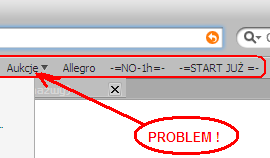
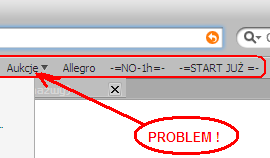
I play with userChrome.css since yesterday. Have one problem with changing fonts of this part of Firefox (marked red).
Can anybody help me with this??
Thanks in advance
Jack
Hi,
I play with userChrome.css since yesterday. Have one problem with changing fonts of this part of Firefox (marked red).
Can anybody help me with this??
Thanks in advance
Jack
if im not mistaken, that font is the same as the font used in your visual style.
Maybe you can see (just belo the red arrow top) that my active bookmark color is not-very-much visible, cause of the grey color. Maybe you know as well how to change the color to black ??
Thanks again
Jack
i think you should just be able to style the tag element...
i.e. tab { color: black !important; }
i think u may need the tabbrowser extention. there was a modded one posted here in the forums. search for it. it did the trick for me
hey jack, glad that everything worked out for you. mind sharing with us how you managed to change the font color of the tab extension via css? there are 2 css files in my profile, which one should i edit? and what strings should i add/modify? cheers
Hi genosypheus,
I asked in other foums this question and got a couple of hints. It was not as straight as I would think cause this required more parts in userChrome.css than one. Which one helped - really I am not sure now, but my userChrome.css looks now like this (I have only userChrome.css and modified by experimenting only this file):
/* Menu Font */
menubar, menubutton, menulist, menu, menuitem
{
font-family: HandelGotDLig_PL !important;
font-size: 8pt !important;}
/* Address line font, Bookmark menu panel, status line */
treechildren {
font-size: 3.3mm !important;
font-family: HandelGotDLig_PL !important;}
/* Bookmar line font */
#bookmarks-stack *{font-family:HandelGotDLig_PL !important;}
/* Status line font */
window {
font-size: 3.1mm !important;
font-family: HandelGotDLig_PL !important;}
/* Bookmarks font */
.tabbrowser-tabs .tab-text {
font-family: HandelGotDLig_PL !important;
font-size: 3mm !important;
color: Black !important;
}
/* Change address bar font */
#urlbar{
font-family: Microsoft Sans Serif !important;
font-size: 9pt !important;
}
Hope it'll help ya
/* Bookmarks font */.tabbrowser-tabs .tab-text {
font-family: HandelGotDLig_PL !important;
font-size: 3mm !important;
color: Black !important;
}
This really helps! Thank you!
You're wellcome :cool: