Aqua-Soft Forums
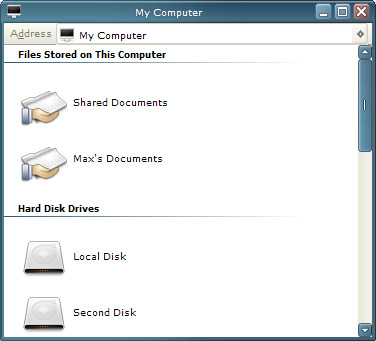
I want to remove this:
Click on the picture to see the problem.

How do I ?
Any Registry Tweak for this?
FlyAKite Mac OS X can remove it... means there must be some tweak for this??
Anyone knows??
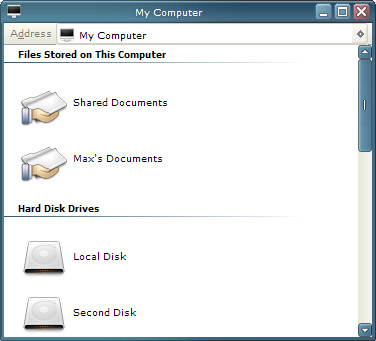
I want to remove this:
Click on the picture to see the problem.
How do I ?
Any Registry Tweak for this?
FlyAKite Mac OS X can remove it... means there must be some tweak for this??
Anyone knows??
First you go to http://www.mozilla.org/products/firefox
Then you download Mozilla Firefox
Then you open your firewall and set it to deny IE all web access
Then install Firefox, open it, and customise it to your heart's desire
that is one way, right click anywhere where the toolbars are and uncheck address bar
Open your "Browselc.dll" in ResHacker.
Look for : String table #807
The third numbered line, saying "A&ddress", is the address text you see at the address bar in IE 5.5+. Deleting content between "" will delete whole line, hit compile and save.
Thanks to virtualplastic.net 
Open your "Browselc.dll" in ResHacker.Look for : String table #807
The third numbered line, saying "A&ddress", is the address text you see at the address bar in IE 5.5+. Deleting content between "" will delete whole line, hit compile and save.
Thanks to virtualplastic.net
thanks a lot amit... tht was very helpful....  :D
:D
Or you could just use Styler Toolbar.
yeah... thnx vauge... i know that this can be done using other application as Styler or hidding the address bar from IE toolbar etc. but i wanted to remove tht "Address" from IE Address Bar... problem solved, thnx to Amit...
it's funny ppl suggested me to use other browser instead of giving me solution to the problem [which I'm already; IE is my last browser stuff, I prefer Opera > Firefox > Maxthon > IE]
... because Firefox is the most customizeable browser out there (short of making your own)
Yay ! Move it up next to the freakin toolbar  Like so : http://www.deviantart.com/view/17567725/
Then it's well and truly done !!
hi..amit, how to do the same on windows explorer?
Is it possible to remove separators in a similiar way? If yes then how?
Why not just use styler, I don't get is.
Removing separators is easy - just right click on the toolbar and Customise - move the separators from the right panel to the left
Personally, I do it the easy way with Styler Mad props to Susumu !
Open your "Browselc.dll" in ResHacker.
Look for : String table #807
The third numbered line, saying "A&ddress", is the address text you see at the address bar in IE 5.5+. Deleting content between "" will delete whole line, hit compile and save.
Thanks to virtualplastic.net
I complie ok, but when i save it it says it cannot save the file 
I complie ok, but when i save it it says it cannot save the file
thats because the file is in use, save it elsewhere, then use replacer to replace the original with your modified version
edit:
also, yeah if anybody wants to get their browser to look like safari, i strongly reccomend firefox, or opera, for aesthetical reasons, aswell as security
i would have to say my explorer window, however, is a lot more minimalistic than most of you  without any stupid software, like objectbar, or styler... :