weird problem after reformat

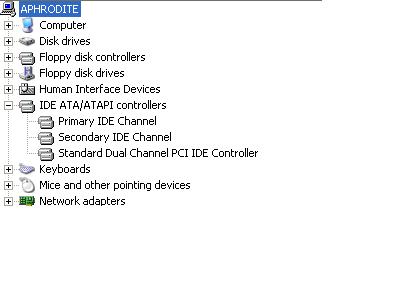
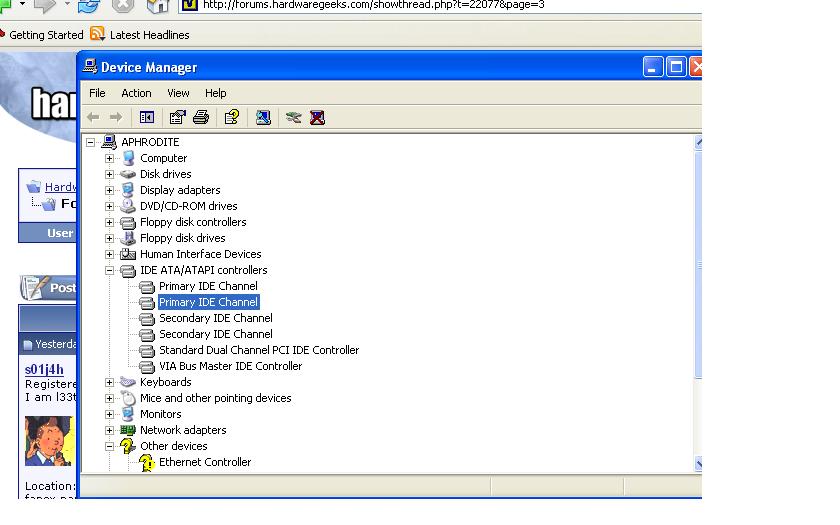
i just reformatted my computer, but my device manager keeps showing two copies of my primary and secondary ide channels for some reason. when i delete them, they just keep coming back with every restart.

anyone know how to remedy this? i have read that this may be a driver problem, but i cannot find a solution
post-29144-1114039047_thumb.jpg

untitled.JPG
untitled.JPG

#275457

weird. updated the bios? done all your windows updates? been to the mobo website?

#275463

don't know how to update bios. windows updates all done. nothing on the mobo site

#275468

Most important are the drivers. Many motherboards come with drivers that should be installed to optimize performance and reduce system conflicts. These drivers are usually found on a CD that comes with your motherboard or on the manufacturer's website. For example, motherboards using the VIA chipset use the VIA Hyperion drivers, etc. If you can't find them, maybe it'd be wise to post your hardware so people can understand more about your computer.

#275482

do you have these problems, before you reformated your computer? i don't know, but maybe another reformating might do the trick. the drivers for mohterboard are crucial. jester's advice is gold.

#275501

yeah i looked at the drivers, the only SATA driver is an SATA RAID driver, and it makes my c: drive recognized as a SCSI.

I don't know what to do anymore. :/

#275503

Check with motherboard manufacturers site for drivers.

Also, do you have any add-on IDE controllers?

I run an additional Promise Ultra IDE controller so I can run 8 IDE drives in my system.

It showed up that way on my system as well until I updated the drivers.

#275512

Please post your hardware, it will help us A LOT and save us from asking a lot of questions about your setup. At the least, if you don't know your setup your motherboard manufacturer and model will save us some time. Also, we're not looking at SATA drivers here but actual motherboard chipset drivers. Any other driver won't help if your motherboard chipset is recognizing your devices/SATA controllers incorrectly.

#275521

epox 8hda mobo

western digital SATA connected by SATA cable directly to MOBO

western digital IDE drive connected by IDE directly to MOBO

CDRW connected by IDE directly to MOBO

DVD-ROM connected by IDE directly to MOBO

floppy drive connected by IDE directly to mobo

i appreciate it everyonne.

#275734

when you reformatted your mobo, did you delete all of the partitions? It may be that the mobo is reading 2 partitions and one is not formatted correctly so it does not show up in my compuer. Just reformat and delete all the partitions if that is the case

#275749

Go here... get the proper drivers.

#275755

I don't think it has much to do with mispartitioning. From the screenshot, his computer is recognizing duplicate IDE channels, which represent the actual IDE connectors on the motherboard (for example IDE0 and IDE1) and not the partitions on this hard drive.

As for the drivers on that website, I'd recommend you start out by installing the VIA Hyperion Driver (as I see VIA Bus listed in your screenshot, so I assume you have a VIA chipset). Next, choose the appropriate SATA driver that matches your SATA controller (there's a ton of them at that website) and install that. Try those two and see what happens.

#275795

Well I just reformat again.

I'll try what you guys are suggesting, but might this be an answer as well?:

IDE1/IDE2: Ultra DMA-66/100/133 Primary/Secondary IDE Connector

This mainboard is equipped with 2 IDE disk connectors for connecting up to 4 ATA-133 IDE drives. It supports PIO and DMA mode operations for maximum data transfer rate of 133 MB/sec per channel.

"connecting up to 4 ata-133 ide drives" is that why it is showing 2 of each?

#275822

Well, I found out that what I just posted ISN'T the answer.

I installed the hyperion drivers, and i am still seeing double detection.

i don't know which SATA driver to use. how would the SATA driver affect the IDE connections anyway, it is connected to its own port, right?

#275826

omg i fixed it...

it was just a stupid bios setting.

in my OnChip IDE Device>OnChip IDE Channel0/1 settings, both channels were set to "enabled" this meant that activation of each channel was set to be configured separately, causing it to detect the IDE's twice.

I set it now to disabled, allowing for automatic normal detection.

thanks for everyone who was in on this problem with me. i can't believe it was just a damn bios setting. well, we're only human.

post-29144-1114140324_thumb.jpg

untitled.JPG
untitled.JPG

#275861