Rampant Javascript Errors with IE

Hellu all you admin-types...

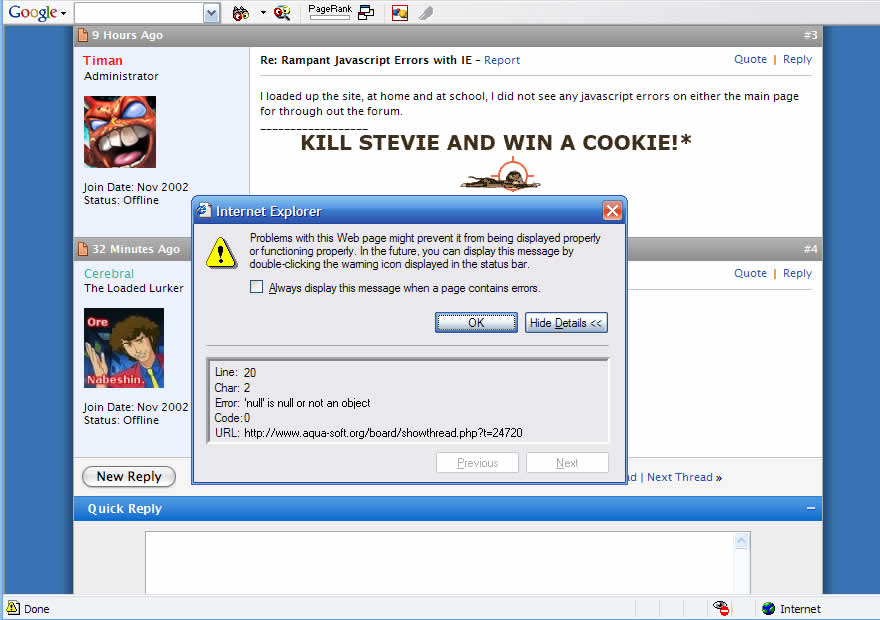
Nearly every page except for the forum indexes here on A-S have a nasty javascript error which sometimes prevents any user interaction with the site. This is, as far as I can tell, only affecting IE. It's also preventing me from using the shoutbox page to post anything into the shoutbox.

Please withhold the 'use firefox' comments. This post is simply to let the admins know of the issue.

#273459

Use firefox :P

#273519

I loaded up the site, at home and at school, I did not see any javascript errors on either the main page for through out the forum.

#273555

IE6, XPSP2, no problems here.

#273624

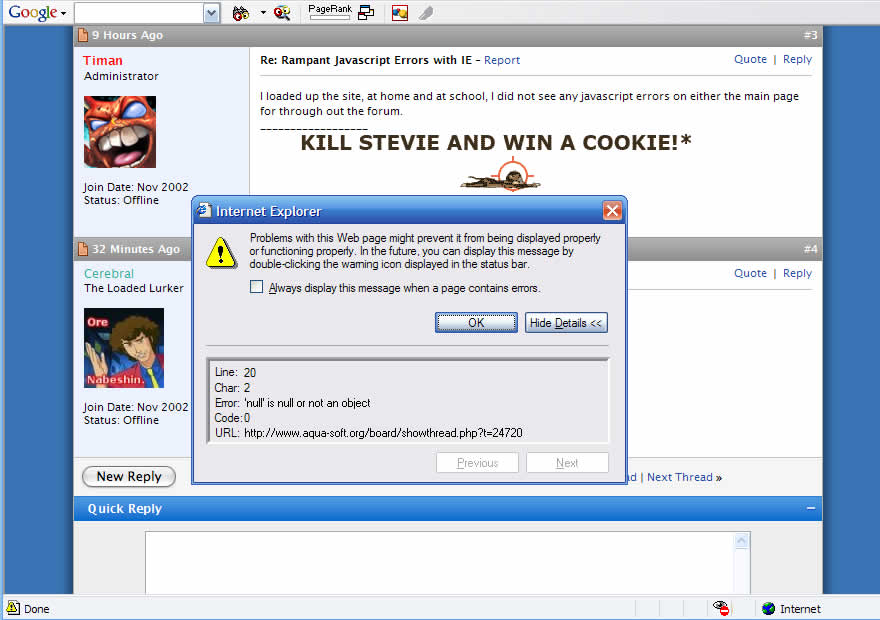
Here's a screenshot. It's usually that same NULL error, but sometimes varries, like when I try to use the shoutbox page (not the iframe) to post a message.

I've attached a screenshot of this error. I'm leaving town for a few days, but if you would like, I could enable the script debugger in IE here and let you know exactly what is causing the error.

post-15653-1113483485_thumb.jpg

jserror.jpg
jserror.jpg

#273627

oh noes, not really sure, can you send me the source of that page on msn?

#273665

Well... for me, line 20 looks like this:

// -->

I code javascript and like to consider myself good. Try it without the space. The comment should be working fine and all but it says Char: 2. Which would be the second slash. For me, that would mean that the HTML comment function working right

#273716

Hmm I honestly don't even know where that code is in VB. Thats crap they threw in there.

#273719

Tracked down the error...

board/clientscript/vbulliten_quickreply.js

if (threadedmode != 1)

{

fetch_object("qr_quickreply").disabled = true;

}

A Runtime Error has occurred.

Do you wish to Debug?

Line: 19

Error: 'null' is null or not an object

The red line is where the error is ocurring.

#277334

Using the developer toolbar extention in Firefox, I get the following error appearning many times in my error log (don't know why IE's fine with it on my system though)...

Error: fetch_object("qr_quickreply") has no properties

Source File: http://www.aqua-soft.org/board/clientscript/vbulletin_quickreply.js

Line: 19

Seems to me that fetch_object("qr_quickreply") returns null.

#277347

Here's a screenshot. It's usually that same NULL error, but sometimes varries, like when I try to use the shoutbox page (not the iframe) to post a message.

I've attached a screenshot of this error. I'm leaving town for a few days, but if you would like, I could enable the script debugger in IE here and let you know exactly what is causing the error.

You killed stevie in your screenshot by shooting him right in his head! you have won a cookie! :P

#277365

You killed stevie in your screenshot by shooting him right in his head! you have won a cookie! :P

Hahahhahaha, awesome.

In other news, I'm getting 0 errors.

#277485

Hell I see those "Null" errors all the time... I just ignore them.

I'm getting one viewing this very thread. Doesn't seem to cause any problems though.

#277501

Sorry to bring up an old thread, but I think I've found the source of the problem (sorry if this has been posted elsewhere already).

This error only occurs when the quick reply box and the "Require Click for Quick Reply" option is enabled (Admin CP -> Options -> Message Posting and Editing). The reason this happens because the quick reply box in this skin is actually missing a few options (the "Quote message in reply?" and "Show your signature") underneath the quick reply box.

To fix this problem, go to the showthread_quickreply template and look for the following lines:

<!-- >>>> outdent back to normal -->

</td>

</tr>

Add the following code immediately after the above lines:

<tr>

<td align="left">

<fieldset class="fieldset" style="margin:3px 0px 0px 0px">

<legend>Options</legend>

<div>

<div style="float:right">

<label for="cb_signature"><input type="checkbox" name="signature"

value="1" id="cb_signature" tabindex="5" checked="checked" />Show your signature</label>

</div>

<label for="qr_quickreply"><input type="checkbox" name="quickreply"

value="1" id="qr_quickreply" accesskey="w" tabindex="4" />Quote message in reply?</label>

</div>

</fieldset>

</td>

</tr>

Note the id label "qr_quickreply", reponsible for the null errors since it wasn't set in the original code.

#296764

Use Safari. :P

#297039

DVDGuy was trying to be helpful - use safari is not helpful....

God, i hate when people push things just for the sake of doing so...

#297040

Safari, like Firefox (didn't give me any errors), may be better able to deal with the error, but when missing this code, the quick reply function (when the "click required" option is turned on) will be effectively broken and posts won't be ordered properly in threaded view mode. In Firefox, for example, clicking on the "reply" link didn't bring me to the quick reply box, but instead to the full reply box.

#297042