TopDesk 1.3 - Exposé Clone for Windows XP

Great app. I will probably buy this whenever I reformat my computer again so I get rid of all the various failed mods and viruses. :)

Only bug I noticed so far was that when I use it with firefox I get a black white screen and it displays my homepage in the taskbar instead of the current webpage.

#272890

this is the first expose app i find usefull on my comp and the only thing stopping me from using it all the time is the 18MB of RAM it`s using at the moment.

great release and i`ll be keeping my eye on this app ;)

#272901

Very impressive! One question (it's impossible to tell from the trial version): Can the app capture hotkeys, or does it just use presets? I ask because I use an Apple Pro keyboard, and I'd love to be able to use F14, F15, and F16.

#272940

firecracker - The flickering of windows when they're restored is something we're aware of (we talk about it on our support page ), but unfortunately, like the black window images, it's a Windows issue that we can't do anything about. Some windows (e.g. explorer) have flicker free redraw, and some don't. Those that don't will "flash" when TopDesk restores them. Could you elaborate on "needs some polishing to make it feel dependable in a consistent way"? We're always looking to improve TopDesk, so any suggestions you have will be appreciated. Finally, you're seeing CPU activity while working with windows because TopDesk grabs an image of a window when that window is resized.

Unbeliever - The 18MB RAM usage is because TopDesk has to store window images in memory to achieve it's level of performance. If it didn't store window images in memory, then it would take anywhere from 1 to 10 seconds to tile windows. I'd like to point out that that 18MB is not all in you're main memory - most of it is used for window images, which are stored in video memory if possible.

Cinema54 - TopDesk uses preset hotkeys, but we'll look at either adding support for F14, F15, F16, or for capturing hotkeys.

#272959

This program is GREAT! I just tested it using 50+ Firefox Windows + Microsoft Word / Excel + Photoshop. It works like a charm! Although it does seem to slow down a bit.But once everything's loaded, it's back to operational status.

Great app, can't wait for the updated version.

Btw, if we buy it, do we have unlimited updates to it?

#273010

wnakey - Users who buy TopDesk will receive free updates for all point releases of the program (e.g. if you bought v1.3, you'd receive free updates to v1.4 through to v1.9).

Given that each "point release" currently requires around 2-3 months development, you'd effectively have free updates for around 12-18 months (at which point Longhorn is going to be out, and from what we've seen it'll include something similar to Exposé).

#273020

Could you elaborate on "needs some polishing to make it feel dependable in a consistent way"?

Just off the top of my head with a few hours of TopDesk Use & in addition to what Ave mentioned previously...

it seems as if, when instantiating a sequence of expose's with approx. 12 windows spread across 10 applications, and when done quickly (ie: exposing, to immediately click and select a particular window out of the selection, then expose again, etc.,) this action sometimes does not bring the user's chosen window to the front. Meaning, my desired selection of a window via a mouse click, does not bring that window to focus.

Sometimes themed (visual styles) windows get exposed with black borders atop the title bar or along the side. (Or semi-ghosted lines outlining the VS's border.) I admire your program taking into consideration themed regions but entbloess performed this to such an extent wonderfully that i forgot this issue was anything but an obstacle/thing of the past.

An exclusion list really is a must if you wish to be compatible friendly with the modding/theming community. I currently use Orbit as a "Dock/Launcher" and every time I invoke this floating dock, it is as if TopDesk is trying to grab an image it considers changed, multiple times inducing a flicker to Orbit's use. I may very well have this incorrect tho...

I saw this mentioned in your forum, (thanks for the link by the way, I finally had a chance to check it out when I returned home,) to be able to, when in "all windows" expose mode, toggle between the before mentioned mode and the "application windows" expose mode. For instance, hit F9, and all your windows expose, then move your mouse over IE and hit F10, and all other application windows fade out of view while all IE windows slide and adjust in size to fit the new additional desktop space. Then, were F9 to be hit again, the IE windows would animate back to their original positions and the other application windows would fade back into view. This is how Entbloess does this. Perhaps as apple does as well? Anyways, this bit of usability becomes indispensable once a user acclimates to that perspective of sorting content, and to not have it, gives the program a disjointed feel.

I have not experienced any black captured windows on my machines; neither with Entbloess nor TopDesk. If ever entbloess seemed unable to capture a screenshot in time, expose would happen with blank spots 'reserved' for the forthcoming window which would appear a split second later. I get the feeling like I recollect TopDesk giving a black capture which would then be filled by the window subsequently there-after.

Also, when comparing live previews with entbloess, TopDesk does not fare well. Perhaps were there to be some user configurability, TopDesk could be allowed to achieve similar frame update rates as entbloess and/or perhaps you have chosen to limit refresh intervals to keep performance accessible by a broader range of customers. However, currently, there are noticeable instances where, upon exposing, and then restoring a chosen window, a momentary hiccup would result in the captured windows contents being off sync with it's current state counterpart. I did not notice this issue as much with Entbloess.

With regards to the animation handling, TopDesk performs gracefully! With 26 windows open across 10+ applications, I did some side by side comparisons of TopDesk (mind you, I only have the trial version,) and Entbloess (Full licensed version.) Configured to match TopDesk's default expose speed/rate, Entbloess gets choppy and feels as if it sticks a little, although exposing the windows in the defined timeframe. Of course I have many of the bells and whistles enabled through entbloess's almost overly configurable Options window. However, TopDesk gets my utmost respect and admiration for their exposing algorithm as the attention paid here in development shows! Also, TopDesk can be used with multiple monitors which is quite a polished feature, in contrast, Entbloess cannot accomplish this. The only thing that does TopDesk's smooth animation severe injustice is the annoying flicker that affects certain windows upon returning from an expose. (ie: Notepad would flicker 4 (or so) times before settling after being chosen via an expose. In contrast the window would flicker only once on Notepad restores using entbloess.) I remember some developer marketing some graphical enhancement to windows which, in addition, touted the characteristic of a completely eliminated flicker effect during a window's redraw and as being the only implementation of this capability. I wish I could remember the application or what it related to.. sorry. It would be nice if a solution or workaround could be found to address this issue.

in closing, I guess I can be overly critical with details sometimes ;) but hey, I wouldn't have typed away like this if I didn't think it was worth it in the end... as such, I recommend people try this application and even purchase it if it's within your means & priorities, since, TopDesk is currently being supported and improved upon, and certainly on the right track. I can only imagine how great TopDesk has the potential to be.

@ OtakuSoftware, thanks for showing an invested interest in people’s suggestions.

#273036

omg! lol......................

#273039

firecracker6 - Thanks for the feedback. It's always good to get in depth comments from users :).

We'll be keeping users up to date on the progress of the next version of TopDesk through our forums, so feel free to drop by there if you've got any additional comments.

#273040

one thing i`ve noticed. the explorer windows i had opened before i started TopDesk have a black square in place where files should be shown. I get the window itself and the shell showing fine but in the file panel, it`s all black.

WinXp Pro SP1

P4 2.66

512 DDR

#273067

@OtakuSoftware..

I look forward to following TopDesk's progress and've decided to purchase your app in support :)

#273163

Bought this now and still feel its well worth it.

Only getting the usual black windows on media players, all other windows always display what they should. It does seem having 256MB GFX ram does help this app. Not sure if using WB4.5 with SmartPaint helps with all windows being left in graphics ram.... but it may do.

#273180

I like the smoothness, but it kinda mess up my taskbar when using ObjectDock. I use the hide Taskbar option in OD, but sometimes I need to close OD to access the systray, after using Topdesk, I cant see my taskbar anymore (after closing OD, I'll have to re-login to see my taskbar again).

#273223

Ever since the upgrade to v.1.3.1 TopDesk has been behaving badly in numerous places:

my explorer.exe process is at a constant 30% CPU load, this drops back down to 0~1% when i open Topdesk's Options window. (and enabling/disabling live previews does not help.)

In addition, the topdesk Options window's close "X" on the top right does not work. It is as if it is an unlinked button.

Also, and this is most important, topdesk is behaving badly with other installed customization apps; problems which the previous v.1.3 did not have.

- Windowblinds performance has dropped. Used together, windows drawn and redrawn with WBv4.5 have gotten a little bit choppy. There is a distinctive downgrade in performance when topdesk is running. I have tested this on multiple machines with the same characteristic appearing for each of these concerns i raise today. I have P43.0ghz, Nvidia6600GT 128mb, 2gigs of performance RAM, etc...

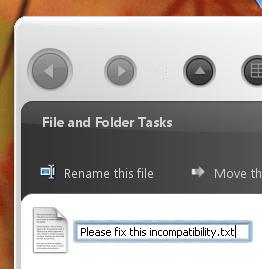
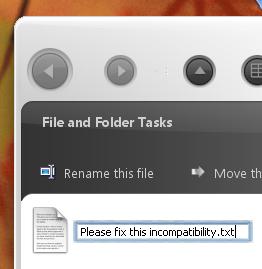
- But worst of all, while using vanim Version 0.0.22 (this prog. hooks animated buttons (think aqua pulse buttons,) and halo effect around text fields such as when you want to rename a folder or file (please see attached image: attachment.php?attachmentid=5496&stc=1 ), similar to OSX's blue halo effect, and additionally overlays a beautiful blue aqua progress bar that is ripple animated like the OSX counterpart.) I only use this program for the progress animation and text field halo effect, and not for the button pulsing. However, after the update, (again tested on 3 machines.) and when both programs are running, if i try to rename a file or folder on my desktop, the desktop freezes, and for about 10~20seconds, the desktop becomes unresponsive with the file/folder attempting to be renamed.. its name text box, highlighted (to be edited) but frozen in that state.

I applaud the update and the progress towards a tighter app.. i like the improvements to the organization algorthim, but these bugs are critical and impair my use of my os significantly. Please, please, see what broke between versions.

Regards, (and thanks for all your hard work thus far.) :)

~fc

P.S. I will post this in your support forums as well.

post-20869-1115231005_thumb.jpg

TopDesk Issue.JPG
TopDesk Issue.JPG

#279594

firecracker6:

We're aware of the explorer CPU issue (see our forums), and are currently testing a patch for it. The problems you are experiencing with the applications you mentioned are due to this issue, and will disappear once this issue is resolved.

The close button on the Options dialog is disabled. The only way to exit the options dialog is to press the "cancel" or "OK" buttons.

On a side note, we intended this thread as a product annoucement thread for version 1.3, not a general discussion or support thread, and so we don't monitor it often (we're only aware of your post to this thread because you mentioned it in our forums). Therefore, in the future could you please post bug reports only to our forums? The reasoning behind this is that if people start posting bug reports to this thread instead of our support forums, we might not see their posts for a couple of weeks, if ever, and we don't want that to happen.

#279768

Wow! It's beautiful! Oh man, now I'm much more happier!

#279827

@OtakuSoftware... thank you for the reply... I will post bug report related issues over at your support site. I understand your desire to keep this thread on topic... and i respect that. I also respect that you took the time to respond and give mention of the fixes soon on the way. I think folks here may like to be made aware of such development/enhansement/improvement progress (as well as the incompatibilities which may exist between topdesk & customization apps used and created here)... this kind of dialogue also makes ppl simpathize with a program's success (such as topdesk) that much more.. good pr. :) Adding to this thread can give exposure to some folks who may not have known about topdesk before (above) ;)

...have i come up with enough excuses yet :P

Regards, and thanks again, for addressing those bugs!

~fc

New update released: version 1.3.2

This version fixed the compatibility issues i mentioned a few posts back :)

And the explorer.exe CPU issue seems to be resolved aswell!

#279903

firecracker6,

Glad to see the new version fixes the problems you were seeing :). I agree that it's a good idea to keep this thread open and active, and that it's good for people to see the software evolve. The only reason I suggested that bug reports be posted only to our support forums is that we monitor those forums daily, while we only check these forums once a week (or even less, depending on how busy we are). We'd like to provide a quick reponse and turnaround to users issues, so we don't want to get into a situation where someone has posted an issue to this forum and they don't see a response from us for over a week :).

#280070

Just to make the announcement official -

TopDesk 1.3.2 is now available. This release fixes issues found in version 1.3.1, and includes the new features added in version 1.3.1, such as improved multi-monitor support and improved spatial window tiling. To find out more about TopDesk 1.3.2, visit the TopDesk page on our website. Customers who have purchased a previous version of TopDesk can upgrade to 1.3.2 by downloading the 1.3.2 retail update.

#280074

Through the day I usually go somewhere or do something, so in the meantime my screensaver gets activated and the comp switches to the login screen.. so the only thing that's annoying right now, is that it eats up a lot of memory - after couple of hours it gets to 250 Megabytes and more..

Is that normal for this app? Other than that, I find TopDesk very sexy! ;)

#280605

Hello OtakuSoftware,

I really like this software, like one person stated, it makes me want to sit all day just pointing the mouse to the left corner. One thing, though, in exposé, when tiling, it halves up the screen according to the number of windows (when two is up, they are lined up diagonally). This really, in my opinion, looks better than just randomly tiling the windows. It also lines the windows perfectly to eachother, instead of giving some random space.

I don't know if this is regarded by the spatial option, if so I say no more. I will go try that now.

Thank you for developing a helpful program.

#281167

TNT cards are wwwwaaaaaaaaaag old get with the times man.

I really like this product however its too slow on my machine ( a 2500XP) I think the problem is that i run at 1600x1200 and thats a whole lota image to collect.

#284175

$10... definitely worth the purchase. Now I have to figure out where I'm getting gas money to get to work tomorrow :o. Didn't think that one through...

#298617

This is a really nice tool, but I'm having the same problem with it that I had with Entbloess - after hitting F9 and selecting a window, my Firefox window stops functioning properly. I can use the close/min/max buttons and the menu, but clicking on anything below that has no effect until I restart Firefox.

#300348

AndreasV - Thanks for the suggestions. We're currently compiling a list of internal and user suggestions for features to include in 1.4, and once we've finished, we'll post a poll on the forums so that users can vote for the features they want to see in 1.4.

i'll guess i'll wait and purchase 1.4 then :D

#300538