Aqua-Soft Forums
Sorry, I'm keeping the beta testers on an AIM list. Instant gratification with instant messenging.
Miranda has a nice AIM plugin, GAIM and Trillian are also free (and free of ads).
Sorry, I'm keeping the beta testers on an AIM list. Instant gratification with instant messenging.
Miranda has a nice AIM plugin, GAIM and Trillian are also free (and free of ads).
Probably the last update for tonight/today...
http://shellscape.org/thumb.jpg thumbs are nearly there. Just kinda ugly now.
One Minor update; I've decided to use some GDI+ - which is only available on Windows 2000 and up. Sorry 9x users.
MMMMMM MINty!
I have my migions testing the first Alpha build. I've attached a preliminary screenshot (after I took that I managed to improve the thumbnail quality further).
Ok so I guess the ss was too large, here's a link instead http://mint.shellscape.org/mintalpha.jpg
IMPORTANT QUESTION!
Is there any real need to keep support for Windos 2000 users? I could do even better on the thumnails but sadly it would be XP only. If there is a large cry for Windows 2000 support, I'll write in the special sauce for Windows2000.
I have no complaints so far... the thumbnails look great to me, but ill have to compare on my laptop (my monitor sucks balls... I'm working on some ideas for other icons and tray icons... just to throw out some options...
Windows 2000? what?! whats that? :confused:
Looks very promissing..  Lovely thumbnails!
Looking good so far.. are those black bars across the bottom of some thumbnails there because the windows aren't a particular proportioned dimension?
Dude make another thread for that !Where can we get the deskbar app in your screenshot? Is that one of your apps too?Chris

Andrew that app is looking pretty good man , Keep it up and I don't think you should add support for Win2k if you're gonna make it even better for xp , but that's just me
Here's another vote for XP only, if that will improve the looks.
Furikuu : I was testing the Windows 2000 compatible method. The XP method will not have that effect.
Willy : Thats a shell I wrote about two years ago. The codebase was shaky and there are alot of quirks. I didnt release it to the public and I wouldnt feel comfortable doing so now. All my settings are backed up in a .reg file and I'll be darned if I could still explain what they mean I just enjoy using it.
awesome thumbnail app!
that deskbar app reminds me of the BeOS interface! I liked that thing!
-bolero
Added dual support for Windows2000 and Windows XP tonight.
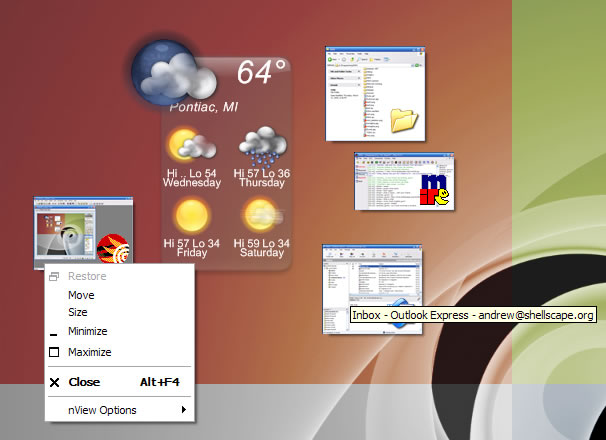
Added tooltips with the window title of the actual minimized window. That'll have to do for now for the folks who wanted AveDesk'ish labels.
Added showing the minimized window's system menu on right click. (So you can close the window without having to restore it).
Gonna add the options tomorow. Still having funky icon issues with 256 color icons that windows so graciously converts to 32bpp for me (grrrr).
I'll post another screenshot tomorow night. Beta testers will (probably) get a beta tomorow night as well.
wow, this is great news Andrew. Keep up the great work !!!
Awesome job Andrew_
I've got some ideas if its not to late for that.
1. I'd love an option to turn off the little app icons in the MINt thumb
2. How about a short cut to make all the thumbs appear over the rest of the windows. Like showcase for avedesk, or make a feature to just minimize all windows. (like ctrl+f9 or something, or a shortcut that does it)
Thumbs will have the option of being always on top or stuck to the desktop (always on bottom).
I'll see about adding a shortcut to make them all topmost, and vise versa. All depends on how much time i have this week.
I'll add an option to turn off the Icons. But there again, depends on the time restraint.
I'm gonna get this out this week and let the testers play with it for a while, and probably release it Monday. I have to get back on Kapsules dev for a couple weeks, been lettin that go slack lately 
Yea, shadows would be cool.. and an option align the thumbnails
well, there is a shadow on the tumbnails, it uses the defult menu shadow.. it may not work if u use Winfx, you can fix it by turning off menushadow in winfx..
To address some comments...
There are shadows on the thumbnails, XP only. 2000 doesnt support the Shadow Window Class Style, sorry.
Thumbnail alignment may come in a later version of the app, but for now youre left with what you get.
Posting another beta for the testers tonight. If youre a tester, please check your AIM messages.
Configuration gets added tomorow.
I do not know if this was suggested or not, but a hotkey to minimize all mint-recognized windows would be really neat. I guess that would be kind of Expose-ish. also, I would like to request the option to have mint remember where thumbnails for a certain app are, or a designated area for the thumbnails to go.
Well MINt will recognize any window that actually minimizes (some windows just hide themselves), so Im not sure what youre asking for there.
I might make MINt remember where a thumbnail was last for a certain window, but as soon as that window is closed (destroyed, whatnot) I'll be tossing the 'memory' for that window. I have a buddy working on an algorithm for arranging thumbnails as well.
Right now I have about all the options and stuff that I want to add for the first version. While I appreciate every single bit of input; please hold onto to any more requests for after the first official version is made public.
Thanks for everyone's support and interest!
to clarify my first request, I was asking for a hotkey like F6 that when pressed would make thumbnails of all the windows that are not already thumbnailed/minimized.
Hmmm. Mebbe when we get the sorting algorithm implemented. I like the idea.. Win + M already minimizes all windows, but it simply moves them, doesnt actually minimize them, so the thumbnails wouldnt get created, but thats something I can test for when we get the algo for sorting... sorted.
In the meantime, here's a Fireworks'd screenshot of MINt Beta 0.5. That's the actual app running, just had to copy the system menu over to the other screenshot, couldnt get the menu and tooltip all in one at once..