 Aqua-Soft Forums
Much comfortable use DESCKLET or like that .
To example if my system tower on floor and I do not see HDD LED light 
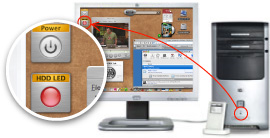
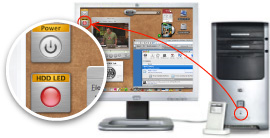
Much comfortable use DESCKLET or like that .
To example if my system tower on floor and I do not see HDD LED light
Uhm, okay..
I think you need to be more specific, because i don't think anyone understands what you just wrote.
i think what he means is if it's possible to have HDD LED lights while the HDD is still inside his case
and what does that have to do with ave apps? this should be in hardware section, and i do think it is possible. if somebody can change the entire metal covering and replace with an identical plate that is see-through then putting a led should be possible. but i am not sure if it will inturrupt the hd writer though.
Oh...I thought he ment having an picture of an led as a desklet which flashed upon hard drive access.
that's even easier. just edit any harddrive pic with photoshop.
Oh...I thought he ment having an picture of an led as a desklet which flashed upon hard drive access.
If this is the case he can use Judge's ActiveDisk for SysStats.
http://www.dockex.com/index.php?pageId=doc...age=1&dkview=40
See updated first post with attached picture 
One more idea is angular variant.
 Much compact and always on top.
Alexander Stun;
As suggested by mep, download ActiveDisk for SysStats(an addon to avedesk). http://www.dockex.com/index.php?pag...age=1&dkview=40
Using this, you can have the picture of an LED that changes upon hard drive access on your desktop, just like the one in your computer tower.
Your corner idea in the post above is also possible using the ActiveDisk, just set the desklet property to "Always On Top"
Many thanks Zenko for detail post.
hmmm...i'm having a prob getting this config to run right under v2.5.2. i keep setting the meter to logical disk and saving, but when i go back in, it's back on processor. is it me?
Don't trust the PDH dialog. Set it to the disk you want and then forget it. If you open the PDH dialog again it forgets where it was (thank SP2).
oh? and who made you judge and...oh wait. you are the judge!
thx! btw...so i set it to logical, select total (i got 4 partitions). what do you think is the best indicator of real hd activity? i've been selecting %disk time. ya think?
thx again!