 Aqua-Soft Forums
would somebody please explain to me how exactly the Y'z Dock background works ?
some images would be very helpfull too...
maybe even a link to a tutorial or something...
thank you.
would somebody please explain to me how exactly the Y'z Dock background works ?
some images would be very helpfull too...
maybe even a link to a tutorial or something...
thank you.
Well afaik you have an image and you set margins on the top bottom left and right. This is the margins that dont get streched or tiled (choses in the ini file). The middle part is the part that either gets tilled or streched.
The seperator is simmilar. Hope this helps if any.
ps rklauncher roxors!!11!!11
Ok im gonna go a little moe in debth.
ini example file:
[Panel]
Image		= bg.png   << file name for background image
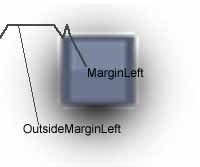
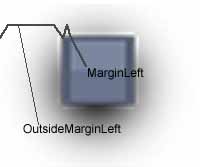
MarginLeft = 2 <<check attachment for meaning of this this is the margin INSIDE the dock IE a boarder, likewise for the top and borrom and right.
MarginTop	= 1
MarginRight  = 2
MarginBottom = 1
OutsideMarginLeft   = 16 << This is the margine outside the dock, ie a shadow or the like
OutsideMarginTop	= 8
OutsideMarginRight  = 16
OutsideMarginBottom = 16
; FillMode: tile or stretch. when not specified, 'tile' will be used.
FillMode = stretch  << defines weither smaller images are tilled or streched

[Separator]
Image		= sep.png << file name for seperator image
MarginTop	= 2 <<top margin that doesnt get streched
MarginBottom = 2 <bottom margin that doesnt get streched
is it ok for you guys if I do it the same way in RK Launcher ? 
i feel you should do that.
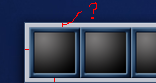
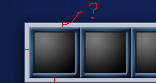
if it's how you say it is then why do these extra pixels appear there ?
(check the screenshot)
that's the margin (marginleft, marginright, etc.)
if it's how you say it is then why do these extra pixels appear there ?(check the screenshot)
that's the margin (marginleft, marginright, etc.)
no it's not...
the marginLeft, marginRight, etc are only 2 pixels wide
there are at least 3 additional pixels between the margin and the dock item.
is that a value Y'z Dock automatically sets ?
can someone explain how the 'import Y'z background' work?
no it's not...the marginLeft, marginRight, etc are only 2 pixels wide
there are at least 3 additional pixels between the margin and the dock item.
is that a value Y'z Dock automatically sets ?
If Yz sets the normal 0 value to a few pixels, shouldn't you be able to use negative numbers to accomplish the perfect border? Like, if you set 0, and there are like 3pixels, why not try -3? Dunno if that would work, but I spose it might be worth looking at.
Glad I found this thread. I've got quite a few Y'z BG's that I'm trying to convert to RKlauncher, But something is going wrong. Here's what happens when I try and convert a Y'z BG to a RKL one :
This was the GFXOasis Y'z dock BG but as you can see the inside of the dock is hollow. This was the original Y'z Code for it :
[Panel]

Image		= bg.png

MarginLeft   = 7

MarginTop	= 7

MarginRight  = 7

MarginBottom = 7

; FillMode, when not specified, 'tile' will be used.

FillMode = stretch


[Separator]

Image		= sep.png

MarginTop	= 2

MarginBottom = 2
I tried to compare this with the way RKlauncher does it and came up with this :
[Description]


name = GFX


[Background]


Image		= bg.png


outsideMarginLeft = 20

outsideMarginTop = 14

outsideMarginRight = 22

outsideMarginBottom = 24


MarginLeft   = 7

MarginTop	= 7

MarginRight  = 7

MarginBottom = 7


; FillMode, when not specified, 'tile' will be used.

FillMode = stretch


[Separator]


image = sep.png


marginTop = 2

marginBottom = 2


[Indicator]


image = mark.png


[Poof]


image = poof.png
And also like this :
[Panel]

Image		= bg.png

MarginLeft   = 2

MarginTop	= 1

MarginRight  = 2

MarginBottom = 1


; FillMode, when not specified, 'tile' will be used.

FillMode = stretch


[Separator]

Image		= sep.png

MarginTop	= 2

MarginBottom = 2
I leant from Lostspyder that one margin set defines the outside and the other the inside. However, I still can't get any background to show up on the inside. Does anyone know where I'm going wrong?
Any help would be great. Thanks.
PS: I even tried just copying the Y'z ini into the RKL theme folder and changing the extension to .CONFIG but still get the hollow effect.


it prolly have something to do with the background png beeing smaller then the amount of pixels in your ini...
Any ideas how I would go about getting the right sizes for the PNG ??
hmm i dont understand either why these PNGs look so strange...
if it's how you say it is then why do these extra pixels appear there ?(check the screenshot)
Isn't that a Y'z Dock running indicator?