[help] Desktop Picture & SysStats v2.5

I just installed the new version of SysStats, and for some reason my Desktop Picture desklet isn't working.

The only thing showing up is the frame now, but if I look into the DTP.ini file, I can see that it's updating with a new image link and such - it's just not showing up.

I've racked my brains trying to figure out what's wrong with it, but can't. Anyone else having problems, or know how to fix this?

Judge?

Thanks in advance anyway.

viddy

#261457

i fixed mine by going into configure|meters|image directory|configure and browsing to the dtp.vbs. it then populates the field with the fully qualified path.

#261480

Does this fix it?

BTW I will be updating this desklet with new features in the coming weeks.

well, far be it for me to question you, but, it fixed it for me.

#261578

Doesn't for me. I've tried everything - but then again I'm well known for my technical prowess :slant:

#261593

hhmmmm, i'm also having a problem with the latesr Sysstats. I'm using the a clock config, but i can't get it to be always on top. It only sticks to the desktop. Any ideas guys ?

#261610

ok, nvm. I figured it out. One of the files got corrupted. Works now. =p

#261654

i fixed mine by going into configure|meters|image directory|configure and browsing to the dtp.vbs. it then populates the field with the fully qualified path.

Nup, not working for me :(

Does this fix it?

BTW I will be updating this desklet with new features in the coming weeks.

Will this version be able to open sub directories too? :D

#261661

well, i don't kno0w what to say. after closing the desklet, then reopening it, it's dead for me now as well. so, yeah, it's broke.

but...i swear to god, it was working!!

#261674

Okay - I think that made some progress.

Loaded up the desklet, and still the same problem. I went into the configuration and changed the picture overlay to a picture that was in the image directory I set, and wham! There's the picture. However, it's not resized properly. I threw in some scaling options, and got it looking just like I wanted.

Thought this would fix it - but then right clicking and pressing update doesn't do anything.

So, I can get it to display a picture, but just not scale it automatically or update.

#261714

I take that back. Restarted AveDesk and it's working now.

Great work, thanks heaps.

viddy

#261715

Variable %s in [label] section doesn't seem to work anymore. I use %s to show the name of the actual file displaying, but now it just shows as "%s".

[label]

MeterIndex=-1

format=%S

selector=

Other than that everything is ok.

#262211

Allrite, I'm just another one who is facing problem with DesktopPictures....

When I add it to desktop, go to configure and set the path in Image Directory.... it just throws me out.. AD crashes and closes.... No error, no prompt.. nuthing just BAM !! OUT !!

little fiddeling and I managed to get error message... got two one after another... see the attached pictures...

#264046

Well.. after spending hours over it.. I'm still not able to fix the trouble over DesktopPicture.. :(

But in a while I found out something cool (which is bit out of line here)....

Someone, in other post, asked the shortcut can be modified to set as wallpaper.. and there were few commands using some third party apps. I was checking if it can be done using some native windows commands. I couldn't find exactly what I was looking for, but here is something which can be used. Probably a programmer guru like judge or Ave will know better but DLLs and functions.

If you are running windowsXP (which I assume most of us mod-freaks must be), you can use Windows Picture and Fax viewer so set image as desktop background. You can invoke this viewer using following command :

rundll32.exe %SystemRoot%System32shimgvw.dll,ImageView_Fullscreen %1

%1 will be the image name, which I guess can be passed using sysstat variable

or whatever variable DTP.VBS will be using to pass this image to sysstats meter.

I'm sure there must be way to access that command which sets the background. Hope this might invoke some thought and help.

#264081

I'm still not able to get that Desktop Picture thing work... :(

hey Judge were those attachment any help finding what's happening?

#265113

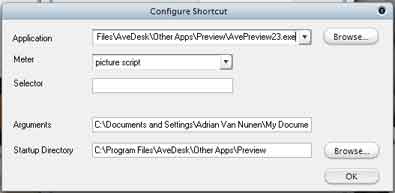
Hey Judge - lovin' v2.5! Thanks for such a cool update. My DTP is working fine except I'm having trouble setting the shortcut controller. I can get it to launch AvePreview onClick but it doesn't display anything (I'm assuming the filename is not being passed to AvePreview?). I've messed about with this but still can't get it working.

Anyone know how to get this working? Even better, along similar lines to igo's request re windows image & fax viewer, how can I get the shortcut to point to Windows Image & Fax viewer and pass the filename as a variable to display?

Thanks again!

#266171

Thanks for that Judge, but it's still not working. AvePreview opens fine but there is no image displayed. Here's a screenie of my controller config.

post-1461-1111203515_thumb.jpg

config.jpg
config.jpg

#266222

...and that's a beautiful thing! Works perfect now - thanks a million Judge!

#266528

good job the linked zip works fine now :)

eDiT but the Slideshow function doesn't work :-(

#266690

:(

I want this.... it's still not working.... gives me the same error messages I posted earlier (See the attached images in earlier post).

Now I'm wondering, do I need to update something related to VBscript runtimes in my system?? I've already tried downloading and installing VB6runtime6 from microsoft and it's didn't improved anything?

Please HELP !!!! I'm missing such a beautiful thing !!

#266808

@iGo & lalopez - have you tried 're-pointing' the meters at the VBScript (DTP.vbs) and the config file (DTP.ini)? I had to do it manually via the right-click 'Configure...' option and setting the paths via the desklet's Systats Config dialog that comes up.

#267340

Raven... I did try that. But, alas it's not working still.... :(

I really don't have any clue what's going wrong there....

#267467