 Aqua-Soft Forums
So I'm using hills' Default Safari firefox skin, with the Pixel Perfect substyle.
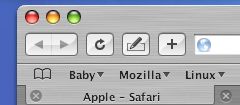
Here's the problem: The tab color doesn't match up with everything else, you can see in the picture.
Is there a nifty solution to this? thanks 
So I'm using hills' Default Safari firefox skin, with the Pixel Perfect substyle.
Here's the problem: The tab color doesn't match up with everything else, you can see in the picture.
Is there a nifty solution to this? thanks
I spent ages trying to fix this problem, no lick I'm afraid. Apparently it is dependant on screen resolution and width of the Firefox window.
The best solution I found was to use the "brushed_brushed" substyle, which doesn't have the shiny look to it but everything matches up perfectly.
Which Windows Blinds skin goes with "brushed_brushed"
Oops, I forgot about about Windowblinds. If there is a skin to match, I never found it.
However, I did modify a Windowblinds skin to use with the brushed_brushed theme and it matches up perfectly.
If you PM me with your email I can send it to you.
Screenie below of it in action.
[Edit] Hey look! I just became a senior member, cool.
[Edit again} I have had a couple of requests now for this modified theme. Am I supposed to get permission from the author before emailing it to anyone?
All I have done is changed a few images and I have no intention of releasing it as my own theme or pretending I have made it myself.

better to ask teh author. it's much more friendly and respectful than releasing it without them knowing it.
